By AppHub Editorial Team · Updated August 3, 2026

Lense: Disposable Event Camera


Overview
Events
Rewaive B.V.
Free
Feb 25, 2023
1.4.1
7.0
$5.49 - $109.99 per item
No
Apr 29, 2026
Features
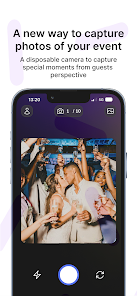
Lense is a digital disposable camera app for capturing unforgettable moments at weddings, parties, vacations, and more. With Lense, you can create stunning visual memories and effortlessly share them with friends and family. Discover Lense's unique features and enjoy the simplicity and charm of analog photography combined with the convenience of the digital world.
📸 Allow guests to capture precious moments with just one click. Lense allows your guests to capture all the valuable moments, from ...
Lense is a digital disposable camera app for capturing unforgettable moments at weddings, parties, vacations, and more. With Lense, you can create stunning visual memories and effortlessly share them with friends and family. Discover Lense's unique features and enjoy the simplicity and charm of analog photography combined with the convenience of the digital world.📸 Allow guests to capture precious moments with just one click. Lense allows your guests to capture all the valuable moments, from romantic wedding vows to festive dance moves and breathtaking vacation views. You can determine how many photos each guest may take, just like a disposable camera!🔄 Effortlessly share your photos with a unique QR code. Lense generates a unique QR code with a single tap that you can share with your guests. By scanning the code, they gain instant access to the disposable camera, allowing them to capture, view and download all the beautiful moments. The guests don’t need to download any app to take pictures!🕔 Experience the thrill of anticipation with Lense's delayed photo revealing feature. Customize the delay to your preference, whether it's a few hours, days, or even weeks. Build up the excitement among your guests as they eagerly await the unveiling of the captured memories.🪄 Embrace vintage nostalgia with Lense's disposable camera effect. Give your images a touch of vintage, play with colors, or use artistic overlays to add a unique and personal touch.🔒 Securely store and relive your cherished memories with Lense. Our photo storage feature stores your photos for a year. As the organizer, you’ll receive a download link to download all photos taken on your event.
Download Lense: Disposable Event Camera
Get the official app from the trusted app stores. You will be redirected to the download page.
When you purchase through links on our site, we may earn an affiliate commission. Learn more
Ratings breakdown
1,010 reviewsDeveloper contact
Name
Rewaive B.V.
Address
Mauritsstraat 17 5491 JA Sint Oedenrode Netherlands
Website
https://lense.appPhone
+31 6 10719106
Support
contact@lense.app
Privacy
View policyFrequently Asked Questions
Is Lense: Disposable Event Camera free to download? high
Yes. The app metadata lists Lense: Disposable Event Camera as free, with in-app purchases listed as $5.49 - $109.99 per item.
Source: app_metadata
What do sampled users complain about in Lense: Disposable Event Camera? low
Lense: Disposable Event Camera has sampled reports of bugs, crashes, lag, or reliability problems. Only 1 sampled review supports this theme, so confidence is low.
Source: user_reviews
What do sampled users like about Lense: Disposable Event Camera? low
Lense: Disposable Event Camera is praised by sampled reviewers as easy, useful, or convenient. Only 1 sampled review supports this theme, so confidence is low.
Source: user_reviews
How to Use
Lense is a digital disposable camera app for capturing unforgettable moments at weddings, parties, vacations, and more. (app_description)
Getting Started
Source: app_description_and_user_feedback_noted
- Install Lense: Disposable Event Camera from the appropriate app store.
- Open the app and start with the free experience.
- Review the main features described in the app listing.
- Check settings or support resources if you run into sampled issue patterns such as lense: disposable event camera has sampled reports of bugs, crashes, lag, or reliability problems.
Key Features (from app listing)
Source: app_description
- Events app experience
- Free download
- From Rewaive B.V.
- 50,000+ downloads listed
Theme 'easy, useful, or convenient to use' identified in recent_reviews #2. Review #2 praises easy, useful, or convenient to use.
How this content was created
Content type: pattern_analysis_of_user_reviews_and_metadata
AI generated: Yes
- Google Play user reviews (12-20 preferred; may be smaller if source data is limited per app), May 22, 2024 to February 27, 2025
- Google Play ratings distribution
- App Store listing metadata
- Review samples are not statistically representative of all user sentiment
- High-engagement negative reviews can overrepresent complaints
- Claims labeled 'low confidence' are based on single-review observations only
- No real-world app testing was conducted
- Feature availability may vary by region, device, and app version
Pros & Cons
Based on analysis of Google Play user reviews
Pros
- Users appreciate the app: "Great and easy way to have your guests take pictures for you. I downloaded this for my daughter's birthday party as I am" medium
Extracted from 2 high-rated user review(s)
Evidence (2)
“Great and easy way to have your guests take pictures for you. I downloaded this for my daughter's birthday party as I am always too busy hosting to take pictures. So having the guests take for me was ”Rating: 4★ May 21, 2024 13 likes“Chose this app after comparing a few. There are a couple of changes that would improve it for the user. I thought I'd lost photos, but have to scroll through events to find them. The app would be bett”Rating: 4★ May 13, 2024 12 likes
Cons
- Some users report issues: "Pricing is fair and user friendly. However, photos cant be downloaded unless you download the app. The photos are very slow to load and the disposable" low
Identified from 2 low-rated user review(s)
Evidence (2)
“Pricing is fair and user friendly. However, photos cant be downloaded unless you download the app. The photos are very slow to load and the disposable film filter doesnt seem to work. Most of my frien”Rating: 2★ February 27, 2025 4 likes“app isn't Android friendly. They say it's "so easy to use" because they add a lock screen banner for guests to have easy access to their camera, but it only works for iPhones. I don't recall this bein”Rating: 2★ May 29, 2025 4 likes
Recent Reviews
Melody Lee-Ikeda
2★Pricing is fair and user friendly. However, photos cant be downloaded unless you download the app. The photos are very slow to load and the disposable film filter doesnt seem to work. Most of my friends prefered NOT to use it over other disposable film camera apps. Glad I tested it out before my wedding! Will not be using again.
Lani Duke
4★Great and easy way to have your guests take pictures for you. I downloaded this for my daughter's birthday party as I am always too busy hosting to take pictures. So having the guests take for me was great. Tons of pictures and I love the fact that I can download the whole album afterwards to my phone. The reason I didn't give it 5 stars was because like the advertised pictures for the app. My guests did not have an easy access tab on their lock screen during my event.
Bella T
2★app isn't Android friendly. They say it's "so easy to use" because they add a lock screen banner for guests to have easy access to their camera, but it only works for iPhones. I don't recall this being advertised as only working with iOS. This kind of defeats the purpose of the ease of the app. If my guests have to constantly remember to scan the QR code and open the camera through the link, nobody is going to take photos. Complete waste of time and money.
Kevin Pegg
4★Chose this app after comparing a few. There are a couple of changes that would improve it for the user. I thought I'd lost photos, but have to scroll through events to find them. The app would be better if there was an option to be able to save the photos taken with the Lense camera so that individuals can also keep the photos they are taking without having to go back & download. The response from Mike to queries has always been first rate.
Elizabeth McEntire
3★**EDIT** After my review, the developers reached out and offered to refund my money since the app didn't work as planned for my guests. I greatly appreciate the wonderful and quick customer service response. Waste of money. I paid the extra so guests could upload or take unlimited photos, yet the app only allowed a few people to utilize it and take photos. I even put that my wedding was approximately 100 people. And of course there's no way for me to get the money back that I wasted.