By App Discoverer Editorial Team · Updated October 1, 2026

Infinite Painter




Overview
Art & Design
Infinite Studio LLC
Free
Apr 2, 2012
7.2.4
9
$1.99 - $9.99 per item
No
Jan 28, 2026
Features
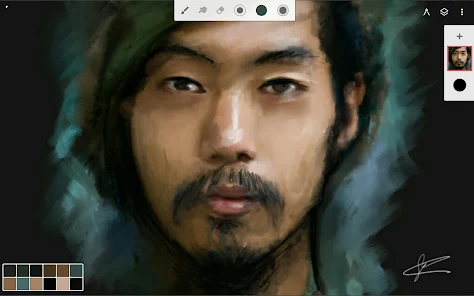
Experience one of the best-designed painting, sketching, and drawing apps for tablets, phones, and Chromebooks. Used by millions, this award-winning app brings rich, powerful features to all artists, whether art is your hobby, passion or career.
HIGHLIGHTS
REIMAGINING BRUSHES
Experience one of the best-designed painting, sketching, and drawing apps for tablets, phones, and Chromebooks. Used by millions, this award-winning app brings rich, powerful features to all artists, whether art is your hobby, passion or career. HIGHLIGHTS
Download Infinite Painter
Get the official app from the trusted app stores. You will be redirected to the download page.
Official Links
When you purchase through links on our site, we may earn an affiliate commission. Learn more
Ratings breakdown
234,000 reviewsDeveloper contact
Name
Infinite Studio LLC
Address
1001 Wilshire Blvd Los Angeles, CA 90017 United States
Website
https://www.infinitestudio.art/Phone
+1 213-866-2595
Support
support@infinitestudio.art
Privacy
View policyFrequently Asked Questions
Is Infinite Painter free to use? high
Yes, Infinite Painter is free to download with no ads. The free version includes 3 layers at device resolution, solid fill, lasso selection, basic transform, symmetry tools, seamless pattern projects, all built-in brushes with editing, and smart shape detection. A paid pro version is available via in-app purchases ($1.99 - $9.99 per item) and unlocks HD canvas sizes, unlimited layers, adjustments, filter layers, layer groups and masks, and over 40 professional tools.
Source: app_metadata, app_description
Can I use Infinite Painter on a Chromebook? high
Yes, Infinite Painter is designed for tablets, phones, and Chromebooks. The app requires Android 9 or higher. It supports stylus devices with full pressure and tilt support and offers a clean, customizable interface optimized for different screen sizes.
Source: app_metadata, app_description
How many layers do I get with the free version of Infinite Painter? high
The free version of Infinite Painter provides 3 layers at your device's resolution. Some recent user reviews have noted this is 'very low' and can be limiting for complex projects. The pro version unlocks unlimited layers depending on canvas size and device capabilities.
Source: app_description, user_reviews
Does Infinite Painter have a timelapse recording feature? medium
The app description mentions 'Share Timelapse recordings with your friends' and 'Bring your painting to life with Timelapse' as features. However, one recent user review expressed a wish for a timelapse option, suggesting it may not be easily accessible or well-known. The feature is listed in the description, but user experience may vary.
Source: app_description, user_reviews
How to Use
Infinite Painter is a painting, sketching, and drawing app for Android devices that provides a minimal interface with a wide range of customizable brushes and tools. (app_description)
Getting Started
Source: app_description_and_user_feedback_noted
- Download and install Infinite Painter from Google Play. It's free with optional pro upgrades.
- Open the app and explore the minimal interface. The main tools are accessible from a toolbar.
- Start a new canvas. The free version provides 3 layers at your device's resolution.
- Select a brush from the built-in library. Hundreds of brushes are available, and you can adjust over 100 settings for each brush.
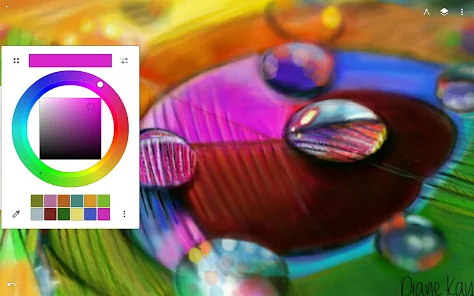
- Use two fingers to pull the color wheel onto the canvas for quick color access.
- To add multiple reference images for inspiration, use the reference image tool.
- Begin drawing or painting. Use gestures like rotating and flipping the canvas to assist your work.
- If you need more layers or advanced tools, consider the pro subscription through in-app purchase.
Key Features (from app listing)
Source: app_description
- Hundreds of built-in customizable brushes with realistic canvas interaction
- Minimal, intuitive interface with separate finger and stylus functions
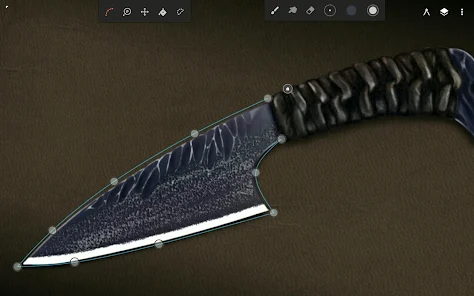
- Layer support with 30 blend modes, masks, clipping masks, and group layers
- Multiple perspective guides (1-5 point, isometric) for 3D cityscapes and game art
- Over 40 live filter effects, color correction, liquify, and timelapse recording
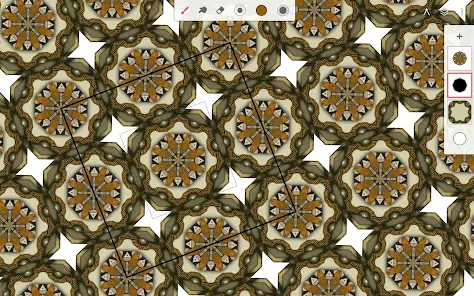
- Seamless pattern projects, selection and masking tools, and industry-leading transformations
- Import from photos, camera, clipboard, or image search; export as JPG, PNG, WEBP, ZIP, PSD, or project files
- Smart shape detection, radial/kaleidoscope symmetry, and hatching guide
- 64-bit deep color support and CMYK color modes for print presets
- Community sharing and access to over 1 million free for commercial-use images
This tip directly addresses the verified user complaint about limited layers found in 2 of 5 recent reviews, where users found 3 layers restrictive for complex work. It guides users to work within the free limitations or seek a paid upgrade.
How this content was created
Content type: pattern_analysis_of_user_reviews_and_metadata
AI generated: Yes
- Google Play user reviews (5 per app), October 15, 2024 to March 28, 2026
- Google Play ratings distribution
- App Store listing metadata
- Review sample is very small (5 reviews) and not statistically representative
- Only one bucket (recent_reviews) was available, limiting cross-bucket validation
- Claims labeled 'low confidence' are based on single-review observations only
- No real-world app testing was conducted
- Feature availability and bug prevalence may vary by device and app version
- Ratings distribution data was not provided, so overall sentiment context is missing
Pros & Cons
Based on analysis of Google Play user reviews
Pros
- Intuitive and comfortable interface praised by multiple recent reviewers medium
Theme 'intuitive and comfortable interface' appears in recent_reviews #2 and #3. Review #3 (rating 2) explicitly says 'It feels comfortable to use and intuitive.' Review #5 (rating 5) describes the app as 'a breath of fresh air' after dealing with paywalled features elsewhere. This is a cross-reviewer pattern in the recent bucket.
Evidence (2)
“I've been using the app with no issues when out of the blue today it told me I have to pay for more than 3 layers... I really like this app! It feels comfortable to use and intuitive.”Rating: 2★ October 15, 2024 118 likes“I've used other apps for a long time and watched as features become more and more paywalled... This was like a breath of fresh air.”Rating: 5★ March 28, 2026 5 likes - Good brush variety and community brush additions are a recent pattern medium
Theme 'brush variety and community support' appears in recent_reviews #2 (rating 4) and #4 (rating 5). Review #4 says 'variety of brushes not too limited but not too wide either... you can always get more from the community!' Review #2 mentions 'many options for pens.' This is a bounded but supportive pattern in the recent bucket.
Evidence (2)
“good drawing app! i find the variety of brushes not too limited but not too wide either, and incase you find the brushes too minimal you can always get more from the community! i also really really like how you can add more than 1 reference!!”Rating: 5★ April 21, 2025 688 likes“There are many options for pens, but if you don't have premium you can only have 3 layers, which is very low.”Rating: 4★ April 22, 2025 832 likes
Cons
- Limited free layers (3 layers) is a recurring recent concern high
Theme 'lack of free layers' appears in recent_reviews #2 and #3. Review #2 (rating 4) states 'if you don't have premium you can only have 3 layers, which is very low.' Review #3 (rating 2) complains 'it told me I have to pay for more than 3 layers.' This is a clear, recurring complaint in the recent bucket.
Evidence (2)
“if you don't have premium you can only have 3 layers, which is very low.”Rating: 4★ April 22, 2025 832 likes“I've been using the app with no issues when out of the blue today it told me I have to pay for more than 3 layers. Since I can't upload more photos without layers to separate them, it's essentially useless now.”Rating: 2★ October 15, 2024 118 likes - Desaturation bug reported by 1 of 5 sampled reviewers as a project-breaking issue low
Theme 'desaturation bug' reported only in recent_reviews #1 (rating 1). The reviewer states the app 'started to desaturate the first strokes I made' mid-project, turning white grey and black to dark grey. This is an isolated report in the sample and may not represent a widespread issue.
Evidence (1)
“At first this app seemed really good... Then in the middle of a project it started to desaturate the first strokes I made. White turned into a grey, black into a slightly darker grey.”Rating: 1★ June 04, 2025 206 likes - Absence of timelapse feature noted as a missing feature by 1 reviewer low
Theme 'wishing for timelapse' mentioned in recent_reviews #2 (rating 4). The reviewer says 'I do wish there was a time lapse option however, because I post time l...' This is a single-review observation and may reflect personal preference rather than a common missing feature.
Evidence (1)
“I do wish there was a time lapse option however, because I post time l...”Rating: 4★ April 22, 2025 832 likes
Recent Reviews
Elizabeth
1★At first this app seemed really good, I've had other apps where if you don't pay for premium, your experience sucks. This one wasn't as bad. Then in the middle of a project it started to desaturate the first strokes I made. White turned into a grey, black into a slightly darker grey. I had to go over those sections again to give them back their color and then it kept happening. On another note, one of the only free tools you can use, fill, doesn't work most of the time. It just covers everything
Felixx Root
4★There are many options for pens, but if you don't have premium you can only have 3 layers, which is very low. There aren't many ads, only a occasional ad about premium that you can easily tap off of. there is also eraser options. I do wish there was a time lapse option however, because I post time lapses of things I draw. overall, a good app. I would recommend!
Pikapower Kirby
2★I've been using Ibis Paint X for a while and I like it but I've been wanting to try something new and so far I really like this app! It feels comfortable to use and intuitive. Edit: I've been using the app with no issues when out of the blue today it told me I have to pay for more than 3 layers. Since when??? I've been using lots of layers without premium this whole time. Having only 3 is a deal-breaker for me.
Andrea Marie Escudero
5★good drawing app! i find the variety of brushes not too limited but not too wide either, and incase you find the brushes too minimal you can always get more from the community! i also really really like how you can add more than 1 reference!! very helpful there infinite painter.. the tools there are easy to understand and the software is very like, less complicated? idk. but good app anyways!
Al Gould
5★I've used other apps for a long time and watched as features become more and more paywalled, and dealt with more and more intrusive ads to access brushes and even just use the apps. This was like a breath of fresh air. At first I didn't realize there was more to the tools bar because of how low my expectations were, but when I scrolled down to see all the watercolor and effect brushes, again, for free, i genuinely gasped. Definitely going to pay for this when I can! Blows the competition away!