By App Discoverer Editorial Team · Updated October 1, 2026

DeepL Translate



Overview
Books & Reference
DeepL SE
Free
Jan 30, 2022
26.14
8.0
No
Apr 10, 2026
Features
Download DeepL Translate
Get the official app from the trusted app stores. You will be redirected to the download page.
When you purchase through links on our site, we may earn an affiliate commission. Learn more
Ratings breakdown
405,000 reviewsDeveloper contact
Name
DeepL SE
Address
Maarweg 165 50825 Köln Germany
Phone
+49 221 65031688
Support
android@deepl.com
Privacy
View policyFrequently Asked Questions
Is DeepL Translate truly free to use? high
Yes, DeepL Translate is free to download and use with core features. The app description states 'Free to download - access core features without cost!' However, advanced features like Glossary (custom translations) and Tone (formal/informal selection) require a paid plan. The app also has in-app purchases.
Source: app_metadata, app_description
Is DeepL more accurate than Google Translate? medium
Based on 2 of 5 sampled user reviews, users who compared it to Google Translate reported that DeepL seems more accurate for certain languages, specifically German and Japanese. However, this is based on a small sample and individual experiences may vary.
Source: user_reviews
Does the DeepL app crash frequently? medium
Two of five sampled recent reviews report persistent crashing after updates. One user says the app constantly shows 'there's an error' and requires uninstalling and reinstalling to work temporarily. Another user reports being falsely told they are offline. These issues appear to affect some users, but the sample is small.
Source: user_reviews
Does DeepL support offline translation? low
The app description does not explicitly mention offline translation support. One user review reports that the app displays an 'offline' error message even when connected to the internet, suggesting that online connectivity is required for translation functionality.
Source: user_reviews, app_description
Can DeepL translate images or photos? high
Yes. The app description lists 'Camera translation' (take a picture to translate) and 'Photo translation' (upload a photo to translate) as core features. These are part of the free features.
Source: app_description
How to Use
DeepL Translate is a language translation app that translates text, speech, photos, and files across numerous languages, with optional paid features like custom glossaries and tone settings. (app_description)
Getting Started
Source: app_description_and_user_feedback_noted
- Download DeepL Translate from Google Play and open the app.
- Allow necessary permissions (camera for photo translation, microphone for dictation) when prompted.
- Type or paste text into the main input field to start translating; translation begins automatically as you type.
- To translate from a photo, tap the camera icon and take a picture or upload an existing photo from your gallery.
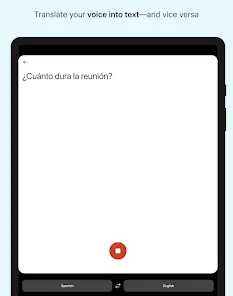
- For voice translation, tap the microphone icon and speak; note that punctuation may not be added automatically.
- Create a free DeepL account to access additional features like saving favorites and viewing history.
Key Features (from app listing)
Source: app_description
- Camera Translation: Translate text instantly by pointing your camera at signs, menus, or documents.
- Photo Translation: Upload existing photos from your gallery for text translation.
- Dictation: Speak out loud to get real-time voice translation.
- File Translation: Upload documents (PDF, Word, etc.) for translation while preserving formatting.
- Alternative Translations: Explore multiple options for single words and short phrases.
- Favorites and History: Save frequently used translations and revisit past translations.
- Text to Speech: Hear your translated text read aloud.
- Glossary (Paid): Define custom translations for key terms or phrases for your organization.
- Tone Selection (Paid): Choose between formal and informal tones for translations in supported languages.
- DeepL Write: Get intelligent writing suggestions to improve text clarity and impact.
Based on user review #5 which notes that the mobile app lacks the ability to switch between formal and informal tones (unlike the desktop version). The app description confirms tone selection is a paid feature. This tip addresses a verified user gap.
How this content was created
Content type: pattern_analysis_of_user_reviews_and_metadata
AI generated: Yes
- Google Play user reviews (5 per app), March 28, 2024 to December 03, 2025
- Google Play ratings distribution
- App Store listing metadata
- Review samples are not statistically representative of all user sentiment
- Sample size of 5 is extremely small
- Only one sampling bucket (recent_reviews) was available — no high-engagement complaint, high-engagement praise, or mixed review data to validate patterns
- Claims labeled 'low confidence' are based on single-review observations only
- No real-world app testing was conducted
- Feature availability may vary by region, device, and app version
- Ratings distribution data was not available for this app
Pros & Cons
Based on analysis of Google Play user reviews
Pros
- Translation accuracy for specific languages (Japanese, German) is praised as a key strength in 2 of 5 sampled recent reviews. medium
Theme 'translation quality' identified in recent_reviews #4 and #5. Reviewer #4 (5-star) specifically praises DeepL for Japanese, calling it the best free translator found. Reviewer #5 (5-star) says German translations seem more accurate than Google Translate. Both reviews highlight accuracy as a positive cross-bucket pattern within the recent reviews sample.
Evidence (2)
“Easily the best Japanese translator I’ve ever found or used. It’s hard to imagine there are better ones out there, especially for free. Even outside of Japanese, DeepL is a pretty reliable translator.”Rating: 5★ April 28, 2022 140 likes“It does seem accurate. (German translation). It does indeed seem more accurate than Google Translate. But just like Google translate, one is stuck with the Formal Sie (you)”Rating: 5★ January 19, 2024 105 likes - The alternative translations feature is highlighted as a unique and valuable offering in 1 of 5 sampled reviews. low
Theme 'alternative translations' identified in recent_reviews #4. The reviewer notes that providing alternative translations seems unique to DeepL. This is a single-review observation within the recent_reviews sample.
Evidence (1)
“One thing that seems unique to them is the providing of alternative translations. I think it’s real”Rating: 5★ April 28, 2022 140 likes
Cons
- Recurring connectivity errors and crashing after updates are reported as critical issues in 2 of 5 sampled recent reviews. medium
Theme 'connectivity errors and crashes' identified in recent_reviews #1 and #3. Reviewer #1 (2-star) describes being locked out of translation due to a false 'offline' error despite being connected, persisting across multiple networks and after reinstall. Reviewer #3 (2-star) reports constant crashing after a recent update, requiring repeated uninstalls and reinstalls for temporary fixes. This is a cross-reviewer pattern within the recent reviews sample.
Evidence (2)
“Used to be fantastic, but now I'm locked from using it. It will no longer translate because "(I) seem to be offline" but I am definitely connected. Tried across multiple internet sources and on data (even though it used to work on data before), and tried uninstalling and reinstalling.”Rating: 2★ December 03, 2025 30 likes“This all USED TO BE amazing. However, sadly now since some recent update it's constantly crashing and worthless, always saying "there's an error." The only fix I've been able to find is uninstalling and then reinstalling, only for it to work a day or two and having to do the same thing again.”Rating: 2★ February 07, 2025 23 likes - Voice translation lacks basic punctuation, a flaw noted by 1 of 5 sampled reviewers. low
Theme 'voice punctuation missing' identified in recent_reviews #2. The reviewer specifically complains about no punctuation in voice translation, contrasting it with other voice-to-text apps. This is a single-review observation.
Evidence (1)
“When you use the voice translation option you have no ability to use punctuation. Other voice to text applications will automatically punctuate your speech.”Rating: 3★ March 28, 2024 94 likes - The mobile app lacks the ability to switch between formal and informal tones, a feature the desktop version reportedly has, noted by 1 of 5 sampled reviewers. low
Theme 'missing tone options on mobile' identified in recent_reviews #5. The reviewer points out that unlike the desktop version, the mobile app does not allow changing between informal 'du' and formal 'Sie' for German translations. This is a single-review observation.
Evidence (1)
“But unlike the desktop version, the ability to change between the infomal you (du) and the formal you (Sie), is not an option. But just like Google translate, one is stuck with the Formal Sie (you)”Rating: 5★ January 19, 2024 105 likes
Recent Reviews
MillieBillie
2★Used to be fantastic, but now I'm locked from using it. It will no longer translate because "(I) seem to be offline" but I am definitely connected. Tried across multiple internet sources and on data (even though it used to work on data before), and tried uninstalling and reinstalling. It's not worth the time to create an account just to get help (because you must create an account to get help) for an app I only used to use a few times a week.
Morgan Scharff
3★I like the app and the accuracy of the translations. But there's two flaws that drives me mad. When you use the voice translation option you have no ability to use punctuation. Other voice to text applications will automatically punctuate your speech. The other issue I have is with how long the mic will remain "hot." So many times I'm finding myself having to speak as fast as possible without pausing or else the mic stops listening and I have to start all over again.
NAH
2★This all USED TO BE amazing. However, sadly now since some recent update it's constantly crashing and worthless, always saying "there's an error." The only fix I've been able to find is uninstalling and then reinstalling, only for it to work a day or two and having to do the same thing again. It's a real bummer, hopefully they get it sorted soon.
other guy
5★Easily the best Japanese translator I’ve ever found or used. It’s hard to imagine there are better ones out there, especially for free. Even outside of Japanese, DeepL is a pretty reliable translator. One thing that seems unique to them is the providing of alternative translations. I think it’s really useful and helpful. The app is easy to use. The only thing missing would be a dictionary or even a history, but, still, hands down, one of the best translators out there.
Missouri Resident
5★It does seem accurate. (German translation). But unlike the desktop version, the ability to change between the infomal you (du) and the formal you (Sie), is not an option. It does indeed seem more accurate than Google Translate. But just like Google translate, one is stuck with the Formal Sie (you) when translating. Still, anyway, a good app.