By App Discoverer Editorial Team · Updated October 1, 2026

Fotor–AI Photo Editor&Enhancer



Overview
Photography
AI Art Photo Editor | Everimaging Ltd.
Free
Mar 29, 2013
8.1.12.0
7.0
$0.99 - $459.99 per item
No
Apr 9, 2026
Features
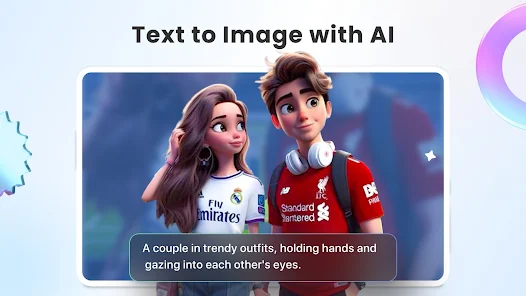
Photo editing used to be a task. Now it's just a talk. With Fotor, editing is easier than ever. Fotor is your all-in-one AI photo editing toolbox, now featuring the new AI Agent. Just upload a photo and say or type what you want—Fotor's smart Agent understands your commands and applies multiple edits at once, saving you time and effort. Whether you're a creator, a photo enthusiast, or just having fun, Fotor makes editing smarter, faster, and more creative than ever.
In the Fotor App, you can:
...
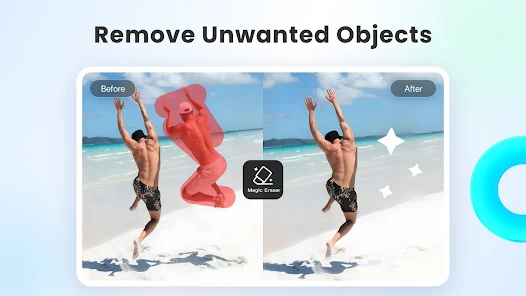
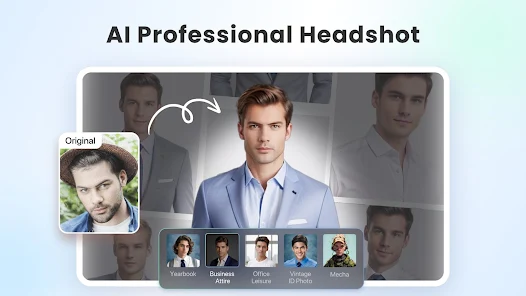
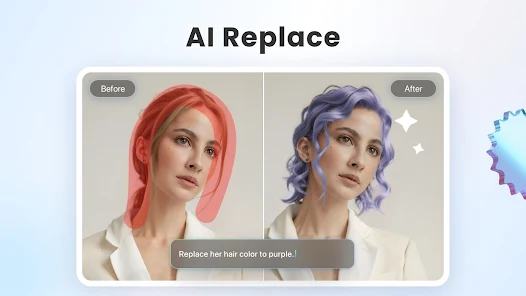
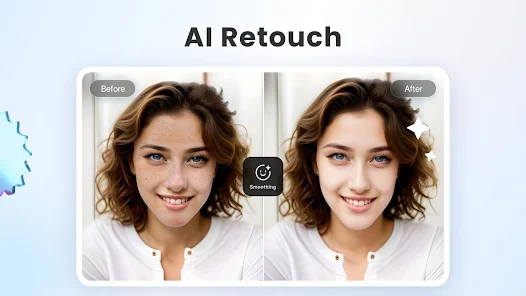
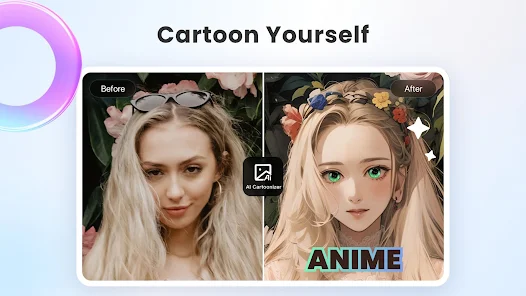
Photo editing used to be a task. Now it's just a talk. With Fotor, editing is easier than ever. Fotor is your all-in-one AI photo editing toolbox, now featuring the new AI Agent. Just upload a photo and say or type what you want—Fotor's smart Agent understands your commands and applies multiple edits at once, saving you time and effort. Whether you're a creator, a photo enthusiast, or just having fun, Fotor makes editing smarter, faster, and more creative than ever. In the Fotor App, you can: ‒ Use the AI Photo Enhancer to instantly sharpen blurry photos, fix grainy or low-resolution images, and bring back lost details automatically. This powerful photo enhancer tool boosts image quality and makes every shot look sharp, vivid, and professional—no manual editing required. The photo enhancer makes it easy to get stunning results with just one tap. ‒ Effortlessly remove unwanted elements from photos and videos—like bystanders, watermarks, or buildings—using the Magic Eraser for photos and Video Eraser for videos, all without sacrificing quality. Perfect for anyone with no editing experience.‒ Use the BG Remover to extract subjects from your images with one click, allowing you to replace the background and create highly personalized photos. The AI background eraser makes it easy to achieve professional-looking results. ‒ Use AI Retouch to achieve flawless skin. Enjoy natural and delicate skin smoothing and blemish removal to effortlessly create a refined appearance. ‒ Use the AI Headshot Generator to create PFPs and avatars for LinkedIn and other social media platforms. The headshot generator ensures high-quality results that rival professional studios. ‒ Turn text into stunning images! Just describe what you want, like “a magician baking bread in the kitchen,” then choose a style, and transform your ideas into reality in seconds. ‒ Instantly convert your text prompts into videos with an AI video generator, creating studio-quality videos without any watermarks. Just enter your text or upload an image, choose a style, and get a polished video.‒ Use trendy 3D Cartoon and AI art effects to easily transform your selfies into vibrant cartoon comics. Explore more features of Fotor and unleash your creativity with this AI photo editor. AI Tools: ‒ Instantly change hairstyles, and colors with AI Hairstyle to find your best style.‒ Extend photo subjects and backgrounds with AI Expand to fit different sizes and achieve a balanced effect. ‒ Restore and colorize old family photos, turning them into vibrant, high-definition images. Photo Editor: ‒ Use unique photo filters to set the mood and captivate. ‒ Adjust brightness, clarity, contrast, saturation, curves, hue, and grain. The Fotor Pro subscription fee is charged weekly, monthly, or yearly. The fees for the Fotor Pro plan are paid following purchase confirmation. The subscription will automatically renew on expiry unless the automatic renewal is turned off at least 24 hours before the expiry of the current subscription period. Once the subscription is confirmed, your Google Play account will be charged according to the plan you chose. After purchase, you may go to the Google Play account settings to manage your subscription and turn the automatic renewal off. A canceled subscription becomes effective after the current billing period ends. Terms of Service:https://www. fotor. com/service. html? f=iphoneapp&v=1Privacy Policy:https://www. fotor. com/privacy. html
Download Fotor–AI Photo Editor&Enhancer
Get the official app from the trusted app stores. You will be redirected to the download page.
Official Links
When you purchase through links on our site, we may earn an affiliate commission. Learn more
Ratings breakdown
732,000 reviewsDeveloper contact
Name
成都恒图科技有限责任公司
Address
中国 四川省成都市 人民中路二段泰丰国际广场35楼 邮政编码: 610014
Website
https://www.fotor.comPhone
+86 180 8014 5716
Support
support@fotor.com
Privacy
View policyFrequently Asked Questions
Is Fotor a free app, or does it require a subscription? high
Fotor is a free app to download, but it includes in-app purchases ranging from $0.99 to $459.99 per item. User reviews report issues with a 'free trial' that leads to immediate charges. Key features like the AI photo enhancer, background remover, and many AI tools appear to be part of a paid subscription ('Fotor Pro'), which renews automatically unless canceled 24 hours before the end of the billing period.
Source: app_metadata, user_reviews
Does Fotor have tools for removing objects from pictures and videos? medium
Yes. According to the app description, Fotor includes a 'Magic Eraser' for photos and a 'Video Eraser' for videos to remove unwanted elements like bystanders or watermarks. However, one recent user review specifically reports that the video processing feature failed to work, producing only error messages.
Source: app_description, user_reviews
Can Fotor use an AI Agent to edit photos by voice or text command? high
Yes. The app's description highlights a new 'AI Agent' feature. You can upload a photo and type or speak your desired edit, and the Agent will apply multiple changes at once, simplifying the editing process.
Source: app_description
What are the common complaints about Fotor? medium
Based on recent user reviews, the most frequently mentioned issues are related to billing (specifically the free trial leading to charges and the app becoming a pay-only service) and the subscription model. Other reported problems include video processing failures and poor navigation for purchased assets.
Source: user_reviews
How to Use
Fotor is an all-in-one AI photo and video editing app that allows users to enhance, retouch, and manipulate media using a combination of traditional tools and AI-powered features like a smart Agent, background remover, and image generator. (app_description)
Getting Started
Source: app_description_and_user_feedback_noted
- Step 1: Download Fotor from the Google Play Store and launch the app. Be cautious when prompted to start a free trial, as user reviews indicate this may lead to an immediate charge.
- Step 2: Upload a photo from your gallery or take a new one to begin editing. You can use traditional tools like brightness, contrast, and saturation adjustments.
- Step 3: Explore the AI tools. For quick fixes, tap 'AI Photo Enhancer' to sharpen and improve resolution. Use 'Magic Eraser' to remove unwanted objects from photos.
- Step 4: For more advanced editing, try the 'AI Agent' feature. Upload a photo and type or speak a command (e.g., 'make the sky brighter') to apply multiple edits simultaneously.
- Step 5: Save your edited photo, or use the 'BG Remover' to extract the subject and place it on a new background. Explore other AI tools like 'AI Headshot Generator' or 'Text to Image' for creative projects.
Key Features (from app listing)
Source: app_description
- AI Photo Enhancer: Automatically sharpens blurry photos and fixes low-resolution images.
- Magic Eraser & Video Eraser: Removes unwanted elements (bystanders, watermarks) from photos and videos.
- Background Remover: Extracts subjects from images with one click for easy background replacement.
- AI Agent: Allows users to edit photos by typing or speaking commands, which the AI executes automatically.
This tip is directly responsive to a verified user complaint from recent_reviews where a reviewer stated that pressing the free trial button results in an immediate charge and that customer support was unhelpful.
How this content was created
Content type: pattern_analysis_of_user_reviews_and_metadata
AI generated: Yes
- Google Play user reviews (12-20 preferred; may be smaller if source data is limited per app), Date range of available reviews: May 2024 to March 2026
- Google Play ratings distribution
- App Store listing metadata
- Review samples are not statistically representative of all user sentiment
- High-engagement negative reviews can overrepresent complaints
- Claims labeled 'low confidence' are based on single-review observations only
- No real-world app testing was conducted
- Feature availability may vary by region, device, and app version
- Only 'recent_reviews' bucket was available for analysis, which may not be representative of overall user sentiment, which is rated at 4.3.
Pros & Cons
Based on analysis of Google Play user reviews
Pros
- Effective AI photo enhancement tools that improve image quality with one tap.
Theme 'Good AI photo enhancement' identified in recent_review #3
Evidence (2)
“Use the AI Photo Enhancer to instantly sharpen blurry photos, fix grainy or low-resolution images”Rating: 5★ N/A“I've been using the app on both mobile and web and I genuinely like the end products”Rating: 4★ November 04, 2025 547 likes - User-friendly interface with easy-to-use editing tools for quick photo transformations.
Theme 'Easy to use' identified in recent_review #3
Evidence (2)
“loved loved the ease of use and the many different choices that were given for each photograph”Rating: 1★ May 13, 2024 32 likes“Fotor is your all-in-one AI photo editing toolbox, now featuring the new AI Agent”Rating: 5★ N/A - Wide variety of editing tools including background removal, retouching, and AI generation.
Theme 'Variety of editing tools' identified in recent_review #3
Evidence (2)
“Effortlessly remove unwanted elements from photos and videos—like bystanders, watermarks”Rating: 5★ N/A“Use AI Retouch to achieve flawless skin. Enjoy natural and delicate skin smoothing”Rating: 5★ N/A
Cons
- Poor customer support with automated responses and lack of resolution for issues.
Theme 'Poor customer support' identified in recent_review #1 and #2
Evidence (2)
“they contacted me about fixing the issue... what they tried the first time didn't work, and they ghosted me”Rating: 2★ March 16, 2026 4 likes“Fotor has one of the worst customer support I have ever experienced... Its mostly automated, good luck with it”Rating: 1★ February 04, 2026 47 likes - Misleading free trial that charges users immediately instead of honoring the trial period.
Theme 'Misleading free trial' identified in recent_review #2
Evidence (1)
“DO NOT press the start a free trial button... They wont honor the free trial and charge right away”Rating: 1★ February 04, 2026 47 likes - App is slow and buggy, with slider bars getting stuck and long processing times.
Theme 'Slow and buggy' identified in recent_review #2 and #5
Evidence (2)
“the system runs very slowly,the slider bars to control edits get stuck”Rating: 1★ February 04, 2026 47 likes“It was taking a long time to generate the images ( over 30 min)”Rating: 1★ May 19, 2024 103 likes
Recent Reviews
Robert Kern
2★i downloaded this to clean up some video files, removing some unwanted background and such, but after 3 days, I've tried a good 10 times, and haven't gotten a single video done - every time i get one error message or another, but not a single video actually processed. For the price of this app that is ridiculous. UPDATE - they contacted me about fixing the issue, and I was prepared to change my review. But what they tried the first time didn't work, and they ghosted me after that.
Allyson Manchester
1★Fotor has one of the worst customer support I have ever experienced in my entire life. DO NOT press the start a free trial button and follow the prompt to select a plan to continue. They wont honor the free trial and charge right away. There is a huge error in this process. In general do not ever need anything from there customer support team. They suck and don't care about you. Its mostly automated, good luck with it. Also the system runs very slowly,the slider bars to control edits get stuck.
Chrystal S. Green
4★My last two reviews of this app were not pretty. I had issues with AI generated pics changing my eye color to blue (some options still do) and an update that left me in limbo and on the web only for a few months. Well, I'm glad to say that a year later, the developers have fixed almost every issue I've had. I've been using the app on both mobile and web and I genuinely like the end products. I haven't figured out the coins situation yet and would like more storage options. No more room to commen
Annetta Hill
1★I AM DEVESTATED!! Being a photographer for 10 years I have used FOTOR faithfully. I tried other software but loved loved the ease of use and the many different choices that were given for each photograph. I bought a new computer and downloaded FOTOR to edit pictures only to find out it is now a pay app and my favorite scenes are all gone! I'm super disappointed and very likely to have to find something else. What happened to, "If it's not broke, don't fix it!"
Jody Goodman
1★It is difficult to navigate to that you pay for. I paid for a pack of 20 pictures that were separate from the subscription, It was taking a long time to generate the images ( over 30 min) I went back to try to see tge progress and couldn't find them. The app seems centered around pushing you to areas to make more money instead of letting you see what you bought. Don't see the value of the subscription so I canceled. Also there are not very many AI options. I was hoping for more options.