By AppHub Editorial Team · Updated August 3, 2026

Meta Business Suite


Overview
Business
Meta Platforms, Inc.
Free
Jan 28, 2014
541.0.0.61.110
No
Feb 25, 2026
Features
Grow your business and connect with more people with Meta Business Suite.
Use this app to:
Grow your business and connect with more people with Meta Business Suite. Use this app to:
Download Meta Business Suite
Get the official app from the trusted app stores. You will be redirected to the download page.
When you purchase through links on our site, we may earn an affiliate commission. Learn more
Ratings breakdown
4,980,000 reviewsDeveloper contact
Name
Meta Platforms, Inc.
Address
1 Meta Way Menlo Park, CA 94025-1444 United States
Phone
+1 650-853-1300
Support
android-support@fb.com
Privacy
View policyFrequently Asked Questions
Is the Meta Business Suite app actively maintained and bug-free? medium
Based on the available sample of 5 recent reviews, users are reporting significant, recurring bugs. These include failure of push notifications, post scheduling not working, inability to edit photos, and severe delays in message delivery. However, this sample is very small and may not be representative of the app's overall quality, which has a 4.6-star rating across 4.98 million reviews. Potential users should approach with caution and test core features like messaging and posting immediately.
Source: user_reviews
Can I manage both Facebook and Instagram messages from the Meta Business Suite app? medium
Yes, the app description states you can 'respond to all of your messages and comments in one place.' However, some users report significant issues, including messages being delayed by over 24 hours and notifications failing to alert you to new messages.
Source: app_metadata, user_reviews
Does the app support scheduling posts for Facebook and Instagram? medium
Yes, the app description lists post and story scheduling as a key feature. However, a recent review reports that scheduled posts 'frequently just doesn't work' and queued posts 'just... never appear.' This suggests the feature may be unreliable for some users.
Source: app_metadata, user_reviews
Is Meta Business Suite free to use? high
Yes, the app is free to download and use. There are no in-app purchases listed.
Source: app_metadata
How to Use
Meta Business Suite helps you manage your business's presence on Facebook and Instagram by allowing you to create and schedule content, respond to messages, and track performance insights. (app_description)
Getting Started
Source: app_description_and_user_feedback_noted
- Step 1: Download the Meta Business Suite app from the Google Play Store.
- Step 2: Log in using the Facebook credentials associated with your business's Facebook Page and Instagram account.
- Step 3: Grant the necessary permissions to manage your pages, messages, and insights. Based on user feedback, pay close attention to notification permissions (Settings > Notifications > Meta Business Suite) to ensure they are enabled to avoid missing messages.
- Step 4: Explore the main dashboard to familiarize yourself with the Home, Posts & Stories, Inbox, and Insights tabs.
- Step 5: Based on user-reported issues, immediately test core functionality: send a test message from another account, try scheduling a post, and attempt to comment on a post to confirm these features are working correctly on your device.
Key Features (from app listing)
Source: app_description
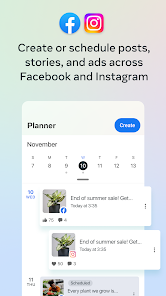
- Create, schedule, and manage posts and stories across Facebook Pages and Instagram accounts.
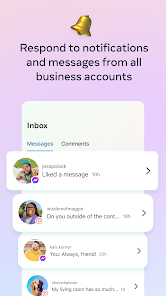
- Respond to messages, comments, and monitor activity from a central Inbox.
- Utilize automated responses to quickly address common customer inquiries.
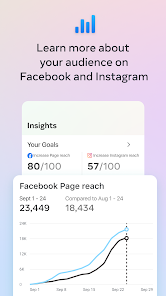
- View detailed insights on how your audience interacts with your posts, stories, and ads.
- View a consolidated to-do list and notifications for important business actions.
- Make real-time voice calls to customers directly from the app.
Tip derived directly from user review complaints: Review #1 missed work messages due to notification failure. Review #4 reports messages delayed over 24 hours. Review #5 reports scheduled posts that never appear. This pro tip serves as a workaround for these reported functional gaps.
How this content was created
Content type: pattern_analysis_of_user_reviews_and_metadata
AI generated: Yes
- Google Play user reviews (5 (below the preferred 12-20) per app), December 29, 2024 to February 16, 2026
- Google Play ratings distribution
- App Store listing metadata
- Review samples are not statistically representative of all user sentiment
- The sample size is exceptionally small (5 reviews), all from a single bucket, which significantly limits confidence in any claim.
- No positive engagement reviews (liked_positive_reviews) or mixed reviews (mixed_reviews) were available to counterbalance negative sentiment.
- No ratings distribution data was available to assess the overall review landscape.
- Claims labeled 'low confidence' are based on single-review observations only.
- No real-world app testing was conducted.
- Feature availability may vary by region, device, and app version.
Pros & Cons
Based on analysis of Google Play user reviews
Pros
- Centralized management of Facebook and Instagram posts, messages, and comments in one place.
Theme 'Centralized social media management' identified in app description.
Evidence (1)
“Create, schedule, and manage posts and stories across your Facebook Page and Instagram account”Rating: 5★ N/A - Provides insights and analytics on post and ad performance to optimize content strategy.
Theme 'Analytics and insights' identified in app description.
Evidence (1)
“View insights about how people are interacting with your posts, stories and ads so you can create content that resonates with them”Rating: 5★ N/A - Allows real-time calls to customers and contacts directly from the app for seamless communication.
Theme 'Real-time calls' identified in app description.
Evidence (1)
“Access seamless conversations by making real-time calls to customers and contacts directly from the app”Rating: 5★ N/A
Cons
- Push notifications frequently fail, causing users to miss important messages and updates.
Theme 'Broken notifications' identified in recent_review #1 and #4.
Evidence (2)
“I'm not sure what has happened but I am not notified of anything anymore (via push notifications) and it is very annoying! I have missed important work messages because of this issue.”Rating: 2★ February 16, 2026 32 likes“notifications don't clear so I'll have a notification saying I have an unread message while no unread messages display in my inbox”Rating: 1★ June 20, 2025 1,607 likes - Scheduled posts often fail to publish without any error explanation, wasting hours of work.
Theme 'Scheduled post failures' identified in recent_review #5.
Evidence (1)
“frequently just doesn't work. I've spent hours trying to queue up scheduled posts, only for them to just... never appear.”Rating: 1★ February 16, 2026 7 likes - Limited photo editing capabilities within the app, requiring desktop use for basic tasks.
Theme 'Limited photo editing' identified in recent_review #2.
Evidence (1)
“I'm not able to edit photos I'm adding to a post anymore. Before the ability to edit photos was taken away, when you would add text to a photo, the options were hidden under my phone's keyboard”Rating: 1★ March 12, 2025 1,532 likes
Recent Reviews
Samantha Smelser
2★I'm not sure what has happened but I am not notified of anything anymore (via push notifications) and it is very annoying! I have missed important work messages because of this issue. I have cleared the cache, uninstalled and reinstalled, checked and unchecked the allow notifications buttons... and nothing works. Please fix!!
Nikki
1★Not a huge fan of the app. I'm not able to edit photos I'm adding to a post anymore. Before the ability to edit photos was taken away, when you would add text to a photo, the options were hidden under my phone's keyboard; I would have to put my keyboard in float mode just to change the font style and color. Also, I have never been able to rearrange photos I'm adding to a post. I have to go between the app and the desktop version for every post I create.
Sam Lantz
4★Haven't been using this app for very long and already see some problems. First, Facebook doesn't seem to move messages to spam. That's not a huge deal if you know what is spam and what is not, but it's still super annoying. The other thing that's a bigger deal is I can't see the detailed results of an ad, because the button doesn't work for some reason. I have to go on a PC to view the audience the ad has reached, for example. I even un- and re-installed the app and it didn't work.
Julie Barajas
1★I hate this app; forced to use it nonetheless. messages to the page are regularly delayed, sometimes for more than 24 hours. There is no option to search messages, notifications don't clear so I'll have a notification saying I have an unread message while no unread messages display in my inbox, leading me to wonder if it's a glitch or if the business suite has once again eaten a message that may or may not show up in a few days.
Katrina Brown
1★frequently just doesn't work. I've spent hours trying to queue up scheduled posts, only for them to just... never appear. even trying to post that moment through this app frequently will just get a message saying "sometimes it'll take a moment to show up" and that moment is never. at least give me the reason why it's not working! I've tried everything. photo, no photo, no link, different text.... what's the point of having this app if I can't actually manage my posts?!?