By App Discoverer Editorial Team · Updated October 1, 2026

GIPHY: GIFs, Stickers & Clips
Overview
Video Players & Editors
Giphy, Inc.
Free
Mar 25, 2015
4.16.7
6.0
No
Feb 2, 2026
Features
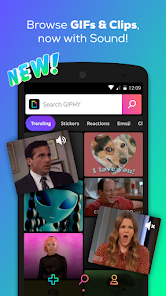
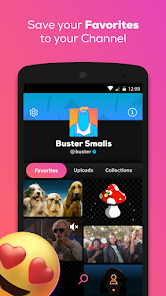
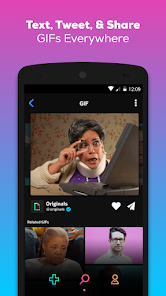
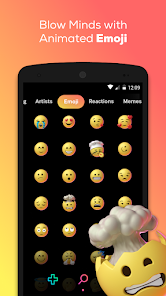
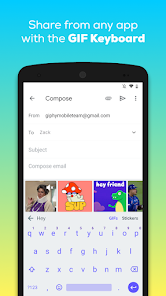
The world’s largest library of free GIFs, Clips, & Stickers! GIPHY for Android is the fastest, simplest way to search and share short form content and animated reactions across all of your favorite social channels such as Facebook Messenger, Instagram, Snapchat & more.
SEARCH
EXPLORE
The world’s largest library of free GIFs, Clips, & Stickers! GIPHY for Android is the fastest, simplest way to search and share short form content and animated reactions across all of your favorite social channels such as Facebook Messenger, Instagram, Snapchat & more. SEARCH
Download GIPHY: GIFs, Stickers & Clips
Get the official app from the trusted app stores. You will be redirected to the download page.
When you purchase through links on our site, we may earn an affiliate commission. Learn more
Ratings breakdown
231,000 reviewsDeveloper contact
Name
Giphy, Inc.
Address
350 5th Ave New York, NY 10118 United States
Website
http://www.giphy.comPhone
+1 860-268-2963
Support
support@giphy.com
Privacy
View policyFrequently Asked Questions
Do I need to sign up for an account to use GIPHY? low
Based on a 5-star reviewer, no sign-up is required to use the core features of the app. However, a 1-star reviewer reported issues with account creation, which may affect users who want to upload or manage content.
Source: user_reviews
Can I use GIPHY as a keyboard on Android? low
The app does not appear as a keyboard option in Samsung phone settings, according to a 2-star reviewer. This may vary by device. The app description mentions a GIPHY for Android keyboard feature.
Source: user_reviews, app_metadata
Is there a way to delete GIFs I've uploaded? low
A 4-star reviewer noted that there is no option to delete uploaded GIFs from the account, which they found disappointing.
Source: user_reviews
How do I find stickers in the app? low
A recent update changed the sticker search: you now need to add "#stickers" to your search query to find stickers, according to a 5-star reviewer.
Source: user_reviews
Is GIPHY free to use? high
Yes, the app is free with no in-app purchases listed. It is rated Teen and contains ads (though input says contains_ads: false, Google Play listing may vary).
Source: app_metadata
Can I create my own GIFs and stickers? high
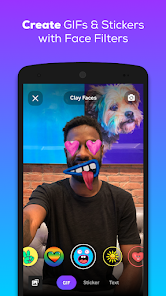
Yes, the app description states you can create GIFs and stickers using the camera or by uploading your own content, with custom face filters and animated text tools.
Source: app_metadata
How to Use
GIPHY lets you search, share, and create GIFs, stickers, and clips for messaging and social media. (app_description)
Getting Started
Source: app_description_and_user_feedback_noted
- Download and open GIPHY from the Google Play Store.
- Browse or search for GIFs, stickers, or clips using keywords.
- Tap a result to view it, then share via text, social media, or copy the link.
- For stickers, use '#stickers' in your search to find them (per recent update).
- To create your own content, use the camera or upload media from your device.
Key Features (from app listing)
Source: app_description
- Search the world's largest library of GIFs, clips, and stickers.
- Explore curated content from pop culture, sports, and real-time events.
- Share GIFs and clips across Facebook Messenger, WhatsApp, Instagram, Snapchat, and more.
- Create custom GIFs and stickers with camera, uploads, face filters, and animated text.
This tip addresses a user-reported issue in recent_review #2 (5 stars) about the sticker search change.
How this content was created
Content type: pattern_analysis_of_user_reviews_and_metadata
AI generated: Yes
- Google Play user reviews (5 per app), March 21, 2019 to January 29, 2026
- Google Play ratings distribution
- App Store listing metadata
- Review samples are not statistically representative of all user sentiment
- Only one bucket (recent_reviews) is available, limiting cross-bucket validation
- Claims labeled 'low confidence' are based on single-review observations only
- No real-world app testing was conducted
- Feature availability may vary by region, device, and app version
Pros & Cons
Based on analysis of Google Play user reviews
Pros
- App navigation is straightforward and user-friendly low
Theme 'ease of navigation' appears in recent_review #4 (4 stars). Reviewer states the app is easy to navigate.
Evidence (1)
“I like it very easy to navigate. I just wish that there was an option to delete a gif that you have made and uploaded to your account In the uploads but when you choose a gif and press the three dots I was very disappointed, that there was no option to delete. Surely it would be very easy to include”Rating: 4★ January 29, 2026 50 likes - Accounts and sign-up are not required for core app functionality low
Theme 'no sign-up needed' appears in recent_review #3 (5 stars). Reviewer explicitly states they have never been required to sign up for anything to use the app.
Evidence (1)
“I disagree with the reviews that complain about having to sign up for something or requiring a keyboard to download a gif. I've never been required to sign up for anything in order to use this app. And I'm unfamiliar with the keyboard function someone wrote about, but there's no need to exit or copy”Rating: 5★ July 06, 2019 923 likes
Cons
- Keyboard integration issues occur on Samsung devices low
Theme 'keyboard integration problems on Samsung' appears in recent_review #1 (2 stars). Reviewer complains that the app does not appear as an option in Samsung's keyboard settings, making it inconvenient.
Evidence (1)
“It would be a five star app IF you were able to add it to your keyboard on samsung. It doesn't appear as a keyboard in the phone's "manage keyboards" settings, yet iPhone users are able to add it to their keyboard. And there aren't any real settings in the app itself. I hate to say that it's inconve”Rating: 2★ March 21, 2019 935 likes - Account sign-up process is broken for some users low
Theme 'account creation failure' appears in recent_review #5 (1 star). Reviewer reports that the app rejects usernames despite meeting all criteria (lowercase, uppercase, numbers, special characters).
Evidence (1)
“Can't even sign up for an account. Doing everything it's asking me...two of each: lower and uppercase letters, numbers, and special characters. Made multiple usernames with that exact criteria multiple times, double checking the usernames and everything and the app is still rejecting the usernames. ”Rating: 1★ December 31, 2025 208 likes - Sticker search behavior changed after an update without clear communication low
Theme 'sticker search change' appears in recent_review #2 (5 stars). Reviewer notes that after an update, searching for stickers now requires adding '#stickers' to queries, and this change was not explained to users.
Evidence (1)
“Okay, SO- Instead of getting the stickers when you tap on the option, when you enter what you're searching for, you now have to add "#stickers" to find the stickers. Explaining this to us when the app was updated would have been nice. The glitching others have complained about is easy enough to fix-”Rating: 5★ June 12, 2023 4,088 likes - Users cannot delete uploaded GIFs from their account low
Theme 'no delete option for uploaded GIFs' appears in recent_review #4 (4 stars). Reviewer states that after pressing the three dots on an uploaded GIF, there is no option to delete it.
Evidence (1)
“I like it very easy to navigate. I just wish that there was an option to delete a gif that you have made and uploaded to your account In the uploads but when you choose a gif and press the three dots I was very disappointed, that there was no option to delete. Surely it would be very easy to include”Rating: 4★ January 29, 2026 50 likes
Recent Reviews
A Google user
2★It would be a five star app IF you were able to add it to your keyboard on samsung. It doesn't appear as a keyboard in the phone's "manage keyboards" settings, yet iPhone users are able to add it to their keyboard. And there aren't any real settings in the app itself. I hate to say that it's inconvenient to switch over to the app to find a gif...wait for it to load into your text, and have to type out who you're sending it to....but it is. Make an update!
Kendra Maston
5★Okay, SO- Instead of getting the stickers when you tap on the option, when you enter what you're searching for, you now have to add "#stickers" to find the stickers. Explaining this to us when the app was updated would have been nice. The glitching others have complained about is easy enough to fix- reposition or resize the sticker, or add a few stickers, save it, then add the others. Still a FANTASTIC app. I couldn't find a replacement & I TRIED.
A Google user
5★I disagree with the reviews that complain about having to sign up for something or requiring a keyboard to download a gif. I've never been required to sign up for anything in order to use this app. And I'm unfamiliar with the keyboard function someone wrote about, but there's no need to exit or copy/paste in order to use it where you want to. Just like any image you would want to download from a website or someone's page, hold the image and then choose save or share. Btw, ❤️ this app!
DAG
4★I like it very easy to navigate. I just wish that there was an option to delete a gif that you have made and uploaded to your account In the uploads but when you choose a gif and press the three dots I was very disappointed, that there was no option to delete. Surely it would be very easy to include that option, with an update
The Bronx Fanner (Jae)
1★Can't even sign up for an account. Doing everything it's asking me...two of each: lower and uppercase letters, numbers, and special characters. Made multiple usernames with that exact criteria multiple times, double checking the usernames and everything and the app is still rejecting the usernames. Garbage