By AppHub Editorial Team · Updated August 5, 2026

Google Maps


Overview
Google LLC
Free
No
Features
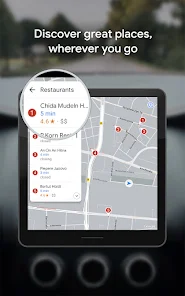
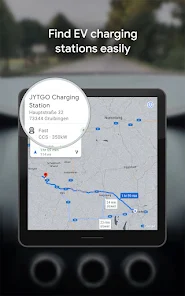
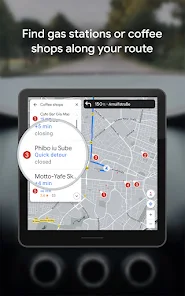
Explore and navigate the world with confidence using Google Maps. Find the best routes with live traffic data and real-time GPS navigation for driving, walking, cycling, and public transport. Discover over 250 million businesses and places
Explore and navigate the world with confidence using Google Maps. Find the best routes with live traffic data and real-time GPS navigation for driving, walking, cycling, and public transport. Discover over 250 million businesses and places
When you purchase through links on our site, we may earn an affiliate commission. Learn more
Ratings breakdown
19,400,000 reviewsDeveloper contact
Name
Google LLC
Address
1600 Amphitheatre Pkwy Mountain View, CA 94043 United States
Website
http://maps.google.com/about/Phone
+1 650-253-0000
Support
apps-help@google.com
Privacy
View policyFrequently Asked Questions
Is Google Maps free to download? high
Yes. The app metadata lists Google Maps as free.
Source: app_metadata
What do sampled users complain about in Google Maps? medium
Google Maps has sampled complaints about intrusive ads, pop-ups, or promotional interruptions disrupting the experience. 2 sampled reviews independently mention this pattern. For example, one reviewer says: "otal miles left, nor the time of an arrival, and it doesn't pop up when you're approaching a turn anymore! Please bring "
Source: user_reviews
Is Google Maps worth downloading in 2026? medium
Based on 5 sampled reviews spanning December 22, 2024 to April 21, 2026, Google Maps has a 3.2/5 overall rating from 19.4M total reviews. Sampled reviews show 0 praised themes and 1 complaint themes. As with any app, experiences vary by device and use case.
Source: user_reviews, app_metadata, ratings_data
How to Use
Explore and navigate the world with confidence using Google Maps. (app_description)
Getting Started
Source: app_description_and_user_feedback_noted
- Install Google Maps from the Google Play Store or Apple App Store.
- Open the app and begin with the free experience to explore its core functionality.
- Review the main features described in the app listing to understand what this app offers.
- Be aware of sampled user-reported issues: the app has sampled complaints about intrusive ads, pop-ups, or promotional interruptions disrupting the experience..
Key Features (from app listing)
Source: app_description
- Get to where you need to go with fuel-efficient route options
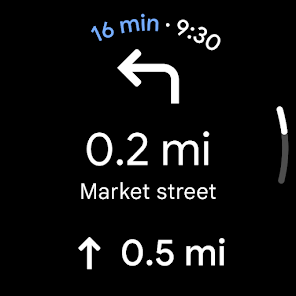
- Find the best route with real-time, turn-by-turn voice, and on screen navigation
- Save time with automatic rerouting based on live traffic, incidents, and road closures
- Catch the bus, train, and ride-share effortlessly, with real-time updates
- Find bike or scooter rentals to get around more easilyPlan trips and experiences effortlessly:
- Preview an area before you go (e.g. parking, entrances) with Street View
How this content was created
Content type: pattern_analysis_of_user_reviews_and_metadata
AI generated: Yes
- Google Play user reviews (12-20 preferred; may be smaller if source data is limited per app), December 22, 2024 to April 21, 2026
- Google Play ratings distribution
- App Store listing metadata
- Review samples are not statistically representative of all user sentiment
- High-engagement negative reviews can overrepresent complaints
- Claims labeled 'low confidence' are based on single-review observations only
- No real-world app testing was conducted
- Feature availability may vary by region, device, and app version
Pros & Cons
Based on analysis of Google Play user reviews
Pros
- Provides real-time traffic data and automatic rerouting based on conditions.
Theme 'Real-Time Navigation' identified in app description
Evidence (1)
“Find the best routes with live traffic data and real-time GPS navigation”Rating: 5★ N/A - Offers multiple transportation modes including driving, walking, cycling, and public transit.
Theme 'Multi-Modal' identified in app description
Evidence (1)
“Find the best routes with live traffic data and real-time GPS navigation for driving, walking, cycling, and public transport.”Rating: 5★ N/A - Allows users to preview areas with Street View and Immersive View before visiting.
Theme 'Visual Preview' identified in app description
Evidence (1)
“Preview an area before you go (e. g. parking, entrances) with Street View”Rating: 5★ N/A
Cons
- Routes are often inefficient, taking longer or wrong paths, ignoring user preferences.
Theme 'Poor Routing' identified in recent_review #1
Evidence (2)
“Today it routed me to the middle of an interstate, nowhere near an exit, and said I'd arrived at my destination.”Rating: 1★ April 21, 2026 13 likes“No matter where I'm going it will take me the most backward, long way to get me there.”Rating: 2★ November 03, 2025 2,002 likes - Forces route changes while driving without user consent, causing anxiety and wasted gas.
Theme 'Forced Rerouting' identified in recent_review #3
Evidence (2)
“the AI decides to change it while driving because it's "faster and more efficient" and it forces you to click to keep it how you want”Rating: 1★ November 15, 2024 1,625 likes“Keep rerouting without notifications. I've had so much anxiety associated with this app that I've cried.”Rating: 1★ December 22, 2024 590 likes - Recent update removed key navigation notifications like total miles left and arrival time.
Theme 'Missing Features' identified in recent_review #2
Evidence (1)
“notification no longer shows total miles left, nor the time of an arrival, and it doesn't pop up when you're approaching a turn anymore!”Rating: 2★ June 30, 2025 1,521 likes
Recent Reviews
Spencer Cashdollar
1★i don't know how an app like this manages to become worse with every update. nearly useless at this point, you're better off with a paper map. Today it routed me to the middle of an interstate, nowhere near an exit, and said I'd arrived at my destination. A few days ago it only offered one route through backroads no matter how many times i tried to hit the alternate route button. I took the highway route i already knew, and unsurprisingly got there in less time and distance. Absolute Trash 0/5 ⭐
Nikola Stojanovic
2★I just got the new android update, and notification no longer shows total miles left, nor the time of an arrival, and it doesn't pop up when you're approaching a turn anymore! Please bring it back!! Edit: More than 2 months later, still no fix. I depended on this feature for almost a decade for my work. It impacted my work life a lot.
Kris McQ
1★I work out a map on my laptop because my phone won't let me edit it to the specific roads I want to take, and then my phone changes it anyway? Even if sent directly from the laptop? Also, even if I do set it how I want, sometimes the AI decides to change it while driving because it's "faster and more efficient" and it forces you to click to keep it how you want, but I can't exactly do that while flying down the highway. Like I didn't have my route set a specific way intentionally. Awful app.
Rachel Patrick
2★The app is unusable. No matter where I'm going it will take me the most backward, long way to get me there. Sometimes even the wrong way altogether. Even right here in town it's has 3 specific streets it dictates you to take no matter where you're going, which are nowhere Near where you're trying to get. There's no way to select a 'shortest' vs 'quickest' route. I've done everything I can. Turned off all the gas saving, toll settings, avoid highways, hob settings, cleared maps cache.
Millwood Naturals and Organics
1★Keep rerouting without notifications. I've had so much anxiety associated with this app that I've cried. Wasted so much gas going in circles, outdated routes, unpaved roads, long routes despite making preferences. Have to run three different apps just to make sure I'm not rerouted. Just use an Atlas. These apps are full of ads and won't allow usage of the Internet to drive as it consumes so much data. Not worth the headache