By App Discoverer Editorial Team · Updated October 1, 2026

Android Auto
Overview
Google LLC
Free
Mar 19, 2015
9
No
May 22, 2026
Features
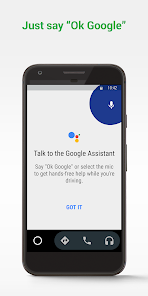
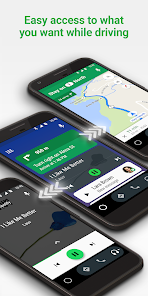
Android Auto is your smart driving companion that helps you stay focused, connected, and entertained with the Google Assistant. With a simplified interface, large buttons, and powerful voice actions, Android Auto is designed to make it easier to use apps that you love from your phone while you’re on the road. Just say “Ok Google” to...
Android Auto is your smart driving companion that helps you stay focused, connected, and entertained with the Google Assistant. With a simplified interface, large buttons, and powerful voice actions, Android Auto is designed to make it easier to use apps that you love from your phone while you’re on the road. Just say “Ok Google” to...
Official Links
When you purchase through links on our site, we may earn an affiliate commission. Learn more
Ratings breakdown
6,020,000 reviewsDeveloper contact
Name
Google LLC
Address
1600 Amphitheatre Pkwy Mountain View, CA 94043 United States
Website
http://www.android.com/autoPhone
+1 650-253-0000
Support
android-auto-app@google.com
Privacy
View policyFrequently Asked Questions
Is Android Auto free to download? high
Yes. The app metadata lists Android Auto as free.
Source: app_metadata
What do sampled users complain about in Android Auto? low
Android Auto has sampled reports that recent updates made the experience worse or introduced new problems. Only 1 sampled review supports this theme, so confidence is low. For example, one reviewer says: "and reconnecting Bluetooth but nothing works. I'm trying to update the app but that"
Source: user_reviews
What do sampled users like about Android Auto? low
Android Auto is praised by sampled reviewers for its features, functionality, or customization options. Only 1 sampled review supports this theme, so confidence is low.
Source: user_reviews
Is Android Auto worth downloading in 2026? medium
Based on 5 sampled reviews spanning January 31, 2025 to April 08, 2026, Android Auto has a 4.1/5 overall rating from 6.0M total reviews. Sampled reviews show 1 praised themes and 2 complaint themes. As with any app, experiences vary by device and use case.
Source: user_reviews, app_metadata, ratings_data
How to Use
Android Auto is your smart driving companion that helps you stay focused, connected, and entertained with the Google Assistant. (app_description)
Getting Started
Source: app_description_and_user_feedback_noted
- Install Android Auto from the Google Play Store or Apple App Store.
- Open the app and begin with the free experience to explore its core functionality.
- Review the main features described in the app listing to understand what this app offers.
- Be aware of sampled user-reported issues: the app has sampled reports that recent updates made the experience worse or introduced new problems..
Key Features (from app listing)
Source: app_description
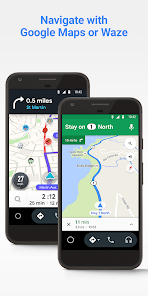
- Route to your next destination using Google Maps or Waze with real-time GPS navigation and traffic alerts.
- Get updates on your route, ETA, and hazards in real-time.
- Have the Google Assistant check your calendar for you so you know where you need to be.
- Set reminders, get updates on the news, and check last night’s score.
- Avoid distractions while driving by setting a custom do not disturb message while driving.
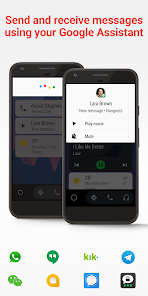
- Make calls using Google Assistant and answer incoming calls with just a tap.
Theme 'features, functionality, or customization options' identified in recent_reviews #1. Review #1 (recent_reviews, 5★) mentions features, functionality, or customization options.
How this content was created
Content type: pattern_analysis_of_user_reviews_and_metadata
AI generated: Yes
- Google Play user reviews (12-20 preferred; may be smaller if source data is limited per app), January 31, 2025 to April 08, 2026
- Google Play ratings distribution
- App Store listing metadata
- Review samples are not statistically representative of all user sentiment
- High-engagement negative reviews can overrepresent complaints
- Claims labeled 'low confidence' are based on single-review observations only
- No real-world app testing was conducted
- Feature availability may vary by region, device, and app version
Pros & Cons
Based on analysis of Google Play user reviews
Pros
- Works reliably in most cars, including rental cars, with minimal bugs after early years.
Theme 'Reliable performance in many vehicles' identified in recent_review #1
Evidence (1)
“Now I rarely have an issue. I also used different models of rental cars (about 10) and it worked perfectly in all of them.”Rating: 5★ April 08, 2026 17 likes - Slick and intuitive user interface designed for safe driving.
Theme 'User-friendly interface' identified in recent_review #5 and app description
Evidence (2)
“One star for the slick user interface.”Rating: 1★ January 31, 2025 924 likes“With a simplified interface, large buttons, and powerful voice actions, Android Auto is designed to make it easier to use apps”Rating: 5★ N/A - Integrates well with popular apps like Google Maps, Waze, Spotify, and messaging services.
Theme 'Extensive app integration' identified in app description
Evidence (1)
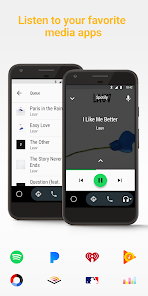
“Route to your next destination using Google Maps or Waze ... Listen to your favorite media apps including Spotify, Pandora, iHeartRadio, Google Play Music, Amazon Music”Rating: 5★ N/A
Cons
- Voice commands often fail to respond, with no audio feedback and messages not sending.
Theme 'Voice command failure' identified in recent_review #2
Evidence (1)
“Almost every time I use the button on my steering wheel or say "ok, Google" there is no response. ... if I get anything to record it goes blank and doesn't send the message.”Rating: 2★ April 13, 2026 13 likes - Frequent disconnections and crashes during drives, sometimes multiple times per trip.
Theme 'Frequent crashes and disconnections' identified in recent_review #4 and #5
Evidence (2)
“it crashes without fail, usually multiple times in a drive. ... Update: Now it will randomly disconnect even when playing music.”Rating: 1★ January 31, 2025 924 likes“I also recently have had an issue where it won't let me connect to Android Auto/it disconnects when I put on a podcast on spotify. Update: Now it will randomly disconnect even when playing music.”Rating: 2★ May 05, 2025 895 likes - Sudden loss of connectivity with car, requiring troubleshooting like changing cords or reinstalling.
Theme 'Connectivity loss with car' identified in recent_review #3
Evidence (1)
“all of a sudden it stopped connecting properly, my car doesn't recognize my device, I've tried changing the charging cord, deleting my phone from my car, and disconnecting and reconnecting Bluetooth but nothing works.”Rating: 1★ March 13, 2025 1,712 likes
Recent Reviews
David Hollis
5★Early on, many years ago, there were bugs of course. Now I rarely have an issue. I also used different models of rental cars (about 10) and it worked perfectly in all of them. I only wish my current car I own would connect via Bluetooth, but that's not an android issue.. That feature is great so you don't have to travel with different usb cords.
Rachel Massaglia
2★Almost every time I use the button on my steering wheel or say "ok, Google" there is no response. The words "How can I help" show up on my vehicle screen, but the color bar doesn't show. Also, if I get anything to record it goes blank and doesn't send the message. Sometimes, it even reads the message back and then goes blank. Very unreliable, and creates a safety hazard because of the multiple attempts needed to process a request.
Andrea Guerretta
1★Not sure what's going on with this app, but all of a sudden it stopped connecting properly, my car doesn't recognize my device, I've tried changing the charging cord, deleting my phone from my car, and disconnecting and reconnecting Bluetooth but nothing works. I'm trying to update the app but that won't work either, I've tried uninstalling and reinstalling the app which also doesn't work. Not sure if I'm doing something wrong or if it's the app.
Alec Taylor
2★Works well most of the time. This app, or maybe it's Google maps, does not like city driving (which is usually when I need it most), it gets lost and recalibrates to reroute randomly, even if I'm just sitting at a red light. I also recently have had an issue where it won't let me connect to Android Auto/it disconnects when I put on a podcast on spotify. Update: Now it will randomly disconnect even when playing music. This app gets worse and worse with each update...
Katherine Tombs
1★One star for the good concept. One star for the slick user interface. I would love to rate this higher but it crashes without fail, usually multiple times in a drive. It's also very inconvenient that I can't use Google maps on my phone. I *have* to use the Android Auto app, which is especially irritating because the search function voice command doesn't work. Great idea, terrible execution. Edit: Changing to one star because it has stopped working out of the blue. "USB device is not responing."