By App Discoverer Editorial Team · Updated October 1, 2026

Shopping List - Simple & Easy




Overview
Shopping
Opulogic Inc
Free
Dec 25, 2018
3.24
8.0
$1.99 - $2.99 per item
No
May 30, 2026
Features
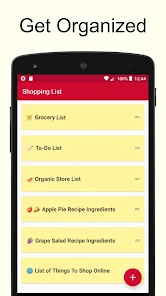
This is a very simple shopping list app. Makes it very easy to create multiple lists. For example, you can create one for each store that you shop at. Use it as a grocery list app or for any other listing needs that you may have. It's free!
Here are the super simple instructions:
Some Helpful Tips
This is a very simple shopping list app. Makes it very easy to create multiple lists. For example, you can create one for each store that you shop at. Use it as a grocery list app or for any other listing needs that you may have. It's free! Here are the super simple instructions:
Download Shopping List - Simple & Easy
Get the official app from the trusted app stores. You will be redirected to the download page.
When you purchase through links on our site, we may earn an affiliate commission. Learn more
Ratings breakdown
28,400 reviewsDeveloper contact
Name
Opulogic Inc.
Address
21720 W Long Grove Rd Ste C-247 Deer Park, IL 60010 United States
Website
https://opulogic.comPhone
+1 847-231-2086
Support
simpleapp051@gmail.com
Privacy
View policyFrequently Asked Questions
Is Shopping List - Simple & Easy free to download? high
Yes. The app metadata lists Shopping List - Simple & Easy as free, with in-app purchases listed as $1.99 - $2.99 per item.
Source: app_metadata
What do sampled users complain about in Shopping List - Simple & Easy? low
Shopping List - Simple & Easy has sampled complaints about search, organization, folders, or finding content. Only 1 sampled review supports this theme, so confidence is low.
Source: user_reviews
What do sampled users like about Shopping List - Simple & Easy? low
Shopping List - Simple & Easy is praised by sampled reviewers as easy, useful, or convenient. Only 1 sampled review supports this theme, so confidence is low.
Source: user_reviews
How to Use
This is a very simple shopping list app. Makes it very easy to create multiple lists. (app_description)
Getting Started
Source: app_description_and_user_feedback_noted
- Install Shopping List - Simple & Easy from the appropriate app store.
- Open the app and start with the free experience.
- Review the main features described in the app listing.
- Check settings or support resources if you run into sampled issue patterns such as shopping list - simple & easy has sampled complaints about search, organization, folders, or finding content.
Key Features (from app listing)
Source: app_description
- Click on the plus sign to create a new list.
- Enter the items to buy in the yellow text box.
- Tap to cross off the item when done. Some Helpful Tips
- Hit the trash icon to clean up and get rid of crossed items.
- Emojis can be inserted using the built in function of your keyboard.
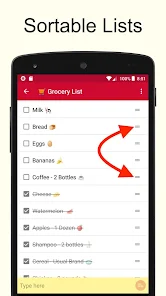
- Lists can be sorted alphabetically.
Theme 'easy, useful, or convenient to use' identified in recent_reviews #4. Review #4 praises easy, useful, or convenient to use.
How this content was created
Content type: pattern_analysis_of_user_reviews_and_metadata
AI generated: Yes
- Google Play user reviews (12-20 preferred; may be smaller if source data is limited per app), December 23, 2025 to August 28, 2025
- Google Play ratings distribution
- App Store listing metadata
- Review samples are not statistically representative of all user sentiment
- High-engagement negative reviews can overrepresent complaints
- Claims labeled 'low confidence' are based on single-review observations only
- No real-world app testing was conducted
- Feature availability may vary by region, device, and app version
Pros & Cons
Based on analysis of Google Play user reviews
Pros
- Users appreciate the app: "Meets my expectations for a grocery list. Allows me to add, delete and edit my list as needed, also allows me to cross o" high
Extracted from 3 high-rated user review(s)
Evidence (3)
“Meets my expectations for a grocery list. Allows me to add, delete and edit my list as needed, also allows me to cross off items when selected and physically placed inside my shopping cart. The only t”Rating: 5★ August 28, 2025 234 likes“it's easy to add items to a list and check them off as you go adding a strikethrough to the item. there's also the option to delete the strike throughs. The only negative is the pop-ups when you open ”Rating: 4★ December 12, 2025 68 likes“I LOVE this app!! I can take old shopping lists, uncheck the items needed again for the week, and then check them off again as I need to. I get basically the same things every week, if I need to add a”Rating: 5★ December 23, 2025 47 likes - Click on the plus sign to create a new list. medium
Extracted from app description
- Enter the items to buy in the yellow text box. medium
Extracted from app description
- Tap to cross off the item when done. Some Helpful Tips medium
Extracted from app description
- Lists are reusable. So for example, if you make a grocery list to shop for groceries at the local store, it can be reused over and over again. There is no need to keep making a new one each time. Just make it once, and after that just check and uncheck the items. It will be uniquely yours and will always have the items you buy. medium
Extracted from app description
Cons
- Some users report issues: "I can't find any thing even close to my "lists" app on T-Mobile, Verizon or Sprint. They were all the same. There was little box next to the item I ne" low
Identified from 2 low-rated user review(s)
Evidence (2)
“I can't find any thing even close to my "lists" app on T-Mobile, Verizon or Sprint. They were all the same. There was little box next to the item I needed to buy. when I had it in my cart I could clic”Rating: 1★ May 21, 2026 1 likes“The checklist does not function as I think a shopping list should—at least not for the way I shop from a master list of items 1) I check because I want them, not already got them; 2) I don't want to b”Rating: 1★ May 21, 2026 1 likes
Recent Reviews
Michael Craig Powell
5★Meets my expectations for a grocery list. Allows me to add, delete and edit my list as needed, also allows me to cross off items when selected and physically placed inside my shopping cart. The only thing I would "love to see" from this type of app is allowing it to be linked to a particular business (major chain stores) such as Walmart, Kroger, etc and allow items to be scanned in, where the app would keep a running tally based on that stores prices in that stores local and figure total + taxes
Kathy Brown
1★I can't find any thing even close to my "lists" app on T-Mobile, Verizon or Sprint. They were all the same. There was little box next to the item I needed to buy. when I had it in my cart I could click it and the item was removed from my active list. After I was done, checked out and home I could easily unlock my items and they became active again. When I was redoing my list for grocery shopping I could add things that hadn't been on my list before and click off the things I didn't need yet.
WWJ [WorldWideJuan]
1★The checklist does not function as I think a shopping list should—at least not for the way I shop from a master list of items 1) I check because I want them, not already got them; 2) I don't want to be moved around as i un/check them; 3) because I want them to stay arranged the same as I encounter them in my stores' aisles; and 4) don't want to recreate a new list every time. But the big killer is the full-screen popup ad that I could not dismiss for about a minute. Intolerable. Uninstalled.
Jody Ritchie
4★it's easy to add items to a list and check them off as you go adding a strikethrough to the item. there's also the option to delete the strike throughs. The only negative is the pop-ups when you open the app, blocking the entire app. You have to close and reopen the app to use it. The developers need to find another way to accept advertisements... and then they get 5 stars!
Lori Thompson
5★I LOVE this app!! I can take old shopping lists, uncheck the items needed again for the week, and then check them off again as I need to. I get basically the same things every week, if I need to add anything I can and it will save! I have yet to forget anything that was on the list!! My mom has a senior center convenience store that she shops for! I downloaded the app on her phone and she loves it too!!