By App Discoverer Editorial Team · Updated October 1, 2026

Car Scanner ELM OBD2
Overview
Auto & Vehicles
CAR SCANNER LLC
Free
Jan 23, 2018
2.1.15
5.0
$1.49 - $5.49 per item
No
Mar 24, 2026
Features
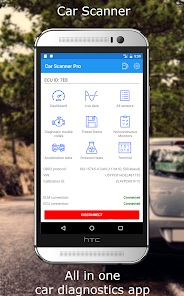
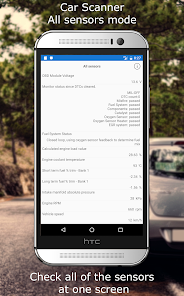
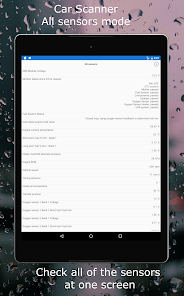
See what your car is doing in realtime, get OBD fault codes, car performance, sensor data and more!
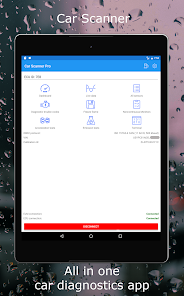
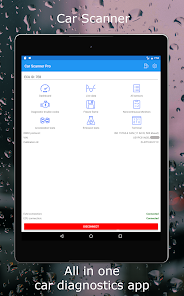
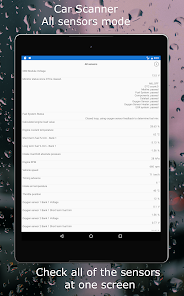
Car Scanner is a vehicle / car performance / trip computer / diagnostics tool and scanner that uses an OBD II Wi-Fi or Bluetooth adapter to connect to your OBD2 engine management / ECU.
Car Scanner gives you a bunch of unique features:
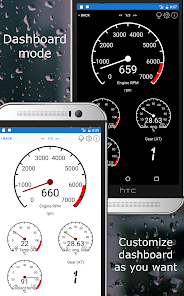
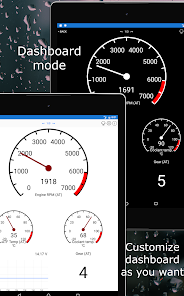
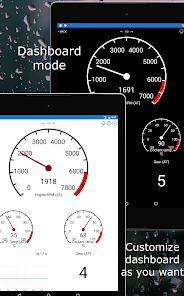
1) Layout your own dashboard with the gauges and charts you want!
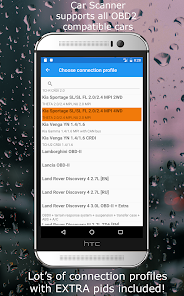
2) Add custom (extended PIDs) and get information, that was hidden from you by car manufacturer!
...
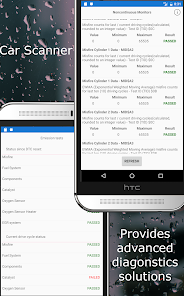
See what your car is doing in realtime, get OBD fault codes, car performance, sensor data and more! Car Scanner is a vehicle / car performance / trip computer / diagnostics tool and scanner that uses an OBD II Wi-Fi or Bluetooth adapter to connect to your OBD2 engine management / ECU. Car Scanner gives you a bunch of unique features:1) Layout your own dashboard with the gauges and charts you want! 2) Add custom (extended PIDs) and get information, that was hidden from you by car manufacturer!3) It can also show and reset a DTC fault code like a scantool. Car Scanner includes a huge database of DTC codes descriptions.4) Car Scanner allows you to read free-frames (sensors state when DTC is saved).5) Now with Mode 06
Download Car Scanner ELM OBD2
Get the official app from the trusted app stores. You will be redirected to the download page.
Official Links
When you purchase through links on our site, we may earn an affiliate commission. Learn more
Ratings breakdown
331,000 reviewsDeveloper contact
Name
CAR SCANNER LLC
Address
3, 1/7, International str. Abovyan 2204 Armenia
Website
https://www.carscanner.infoPhone
+374 94 858452
Support
admin@carscanner.info
Privacy
View policyFrequently Asked Questions
Does Car Scanner ELM OBD2 work with any OBD2 Bluetooth adapter? high
The app works with Wi-Fi, Bluetooth, and Bluetooth LE OBD2 ELM327 compatible adapters. However, the developer recommends specific brands: OBDLink, Kiwi 3, V-Gate, Carista, LELink, and Veepeak. It warns against cheap Chinese clones marked v2.1, which may cause connection issues or unstable engine behavior. One recent reviewer (March 2026) reports persistent connection failures with multiple Bluetooth devices, while other apps connected fine.
Source: app_metadata, user_reviews
Is Car Scanner ELM OBD2 free or does it have in-app purchases? high
The app is free to download. It offers in-app purchases ranging from $1.49 to $5.49 per item. The app description states it provides the widest variety of features for free across the Play Market. One reviewer (2021) mentions the paid version is much better.
Source: app_metadata, app_description
Can Car Scanner diagnose and reset check engine lights? high
Yes. The app can read and reset DTC (Diagnostic Trouble Codes) fault codes, includes a large database of DTC descriptions, reads free-frames (sensor state when a DTC is saved), and supports Mode 06 for ECU self-monitoring test results. It also checks if your car is ready for emission tests. A recent 5-star reviewer (May 2025) confirmed she diagnosed issues correctly and told her mechanic what was wrong.
Source: app_description, user_reviews
Does Car Scanner work for coding or changing hidden car settings? high
Yes, for certain vehicles. The app supports coding (changing hidden settings) for VAG group cars (Volkswagen, Audi, Skoda, Seat) on MQB, PQ26, and MLB-EVO platforms, Toyota/Lexus with CAN bus (2008+), and some Renault/Dacia models. Exclusive functions include Video in Motion, Mirrorlink in Motion, Traffic Jam Assist activation, and drive mode profile editing.
Source: app_description
Does Car Scanner have connection problems with Bluetooth? medium
One recent reviewer (March 2026) reports serious connection issues, saying the app rarely connects to any Bluetooth OBD2 device despite trying multiple adapters, while other apps connect immediately. The developer acknowledges that cheap Chinese ELM327 clones may have bugs and recommends specific adapter brands. This issue is reported by one reviewer in the small sample available.
Source: user_reviews, app_description
How to Use
Car Scanner is an OBD2 diagnostics tool that connects to your vehicle's ECU via a Wi-Fi or Bluetooth adapter, allowing you to view real-time sensor data, read and reset fault codes, measure performance, and customize dashboards. (app_description)
Getting Started
Source: app_description_and_user_feedback_noted
- Purchase a compatible OBD2 ELM327 adapter (recommended: OBDLink, Kiwi 3, V-Gate, Carista, LELink, or Veepeak). Avoid cheap Chinese clones marked v2.1.
- Plug the adapter into your vehicle's OBD2 diagnostic socket (usually under the dashboard on the driver's side).
- Turn on your vehicle's ignition (engine may need to be running for some functions).
- Enable Bluetooth or Wi-Fi on your Android device and pair with the OBD2 adapter.
- Open the Car Scanner app—it should automatically detect and connect to the adapter. If connection fails, try restarting the app or re-pairing the device. One reviewer reported needing multiple attempts to connect with certain adapters.
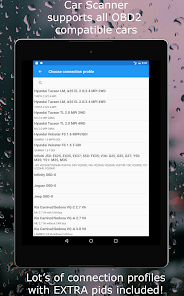
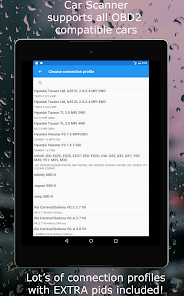
- Select your vehicle's make and model from the connection profiles to unlock extra features (Toyota, Ford, VAG, etc.).
- Start by reading diagnostic trouble codes (DTCs) or customize your dashboard with gauges and charts.
Key Features (from app listing)
Source: app_description
- Customizable dashboard with gauges and charts for real-time data.
- Read and reset DTC fault codes with a large database of code descriptions.
- View free-frames (sensor states when a fault code was saved).
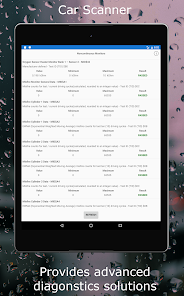
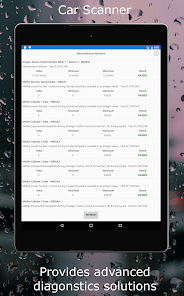
- Mode 06 ECU self-monitoring test results for advanced diagnostics.
- Emissions readiness check to verify your vehicle is ready for testing.
- HUD mode to project data onto your windshield.
- Accurate acceleration measurements (0-60, 0-100, etc.).
- Trip computer with fuel consumption statistics.
- Coding support for VAG, Toyota, and Renault/Dacia vehicles (hidden settings changes).
- Extended PIDs for data hidden by manufacturers.
This tip is derived from the app description which warns against cheap Chinese ELM327 clones and recommends specific brands, and from a recent reviewer complaint about serious connection issues with multiple adapters.
How this content was created
Content type: pattern_analysis_of_user_reviews_and_metadata
AI generated: Yes
- Google Play user reviews (12-20 preferred; may be smaller if source data is limited per app), December 30, 2021 to March 31, 2026
- Google Play ratings distribution
- App Store listing metadata
- Review samples are not statistically representative of all user sentiment
- Only 5 recent reviews were available, no high-engagement or mixed buckets
- Claims labeled 'low confidence' are based on single-review observations only
- No real-world app testing was conducted
- Feature availability may vary by region, device, and app version
Pros & Cons
Based on analysis of Google Play user reviews
Pros
- Ease of use and diagnostic accuracy for non-experts is a recurring recent pattern low
Theme 'easy to use and accurate for diagnosing car problems' appeared in recent_reviews #1. Reviewer #1, a self-described non-car-savvy single lady, states the app is 'AMAZING' and easy to use, and that she correctly diagnosed issues. No other reviews in the sample mention ease of use or diagnostic accuracy, so this is based on a single review but noted as a distinct positive theme.
Evidence (1)
“I'm a Single lady and independent person, but not very car savvy... this app is AMAZING! I have diagnosed a few things and told my mechanic exactly what was wrong. it was correct. This app is so easy to use! And free!”Rating: 5★ May 26, 2025 529 likes - Feature richness and value compared to professional-grade tools is a recurring recent pattern medium
Theme 'comprehensive features rivaling expensive professional scanners' appeared in recent_reviews #5 (2021) and hinted in #4 (2023). Reviewer #5, with 20 years of experience, says the app does everything needed and saves money compared to Snap-on scanners. Reviewer #4 notes the app is 'fairly comprehensive'. This is a theme in 2 of 5 reviews, both 5-star.
Evidence (2)
“Excellent app! Does everything I need it too and more, I've been working on cars for 20 years now and never used a Bluetooth scanner before! I would always use the really expensive snap on scanners, but with this app I will save so much $$$$$.”Rating: 5★ December 30, 2021 49 likes“Fairly comprehensive The only thing I wish it could do is program keys and remotes, if it is there I haven't found it yet.”Rating: 5★ April 18, 2023 83 likes
Cons
- Serious Bluetooth connection issues are a recurring recent concern low
Theme 'connection failures with OBD2 Bluetooth devices' appeared in recent_reviews #2. Reviewer #2 reports that the app rarely connects to any of three different Bluetooth OBD2 devices, while other apps connect immediately. This is a single review but explicitly describes a severe usability issue.
Evidence (1)
“Serious connection issues. As many are now saying, this used to be a great app, but now it rarely connects to ant OBD2 Bluetooth devices. I have three different devices I have tried. other apps connect immediately, but this one does not. If you try 30 times to connect, you might get it to connect. P”Rating: 1★ March 31, 2026 2 likes - Unwanted background activity and battery drain is a recurring recent concern low
Theme 'app wants to run at startup, ignores battery optimization, and includes ads causing battery drain and privacy concerns' appeared in recent_reviews #3. Reviewer #3 gives a 1-star rating and describes the app wanting to run at startup, ignoring battery optimization, and including ads, leading to battery drain and privacy invasion. This is a single review.
Evidence (1)
“Wants to run at startup while ignoring battery optimization and including ads, so it can run when it doesn't need to, drinking the battery and invading privacy. Nice update. I'll just stick with AndrOBD from now on, which is open and doesn't feel the need to be able to run on its own”Rating: 1★ March 13, 2026 4 likes
Recent Reviews
Jennifer G
5★I'm a Single lady and independent person, but not very car savvy. I can do minor stuff, but I leave the big stuff to the professionals. this app is AMAZING! I have diagnosed a few things and told my mechanic exactly what was wrong. it was correct. This app is so easy to use! And free! I was intimidated at first, being almost completely clueless, but directions were clear and I get all the info I need. my fav part is where it links you to articles and videos relating to the repairs needed!
Scott
1★Serious connection issues. As many are now saying, this used to be a great app, but now it rarely connects to ant OBD2 Bluetooth devices. I have three different devices I have tried. other apps connect immediately, but this one does not. If you try 30 times to connect, you might get it to connect. Please fix this and I will give it 5 stars again.
S
1★Wants to run at startup while ignoring battery optimization and including ads, so it can run when it doesn't need to, drinking the battery and invading privacy. Nice update. I'll just stick with AndrOBD from now on, which is open and doesn't feel the need to be able to run on its own, something I've been noticing a LOT of apps adding lately.
dads fix
5★Fairly comprehensive The only thing I wish it could do is program keys and remotes, if it is there I haven't found it yet. Only used it once to realize it was good. Previously I had used another app, but had limited info. I thought my Bluetooth reader didn't read right. I was looking at another reader ($400+) but decided to look into this app first. Sooo glad I did, almost every option was suddenly there and functional.
Justyn Russell
5★Excellent app! Does everything I need it too and more, I've been working on cars for 20 years now and never used a Bluetooth scanner before! I would always use the really expensive snap on scanners, but with this app I will save so much $$$$$. It works perfectly, the paid version is sooooo much better for me, but the free version was still quite impressive! Never will I buy an over priced scanner again!!!!