By App Discoverer Editorial Team · Updated October 1, 2026

Remind: School Communication


Overview
Education
Remind101
Free
Oct 5, 2012
15.6.4
9
No
Aug 14, 2025
Features
Remind is a communication platform that helps every student succeed. Whether you're in the classroom, at home, or anywhere in between, Remind makes it easy to stay connected to your school community.
Join the millions of educators, students, and parents using Remind to manage school communication an...
Remind is a communication platform that helps every student succeed. Whether you're in the classroom, at home, or anywhere in between, Remind makes it easy to stay connected to your school community.
Download Remind: School Communication
Get the official app from the trusted app stores. You will be redirected to the download page.
When you purchase through links on our site, we may earn an affiliate commission. Learn more
Ratings breakdown
228,000 reviewsDeveloper contact
Name
PARENTSQUARE, INC.
Address
6144 Calle Real Ste 200A Goleta, CA 93117 United States
Website
https://www.remind.comPhone
+1 408-627-2524
Support
contact@remind.com
Privacy
View policyFrequently Asked Questions
Does Remind for School Communication work well for parent-teacher communication? medium
Yes, when it functions correctly, users find it helpful for keeping up with assignments and contacting teachers, as noted in a 5-star review. However, some users report frequent login problems that may disrupt access to this feature.
Source: user_reviews
Is Remind free to download and use? high
Yes, the app listing describes it as a free app with no in-app purchases listed.
Source: app_metadata
Does Remind have login or sign-in issues? high
Yes, based on recent user reviews, there are recurring problems. Users report being frequently redirected to a sign-in page, having to re-confirm their email repeatedly, and not receiving email verification codes, making it difficult to log in.
Source: user_reviews
Can I translate messages in Remind? high
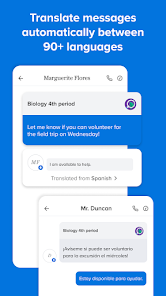
According to the app description, messages can be translated into more than 90 languages. This feature availability is not commented on in the available user reviews.
Source: app_metadata
Does this app support file and photo sharing? high
Yes, the app description states you can share files, photos, and content from your favorite sites. This metadata claim is not verified by user review feedback in the sample.
Source: app_metadata
How to Use
Remind is a communication platform for educators, students, and parents to stay connected through real-time messaging, file sharing, and translation tools. (app_description)
Getting Started
Source: app_description_and_user_feedback_noted
- Download the app from the Google Play Store and install it on your compatible Android device.
- Open the app and sign up using your email address or phone number as prompted.
- Select your role (educator, student, or parent) and follow the setup guide to join your school or class.
- Ensure you are logged in and active, as user feedback indicates the app may prompt for re-authentication after periods of inactivity.
Key Features (from app listing)
Source: app_description
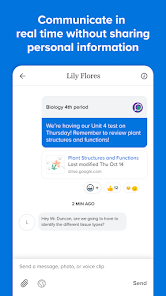
- Real-time messaging on any device without sharing personal contact info.
- Translation of messages into over 90 languages.
- Sharing of files, photos, and content from favorite websites.
- Structured communication management for school communities (classes, groups).
This tip responds directly to the login/re-authentication issue reported by multiple recent_reviews (IDs 1, 2, 5). The suggested troubleshooting steps are common solutions for such app-level issues, though not explicitly stated in the reviews.
How this content was created
Content type: pattern_analysis_of_user_reviews_and_metadata
AI generated: Yes
- Google Play user reviews (5 reviews (below the preferred 12-20 range) per app), Dates ranging from August 14, 2019, to April 06, 2026
- Google Play ratings distribution
- App Store listing metadata
- Review samples are not statistically representative of all user sentiment.
- Claims labeled 'low confidence' are based on single-review observations only.
- No real-world app testing was conducted.
- Feature availability may vary by region, device, and app version.
- The lack of liked_negative_reviews and liked_positive_reviews may cause underrepresentation of highly engaged praise or complaints.
Pros & Cons
Based on analysis of Google Play user reviews
Pros
- Effective for staying updated on child's assignments and contacting teachers
Theme 'Parent-teacher communication' identified in recent_review #4 and #5
- Simple and straightforward for basic messaging needs
Theme 'Simplicity' identified in recent_review #2
- Helps connect students with teachers outside of class for support
Theme 'Student support' identified in recent_review #1
Cons
- Frequent login issues and unreliable email code delivery
Theme 'Login and authentication issues' identified in recent_review #1 and #5
- Cannot mark messages as read or clear notifications within the app
Theme 'Notification management issues' identified in recent_review #2
- Messages sometimes fail to appear despite notifications
Theme 'Message delivery issues' identified in recent_review #2
Recent Reviews
Rivkah Nisan
2★educator/parent here: when it works it's great especially when you have students and they need help outside of work. But forbid you have a phone issue or you are logged out. I experienced both and I'm attempting to log in via the app on my new phone and the email code will not send to my inbox. yes I've checked all the folders and reached out to help that took 5 days to respond, and to no one's surprised I still can't get in the app. why isn't text an alternative security option??
A Google user
2★It's a fairly simple app to use. No bells and whistles, does what it says. The inability to mark things as read or clear notifications in the app is annoying. The character limit is also a hindrance. Aside from those two things, I like it. Edit: This is great for sending messages but terrible for receiving them. Often I'll get a notification that I have a message but the message will not show up. Even if I go to the message history for that person, nothing new appears.
A Google user
3★Decent app,but could be a LOT more intuitive and WAY less drilling around to find people and things. A few recommendations I would have: -The ability to put it on SD card, as it's not an app that's in constant use. Even though it's not a huge app, not everyone has a phone with huge on-board memory, and apps never get smaller. -The ability to delete messages. I have messages years ago and, as far as I can tell there's no way to delete it. Literally the only messaging app I've ever had do that
A Google user
5★Some teachers subscribe and never use, some never subscribe, but when it is used it makes it so much easier to stay on top of your child's assignments, and make contact with their teachers! The interface is different on each of my devices, and i don't like that, otherwise, its still great! Seems like it's getting better! Now if more parents would just respond...🤔
Nicholas R.
2★It does it's job, just rather difficult. The issue is that about every time I open it on my phone (LG Android if you need to know) it takes me to a sign in page and has me confirm my email unreasonably often and I can't seem to find a 'stay signed in' option. Another issue is that in order for a message to send, I have to close the app and open it again. However both of these issues seem to be far less occurring when using it on my iPad.