By App Discoverer Editorial Team · Updated October 1, 2026

SmartLife - Smart Living


Overview
Lifestyle
Volcano Technology Limited
Free
May 26, 2016
7.6.2
7.0
$0.05 - $259.99 per item
No
Apr 7, 2026
Features
「SmartLife」 Your AI assistant for a simpler, smarter everyday life
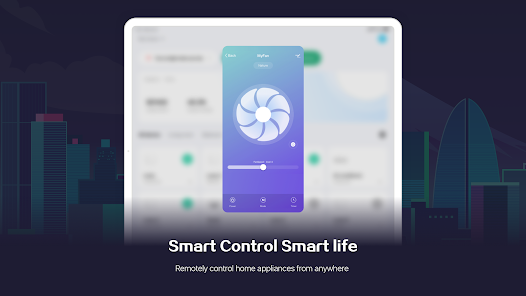
【Control】 Manage all your devices with a tap or just ask — it's that simple.
【Security】 Real-time monitoring and smart alerts keep your home safe around the clock.
【Energy】 Track usage and save on bills with intelligent energy insights.
【Schedule】 Stay organized with shared to-dos and timely reminders for the whole family.
【AI Life Tools】 Fitness, nutrition, meeting summaries, pet care, translation, and more — everything you...
「SmartLife」Your AI assistant for a simpler, smarter everyday life【Control】 Manage all your devices with a tap or just ask — it's that simple.【Security】 Real-time monitoring and smart alerts keep your home safe around the clock.【Energy】 Track usage and save on bills with intelligent energy insights.【Schedule】 Stay organized with shared to-dos and timely reminders for the whole family.【AI Life Tools】 Fitness, nutrition, meeting summaries, pet care, translation, and more — everything you need, all in one place.
Download SmartLife - Smart Living
Get the official app from the trusted app stores. You will be redirected to the download page.
When you purchase through links on our site, we may earn an affiliate commission. Learn more
Ratings breakdown
1,300,000 reviewsDeveloper contact
Name
VOLCANO TECHNOLOGY LIMITED
Address
Rm 603 6/F LAWS COML PLZ 788 CHEUNG SHA WAN RD 長沙灣 Hong Kong
Website
https://www.lifeaiot.comPhone
+1 844-672-5646
Support
volcano@volcano-smart.com
Privacy
View policyFrequently Asked Questions
Is SmartLife free to use? high
Yes, the app is free to download and use. In-app purchases range from $0.05 to $259.99 per item.
Source: app_metadata
Does SmartLife work without ads? high
Yes, according to the app listing, SmartLife does not contain ads.
Source: app_metadata
What devices can I control with SmartLife? high
The app description indicates it can manage smart home devices (lights, security cameras, power strips, etc.) with tap or voice control, and includes AI life tools for fitness, nutrition, meeting summaries, pet care, and translation.
Source: app_metadata
Are there problems with the scheduling feature? low
A recent user review reports that the scheduling/timing feature is broken; users can set a device to turn ON but cannot add an OFF action without the app freezing. This is a single-review report and may not affect all users.
Source: user_reviews
Does the app have forced AI features I can't remove? low
A recent review states that AI features are being forced on users and there is no option to hide or disable them. The reviewer wants a basic app for lights only. This is based on one review and may not be representative.
Source: user_reviews
How to Use
SmartLife is a free AI assistant app that lets you control smart home devices, monitor security, track energy usage, manage schedules, and access AI life tools—all from one place. (app_description)
Getting Started
Source: app_description_and_user_feedback_noted
- Download the SmartLife app from Google Play and open it.
- Create an account or sign in with your existing credentials.
- Follow the in-app instructions to connect compatible smart home devices (lights, plugs, sensors, etc.). Note: Some users report that the in-app instructions may contradict the device manual; if needed, try following the manual instead.
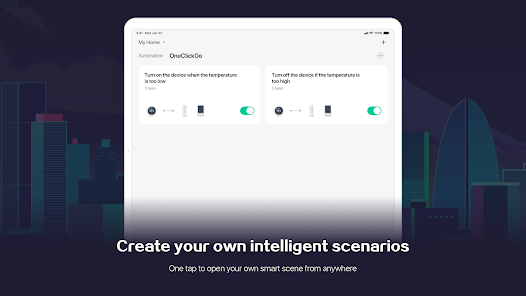
- Once connected, use the Control tab to turn devices on/off, the Schedule tab to set timing, the Security tab for monitoring, and the Energy tab to track usage.
Key Features (from app listing)
Source: app_description
- Control: Manage all devices with a tap or voice command.
- Security: Real-time monitoring and smart alerts for home safety.
- Energy: Track usage and save on bills with intelligent energy insights.
- Schedule: Shared to-dos and timely reminders for the family.
- AI Life Tools: Fitness, nutrition, meeting summaries, pet care, translation, and more.
Based on user complaint in recent_reviews #4 about automations being deleted when manually disconnecting/reconnecting a lamp. This tip suggests a potential workaround (reset vs. disconnect) to avoid the reported data loss.
How this content was created
Content type: pattern_analysis_of_user_reviews_and_metadata
AI generated: Yes
- Google Play user reviews (12-20 preferred; may be smaller if source data is limited per app), August 31, 2024 to April 9, 2026
- Google Play ratings distribution
- App Store listing metadata
- Review samples are not statistically representative of all user sentiment
- High-engagement negative reviews can overrepresent complaints
- Claims labeled 'low confidence' are based on single-review observations only
- No real-world app testing was conducted
- Feature availability may vary by region, device, and app version
- Only 5 recent reviews were available; no other sampling buckets were provided, so confidence is inherently low for all claims
Pros & Cons
Based on analysis of Google Play user reviews
Pros
- App generally works fine for basic device control like turning lights on and off.
Theme 'Basic device control' identified in recent_review #4
Evidence (1)
“App works fine usually, but whenever my lamp has issues I have to disconnect and reconnect it”Rating: 2★ April 04, 2026 3 likes - App supports scheduling for some devices like indoor plugs.
Theme 'Partial scheduling support' identified in recent_review #2
Evidence (1)
“I'm still able to adjust schedules on my indoor plugs.”Rating: 2★ September 14, 2024 91 likes - App has a large user base with high overall ratings, suggesting general satisfaction.
Theme 'High overall ratings' identified in ratings distribution
Evidence (1)
“1000340 5-star ratings”Rating: 5★ N/A
Cons
- After updates, lights malfunction by turning on/off randomly and failing to stay off.
Theme 'Post-update light malfunctions' identified in recent_review #1
Evidence (2)
“After the update my lights no longer stay off. After being off for a few minutes, they automatically try to reset”Rating: 1★ January 03, 2025 160 likes“They just freak out and turn on and off and even flash red occasionally.”Rating: 1★ January 03, 2025 160 likes - Device connection process is unreliable and contradicts instructions, making setup frustrating.
Theme 'Unreliable device connection' identified in recent_review #3
Evidence (2)
“Instructions in app contradict the ones in the manual and do not seem consistent.”Rating: 1★ August 31, 2024 103 likes“Getting through the connection process feels like guesswork, and fail any which way you try”Rating: 1★ August 31, 2024 103 likes - App forces AI assistant banner on homepage with no option to disable it, cluttering the interface.
Theme 'Intrusive AI banner' identified in recent_review #4 and #5
Evidence (2)
“the addition of a giant "hey tuya" banner on the homepage is extremely annoying. Please add a way to disable this”Rating: 2★ April 04, 2026 3 likes“The stuff being forced onto our homepage, pushing our lighting (favorites) down further and further needs to go.”Rating: 1★ April 09, 2026 1 likes
Recent Reviews
Breanna G.
1★After the update my lights no longer stay off. After being off for a few minutes, they automatically try to reset and I have to re add them to the app, only to do it again and again everytime I turn them off through the app. I am going to get rid of them now because I can't sleep!! They won't turn off!!! They just freak out and turn on and off and even flash red occasionally. FIX IT!!! THIS IS TERRIBLE!! Update after 2 days of bs: my lights will no longer connect to the app. Trashing them now.
PJ S
2★No longer able to adjust schedule (or what they are now calling "timing"). I can schedule something to go ON but can't add any other action to the same device (like OFF) without the app freezing and having to be restarted. Major bug. It appears this applies to the interface for the outdoor power strips. I'm still able to adjust schedules on my indoor plugs.
Justin Strickland (KeyboardFailure)
1★I have used a lot of smart home devices over the past decade, and only one other brand has come close to being this poor of an experience connecting devices. Instructions in app contradict the ones in the manual and do not seem consistent. Getting through the connection process feels like guesswork, and fail any which way you try, even when reconnecting devices to networks that previously worked.
Grey Himmel
2★App works fine usually, but whenever my lamp has issues I have to disconnect and reconnect it, which disables/deletes all of my saved automations. This has been really frustrating for me and I wish there was a way to associate a device with existing automations. Also, the addition of a giant "hey tuya" banner on the homepage is extremely annoying. Please add a way to disable this, I do not need yet another AI assistant in my face. Thanks.
Voss
1★Tired of AI being forced on us. Don't need all that bs being added to the app. Stick to lights. Will be looking for other lighting options unless they allow customization in the app to hide/disable all the bs we don't want. I just want a basic app for turning lights on & off. The stuff being forced onto our homepage, pushing our lighting (favorites) down further and further needs to go.