By App Discoverer Editorial Team · Updated October 1, 2026

Steam










Overview
Entertainment
Valve Corporation
Free
Jan 26, 2012
3.10.7
8.0
No
Jan 21, 2026
Features
With the free Steam Mobile App, you can take Steam with you anywhere. Buy PC games and get the latest game and community news
Shop Steam Browse the Steam catalog of PC games from your phone. Never miss a sale again.
Steam Guard
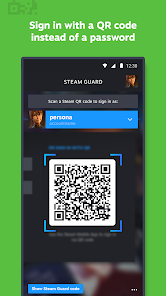
Protect your Steam account and make sign in faster with two-factor authentication.
With the free Steam Mobile App, you can take Steam with you anywhere. Buy PC games and get the latest game and community news
Download Steam
Get the official app from the trusted app stores. You will be redirected to the download page.
When you purchase through links on our site, we may earn an affiliate commission. Learn more
Ratings breakdown
1,060,000 reviewsDeveloper contact
Name
Valve Corporation
Address
10400 NE 4TH St Ste 1400 Bellevue, WA 98004-5212 United States
Phone
+1 425-952-2986
Support
steamandroidapp@valvesoftware.com
Privacy
View policyFrequently Asked Questions
Is the Steam app free to download and use? high
Yes, the Steam app is free to download. It offers in-app purchases to buy PC games, but there is no initial cost.
Source: app_metadata
Does the Steam app have login problems? high
Yes, several recent reviewers have reported issues with the login process, including being unable to log in due to server errors and the app showing you as logged in while not functioning correctly.
Source: user_reviews
Is the Steam app better than using the Steam website on mobile? high
Some users find the mobile website more reliable and easier to navigate. Reviews mention specific app limitations like trailers skipping and a poorly designed wishlist interface.
Source: user_reviews
How to Use
The Steam Mobile App allows you to browse, buy, and manage PC games, protect your account with two-factor authentication, and access community features from your Android device. (app_description)
Getting Started
Source: app_description_and_user_feedback_noted
- Install the app from the Google Play Store. It is free and requires Android 8.0.
- Open the app and sign in with your existing Steam account credentials.
- Set up Steam Guard by enabling two-factor authentication in the app for enhanced account security. This can be done via QR code sign-in or sign-in confirmations.
- Customize your notification settings in the app to receive alerts for sales, friend requests, and wishlist updates.
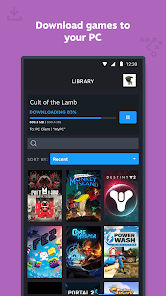
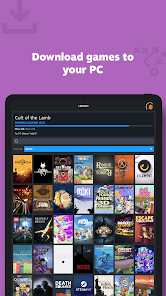
- Use the Library tab to view your game content, manage remote downloads to your PC, and access community guides and discussions.
Key Features (from app listing)
Source: app_description
- Buy PC games and browse the entire Steam store from your mobile device, including sales.
- Protect your account with Steam Guard two-factor authentication, QR code sign-in, and sign-in confirmations.
- Manage game downloads and updates on your PC remotely from the app.
- Access full community features, including friends list, chat, groups, the market, your inventory, and personalized news feed.
The tip addresses a 'login/session failure' theme reported by 3 recent users. The suggestion to use the website mirrors a reviewer's comment that the 'website on mobile is easier and more consistent.'
How this content was created
Content type: pattern_analysis_of_user_reviews_and_metadata
AI generated: Yes
- Google Play user reviews (12-20 preferred; may be smaller if source data is limited per app), January 20, 2026 - February 24, 2026
- Google Play ratings distribution
- App Store listing metadata
- Review samples are not statistically representative of all user sentiment
- Claims labeled 'low confidence' are based on single-review observations only
- No real-world app testing was conducted
- Feature availability may vary by region, device, and app version
- No positive or high-engagement reviews were available for analysis, skewing the findings toward reported problems
- The ratings distribution was not provided, limiting context for overall user sentiment
Pros & Cons
Based on analysis of Google Play user reviews
Pros
- Two-factor authentication via Steam Guard effectively secures accounts and speeds up sign-in.
Theme 'Security features' identified in app description and recent_review #1
Evidence (1)
“Steam Guard only compounds this problem. The desktop application and the website seem to be much better platforms.”Rating: 3★ February 24, 2026 2 likes - Access to a vast library of PC games with frequent sales and community features.
Theme 'Game library and community' identified in app description and recent_review #2
Evidence (1)
“it skips trailers after 3 seconds, really annoying any time you're trying to watch a game's trailer. definitely prevented me from buying some games recently.”Rating: 2★ January 20, 2026 20 likes - Remote download management allows users to install games on PC from their phone.
Theme 'Remote downloads' identified in app description
Evidence (1)
“Library & Remote downloadsThe new Library view makes it easy to view game content, discussions, guides, support, and more. Plus you can manage game downloads and updates to your PC from your phone.”Rating: 5★ N/A
Cons
- Frequent login issues and server errors prevent users from accessing the app.
Theme 'Login/server issues' identified in recent_review #1, #3, #4
Evidence (3)
“Every once in awhile I am "logged in" but I have to relog in. Then I cannot due to a server issue.”Rating: 3★ February 24, 2026 2 likes“I continuously get the error that it's a server issue and thus cannot log in.”Rating: 1★ January 20, 2026 191 likes“Now it shows that I'm logged in... but if I try to do anything... it says I need to sign in.”Rating: 1★ February 24, 2026 3 likes - Game trailers skip after 3 seconds, hindering the browsing experience.
Theme 'Trailer skipping' identified in recent_review #2
Evidence (1)
“it skips trailers after 3 seconds, really annoying any time you're trying to watch a game's trailer.”Rating: 2★ January 20, 2026 20 likes - Mobile app interface is less functional than the website, especially for wishlist management.
Theme 'Poor mobile UI' identified in recent_review #5
Evidence (1)
“Wishlist is a great example - vertically you can only view and not rearrange or change the order -- horizontally you can tap in the number field... but no keys ever appear”Rating: 2★ February 05, 2026 12 likes
Recent Reviews
Gideon
3★Great until it stops working. Every once in awhile I am "logged in" but I have to relog in. Then I cannot due to a server issue. The website doesn't have this issue, but it does automatically redirect to the broken application when I select something. Steam Guard only compounds this problem. The desktop application and the website seem to be much better platforms.
A Y
2★it skips trailers after 3 seconds, really annoying any time you're trying to watch a game's trailer. definitely prevented me from buying some games recently. Also on the PC version, I've been begging them for years to make it easier to browse our own library. For over 10 years I've been asking and waiting. I get that all the development went towards store pages, but it's like 4 clicks to see what genre a game even is from my library. That's super tedious and feel horrible when you're in big pic
Leo Rose
1★I've been trying for well over an hour to log into the app after changing my password on my account. I continuously get the error that it's a server issue and thus cannot log in. I'm frustrated and confused, as I love to use steam. I had it on my phone to share the games I play with my friends on the go, and now am unable to. I feel this is a bug rather than the end all be all, but I do hope it's fixed.
Samuel Veatch (Tacid_Krios)
1★he app used to be fine. Now it shows that I'm logged in, shows my profile picture, username, etc. but if I try to do anything through the app like buying, wish listing or even sharing a link to a game, it says I need to sign in. if I try to sign out to sign back in, it says I can't sign out because it's the only steam guard device on my account.
Medigo Verus
2★It's pretty damn hard to use this...website on mobile is easier and more consistent. Wishlist is a great example - vertically you can only view and not rearrange or change the order -- horizontally you can tap in the number field as if to type a new wishlist number order but no keys ever appear, and you can tap and drag technically (like on desktop) but it is so difficult to do correctly because the first time you drag it, the whole page moves oddly, so you have to re-grab and get lucky.