By App Discoverer Editorial Team · Updated October 1, 2026

Brewfather



Overview
Food & Drink
Warpkode AS
Free
Mar 13, 2020
3.0.0
6.0
$1.99 - $419.99 per item
No
Apr 27, 2026
Features
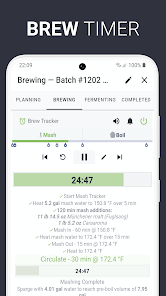
Powerful and easy to use tool for your brewing needs. Easily create and manage your recipes. Keep track of all the details in your batches and your ingredients inventory.
Brewfather is made from the ground up to give you the best recipe design and brewing experience on both desktop and mobile devices. With a modern design that is easy to use. Get your recipes done in no time! With automatic synchronization between all your devices and offline support.
Combining a powerful recipe designer with...
Powerful and easy to use tool for your brewing needs. Easily create and manage your recipes. Keep track of all the details in your batches and your ingredients inventory. Brewfather is made from the ground up to give you the best recipe design and brewing experience on both desktop and mobile devices. With a modern design that is easy to use. Get your recipes done in no time! With automatic synchronization between all your devices and offline support. Combining a powerful recipe designer with intuitive batch tracking and inventory management to make your brew-day easier. Integrated with many popular devices to aid your brewing. Explore the recipe library with hundreds of quality recipes. Features:
Download Brewfather
Get the official app from the trusted app stores. You will be redirected to the download page.
When you purchase through links on our site, we may earn an affiliate commission. Learn more
Ratings breakdown
2,760 reviewsDeveloper contact
Name
Warpkode AS
Address
Kinnvegen 93 6906 FLORØ Norway
Website
https://brewfather.appPhone
+47 48 44 61 76
Support
hello@brewfather.app
Privacy
View policyFrequently Asked Questions
Is Brewfather free to download? high
Yes. The app metadata lists Brewfather as free, with in-app purchases listed as $1.99 - $419.99 per item.
Source: app_metadata
What do sampled users like about Brewfather? high
Brewfather is praised by sampled reviewers as easy, useful, or convenient. 3 sampled reviews support this theme.
Source: user_reviews
How to Use
Powerful and easy to use tool for your brewing needs. (app_description)
Getting Started
Source: app_description_and_user_feedback_noted
- Install Brewfather from the appropriate app store.
- Open the app and start with the free experience.
- Review the main features described in the app listing.
- Adjust app settings based on your preferences.
Key Features (from app listing)
Source: app_description
- Powerful, intuitive and easy to use interface with dark mode support
- Multi-device support - one app everywhere - always!
- Offline support, auto-saving, and automatic synchronization
- Fully-featured and easy to use recipe designer
- Complete batch tracking - log every step of your brew
- Fermentation chart
Theme 'easy, useful, or convenient to use' identified in recent_reviews #1, recent_reviews #2, recent_reviews #3. Review #1 praises easy, useful, or convenient to use. Review #2 praises easy, useful, or convenient to use. Review #3 praises easy, useful, or convenient to use.
How this content was created
Content type: pattern_analysis_of_user_reviews_and_metadata
AI generated: Yes
- Google Play user reviews (12-20 preferred; may be smaller if source data is limited per app), January 10, 2021 to March 23, 2026
- Google Play ratings distribution
- App Store listing metadata
- Review samples are not statistically representative of all user sentiment
- High-engagement negative reviews can overrepresent complaints
- Claims labeled 'low confidence' are based on single-review observations only
- No real-world app testing was conducted
- Feature availability may vary by region, device, and app version
Pros & Cons
Based on analysis of Google Play user reviews
Pros
- Users appreciate the app: "A brilliant app for brewing. It has everything you need and more for helping you to produce that perfect beer. Certainly" medium
Extracted from 3 high-rated user review(s)
Evidence (3)
“A brilliant app for brewing. It has everything you need and more for helping you to produce that perfect beer. Certainly gives you a lot for your money for this inexpensive app.”Rating: 5★ March 23, 2026 1 likes“Great brewing tool. Easy to use, clear, well organized GUI. Lots of customizable options, makes recipe adjustments a piece of cake. Enter different amounts of hops or grains and instantly calculate AB”Rating: 5★ March 20, 2022 16 likes“easy and intuitive.”Rating: 5★ April 13, 2026 - Powerful, intuitive and easy to use interface with dark mode support medium
Extracted from app description
- Multi-device support - one app everywhere - always! medium
Extracted from app description
- Offline support, auto-saving, and automatic synchronization medium
Extracted from app description
- Fully-featured and easy to use recipe designer medium
Extracted from app description
Cons
- No significant user complaints identified from sampled reviews low
No negative review patterns detected in recent reviews
Recent Reviews
D Cowell
5★A brilliant app for brewing. It has everything you need and more for helping you to produce that perfect beer. Certainly gives you a lot for your money for this inexpensive app.
dave kenny
5★Great brewing tool. Easy to use, clear, well organized GUI. Lots of customizable options, makes recipe adjustments a piece of cake. Enter different amounts of hops or grains and instantly calculate ABV and IBU. Was happy to pay for premium version and have full access to the recipe library and other resources. Good support too. Wasn't sure about a couple things so emailed the developers and got a reply with answers so extra stars for that! And no ads.
Paul Bekkers
5★easy and intuitive.
David H
5★Great platform for home brew.
James Goodchild
5★Great app with a really polished UI and allows homebrewers to keep records, alter batches and monitor stock levels. The only think stopping me purchasing the annual subscription is the lack of support for CRS / AMS in the water treatment section. It's a minor point but is widely used in the UK to reduce alkalinity of brewing liquor in place of lactic or phosphoric acid. Even without it the app is great.