By App Discoverer Editorial Team · Updated October 1, 2026
Mgrs & Utm Map Pro



Overview
DakikTech
Free
Apr 9, 2018
No
Features
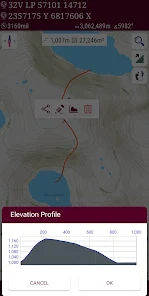
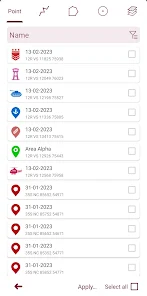
Special features at pro version: 👉 More maps (Bicycle, Topographic, Neighborhood, Atlas etc.) 👉 You can see the altitude profile of your route on the chart 👉 You can search for locations by address 👉 You can create different layers for your different activities 👉 List view for markers, routes, areas and KML 👉 You can draw multiple routes and areas, and change their colors 👉 More and colorful pointer icons 👉 Name or icon display options for markers 👉 Multiple routes can be recorded with the GPS r...
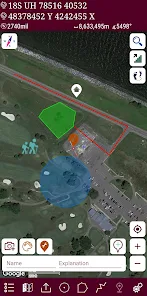
Special features at pro version: 👉 More maps (Bicycle, Topographic, Neighborhood, Atlas etc.) 👉 You can see the altitude profile of your route on the chart 👉 You can search for locations by address 👉 You can create different layers for your different activities 👉 List view for markers, routes, areas and KML 👉 You can draw multiple routes and areas, and change their colors 👉 More and colorful pointer icons 👉 Name or icon display options for markers 👉 Multiple routes can be recorded with the GPS recorder 👉 And no adsThis application is GPS and coordinate systems helper especially for military personnel. It is also a complete helper for mountaineering, trekking and hiking, cross running, scouting, hunting, fishing, geocaching, off-road navigation and all other outdoor activities and sports. With satellite navigation systems such as GPS, GALILEO and GLONASS (GNSS) supported by your device and your sensors, you can see your most accurate position on different map layers. Features:
When you purchase through links on our site, we may earn an affiliate commission. Learn more
Ratings breakdown
1,960 reviewsDeveloper contact
Name
Zahid Çataltaş
Address
İstiklal mahallesi, 1170 sokak, no:18, daire 6, Pamukkale , Denizli Cinkaya Yapı 1 20000 Ege/Denizli Türkiye
Website
http://dakiktech.comSupport
zhdctlts@gmail.com
Privacy
View policyFrequently Asked Questions
Is Mgrs & Utm Map Pro free to download? high
Yes. The app metadata lists Mgrs & Utm Map Pro as free.
Source: app_metadata
What do sampled users complain about in Mgrs & Utm Map Pro? low
Mgrs & Utm Map Pro has sampled complaints about payment, subscriptions, trials, or locked features. Only 1 sampled review supports this theme, so confidence is low.
Source: user_reviews
What do sampled users like about Mgrs & Utm Map Pro? medium
Mgrs & Utm Map Pro is praised by sampled reviewers as easy, useful, or convenient. 2 sampled reviews or 1 sampling buckets support this theme.
Source: user_reviews
How to Use
Special features at pro version: 👉 More maps (Bicycle, Topographic, Neighborhood, Atlas etc.) 👉 You can see the altitude profile of your route on the chart 👉 You can search for (app_description)
Getting Started
Source: app_description_and_user_feedback_noted
- Install Mgrs & Utm Map Pro from the appropriate app store.
- Open the app and start with the free experience.
- Review the main features described in the app listing.
- Check settings or support resources if you run into sampled issue patterns such as mgrs & utm map pro has sampled complaints about payment, subscriptions, trials, or locked features.
Key Features (from app listing)
Source: app_description
- Follow Mode => The center of the map follows your location while on the move.
- You can add and removing markers.
- Distance measure. (You can add custom route and calculate total distance)
- Area measure.(You can select an area on the map and calculate the area in square meters)
- You can see the altitude of your location.
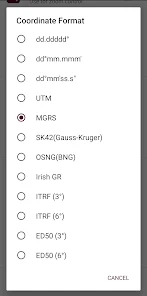
- You can find the location according to Address, Degree/Minute/Second , MGRS, UTM or Latitude/Longitude formats.
Theme 'easy, useful, or convenient to use' identified in recent_reviews #3, recent_reviews #4. Review #3 praises easy, useful, or convenient to use. Review #4 praises easy, useful, or convenient to use.
How this content was created
Content type: pattern_analysis_of_user_reviews_and_metadata
AI generated: Yes
- Google Play user reviews (12-20 preferred; may be smaller if source data is limited per app), December 07, 2022 to April 09, 2019
- Google Play ratings distribution
- App Store listing metadata
- Review samples are not statistically representative of all user sentiment
- High-engagement negative reviews can overrepresent complaints
- Claims labeled 'low confidence' are based on single-review observations only
- No real-world app testing was conducted
- Feature availability may vary by region, device, and app version
Pros & Cons
Based on analysis of Google Play user reviews
Pros
- Users appreciate the app: "Awesome route overlay ability. 1. The route and marker icons aren't showing up when I turn them on and off after a route" medium
Extracted from 3 high-rated user review(s)
Evidence (3)
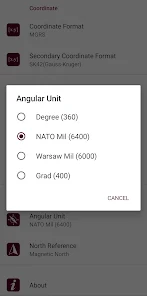
“Awesome route overlay ability. 1. The route and marker icons aren't showing up when I turn them on and off after a route was emailed to me from a friend and then opened in the app. I have to click eac”Rating: 4★ April 09, 2019 21 likes“Excellent application! Orienteering becomes a cinch, can easily replace your conventional map in digital format. Very easy to learn, and contains tools that are extensive in functionality. Would like ”Rating: 5★ June 11, 2021 34 likes“Giving it 4 stars because of the True and Magnetic North issue. Am I the only one but the MAG N reading is off.If this could be resolved would be a perfect app for a active duty soldier but at this po”Rating: 4★ March 15, 2020 10 likes - Compass. => Compass on map (on the map that shows your direction) => Compass only (shows physical directions) => Angular units for compass (degrees, grad and mil) medium
Extracted from app description
- Follow Mode => The center of the map follows your location while on the move. medium
Extracted from app description
- You can add and removing markers. medium
Extracted from app description
- Distance measure. (You can add custom route and calculate total distance) medium
Extracted from app description
Cons
- Some users report issues: "Tge fact that I paid for this app disappoints me. For what it is intended for, it lacks a significant amount of icons that could be placed on the map " low
Identified from 1 low-rated user review(s)
Evidence (1)
“Tge fact that I paid for this app disappoints me. For what it is intended for, it lacks a significant amount of icons that could be placed on the map or layer. For the MGRS map, it sure would bw nice ”Rating: 2★ March 25, 2024 6 likes
Recent Reviews
A Google user
4★Awesome route overlay ability. 1. The route and marker icons aren't showing up when I turn them on and off after a route was emailed to me from a friend and then opened in the app. I have to click each route icon individually. 2. Add grid lines for map usage. 3. Make actual military map icons to utilize for different overlays.
Andrew Dominguez
2★Tge fact that I paid for this app disappoints me. For what it is intended for, it lacks a significant amount of icons that could be placed on the map or layer. For the MGRS map, it sure would bw nice to hace grid squares. Again, the limited icons and inability to use a map offline is pathetic. Now that i write this, how do I get a refund?
Randolph Crommelink
5★Excellent application! Orienteering becomes a cinch, can easily replace your conventional map in digital format. Very easy to learn, and contains tools that are extensive in functionality. Would like to see the capability to move objects between overlays once they are placed, and downloading of mapgrids for use when working offline.
A Google user
4★Giving it 4 stars because of the True and Magnetic North issue. Am I the only one but the MAG N reading is off.If this could be resolved would be a perfect app for a active duty soldier but at this point still have to calculate and adjust to get a correct bearing. If to hard to make the app calculate it, make it possible to adjust manual for GM angle in the options . Add possibility to put a grid square on the map and make GRGs, standart NATO simbols.The rest is pretty excellent.
Faked Clai
4★The overall of this app is good but one day i cannot input address anymore, it's shown "No Result" in every city i enter, even the well-known city in the world is still show the same "No Result". If anyone know how to fix this please tell me, thank you.