By App Discoverer Editorial Team · Updated October 1, 2026

Gmail Go


Overview
Communication
Free
Feb 12, 2018
No
Dec 14, 2022
Features
The Gmail you love, now lighter and just as fast. Enjoy a smart inbox that keeps your messages safe and you organized. Receive notifications when mail arrives, then read and respond both online & offline. Gmail Go also makes attaching and sharing files simple and intuitive. Plus, find messages quickly with powerful search and lots more. With Gmail Go, you'll enjoy:
The Gmail you love, now lighter and just as fast. Enjoy a smart inbox that keeps your messages safe and you organized. Receive notifications when mail arrives, then read and respond both online & offline. Gmail Go also makes attaching and sharing files simple and intuitive. Plus, find messages quickly with powerful search and lots more. With Gmail Go, you'll enjoy:
When you purchase through links on our site, we may earn an affiliate commission. Learn more
Ratings breakdown
158,000 reviewsDeveloper contact
Name
Google LLC
Address
1600 Amphitheatre Pkwy Mountain View, CA 94043 United States
Phone
+1 650-253-0000
Support
apps-help@google.com
Privacy
View policyFrequently Asked Questions
Is Gmail Go free to use? high
Yes, Gmail Go is free to download and use. It offers 15GB of free storage shared across Google services, and there are no in-app purchases listed on the app's metadata.
Source: app_metadata
Why are my emails not showing up or missing from folders? medium
This is a reported issue in recent user reviews. At least two reviewers have noted that emails under labels like 'Promotions' or in the spam folder do not appear after refreshing, or the spam folder shows an incorrect count. Some emails only appear when accessed via a PC rather than the app.
Source: user_reviews
Does Gmail Go support multiple email accounts? high
Yes, according to the app description, Gmail Go supports multiple accounts, including Gmail and non-Gmail addresses such as Outlook.com, Yahoo Mail, or other IMAP/POP email. However, a user review reports difficulty in removing synced accounts once added.
Source: app_metadata, user_reviews
Can I use Gmail Go offline? high
Yes, the app description states that you can read and respond to messages both online and offline.
Source: app_metadata
Why does Gmail Go keep crashing? low
One recent reviewer reports that the app closes immediately when trying to open an email, and continues crashing repeatedly. This issue was reported in March 2021, and the reviewer noted that updating carrier services did not help. This may be due to a version-specific bug.
Source: user_reviews
How to Use
Gmail Go is a lightweight email app for managing multiple accounts, organizing emails with smart categorization, and accessing messages online and offline. (app_description)
Getting Started
Source: app_description_and_user_feedback_noted
- Step 1: Download and install Gmail Go from the Google Play Store.
- Step 2: Open the app and sign in with your Google account. You can add additional accounts, including non-Gmail addresses (Outlook, Yahoo, IMAP/POP), via the Settings menu.
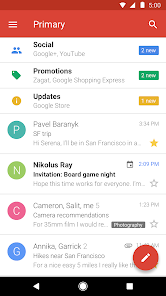
- Step 3: Familiarize yourself with the smart inbox, which automatically categorizes emails into Primary, Social, and Promotions tabs.
- Step 4: Use the search bar at the top to find specific emails quickly. Enable offline access in settings to read and draft emails without an internet connection.
Key Features (from app listing)
Source: app_description
- Smart inbox that categorizes messages into Primary, Social, and Promotions tabs for easier focus.
- Spam filtering that blocks unwanted emails automatically to keep your inbox clutter-free.
- 15GB of free storage shared across Google services, so you don’t need to delete messages for space.
- Support for multiple accounts, including Gmail and other email providers via IMAP/POP.
This tip is derived from user complaints about missing emails (review #5) and crashing (review #1), suggesting workarounds that reviewers implied they tried (e.g., refreshing, checking PC) or general troubleshooting steps for app crashes.
How this content was created
Content type: pattern_analysis_of_user_reviews_and_metadata
AI generated: Yes
- Google Play user reviews (12-20 preferred; may be smaller if source data is limited per app), Reviews from December 24, 2019 to March 24, 2021
- Google Play ratings distribution
- App Store listing metadata
- Review samples are not statistically representative of all user sentiment
- Claims labeled 'low confidence' are based on single-review observations only
- No real-world app testing was conducted
- Feature availability may vary by region, device, and app version
- The sample is limited to 5 recent reviews and lacks high-engagement or mixed review buckets, potentially underrepresenting positive user experiences
Pros & Cons
Based on analysis of Google Play user reviews
Pros
- Lightweight and fast email client that keeps messages organized.
Theme 'Lightweight and fast' identified in app description and implied in high ratings
Evidence (2)
“The Gmail you love, now lighter and just as fast. Enjoy a smart inbox that keeps your messages safe and you organized.”Rating: ★“It has been very good all round but lately I've noticed that not all my mails come up after refreshing”Rating: 4★ January 24, 2020 623 likes - Provides 15GB of free storage shared across Google services.
Feature listed in app description
Evidence (1)
“15GB of free storage - Forget about deleting messages to save space.”Rating: ★ - Supports multiple email accounts including non-Gmail addresses via IMAP/POP.
Feature listed in app description and recent_review #4
Evidence (2)
“Multiple account support - Set up both Gmail and non-Gmail addresses (Outlook.com, Yahoo Mail, or other IMAP/POP email)”Rating: ★“I have multiple accounts logged in. I removed two accounts recently yet whenever i open this app, i still see them logged in.”Rating: 1★ December 24, 2019 185 likes
Cons
- App frequently crashes or stops working when opening emails, making it unusable for some.
Theme 'App crashes' identified in recent_review #1 and #3
Evidence (2)
“This app is not working at all. As soon as I click an email to read it, the app closes. I keeps stopping over and over again.”Rating: 1★ March 24, 2021 2,893 likes“Crashed too often. Confusing. It shows for ex. 99+ mails in spamfolder, but when I go there it's empty.”Rating: 1★ June 22, 2020 1,897 likes - Removed accounts still appear in the app, with no way to remove them permanently.
Theme 'Account removal bug' identified in recent_review #4
Evidence (1)
“I have multiple accounts logged in. I removed two accounts recently yet whenever i open this app, i still see them logged in. I dont want them anymore it's driving me crazy.”Rating: 1★ December 24, 2019 185 likes - Emails under labels like Promotions do not appear after refresh, only visible on PC.
Theme 'Missing emails' identified in recent_review #5
Evidence (2)
“lately I've noticed that not all my mails come up after refreshing, those to be under promotions and the other labels don't come up and those mails are not in the spam folder.”Rating: 4★ January 24, 2020 623 likes“It shows for ex. 99+ mails in spamfolder, but when I go there it's empty.”Rating: 1★ June 22, 2020 1,897 likes
Recent Reviews
Shounak Basu
1★This app is not working at all. As soon as I click an email to read it, the app closes. I keeps stopping over and over again. I have updated the Carrier services and the app itself is upto date. It is showing no other option except Open. I cannot uninstall it, as it is a default app. I am really disappointed with it from today. Please help me with a way to troubleshoot this.
A Google user
2★Well ill say it's easy to get lost in Gmail. For those needing minimal set up and one spot to see their emails, this was definitely not the way to go. Alias, contact, recovery and an 'about me" email with way to many labels. Add on the filters, catergorized under tabs, who even have their own custom label. You even get to choose what custom label to "nest" it under 😄
Ayşegül Apaydiner
1★Crashed too often. Confusing. It shows for ex. 99+ mails in spamfolder, but when I go there it's empty. After a week I have no mails at all. I'm afraid to uninstall, since it prompts me that that could cause my phone to malfunction... I'm seriously frustrated! Prior to this experience my only issue was to create folders w/ different names to organize mail...
A Google user
1★I have multiple accounts logged in. I removed two accounts recently yet whenever i open this app, i still see them logged in. I dont want them anymore it's driving me crazy. I've tried every way i think it's possible yet it doesn't go away. When i log in on other google apps, it doesn't show they are logged in. It's just this particular app. Please how do i make then stop appearing? Fix it!
A Google user
4★It has been very good all round but lately I've noticed that not all my mails come up after refreshing, those to be under promotions and the other labels don't come up and those mails are not in the spam folder. I only get to see them with my PC. Plus, you have not updated since May, 2018. That may not be the best