By AppHub Editorial Team · Updated August 3, 2026
ibis Paint X






Overview
Art & Design
ibis inc.
Free
Feb 27, 2014
13.1.19
7.0
$1.99 - $49.99 per item
No
Jan 16, 2026
Features
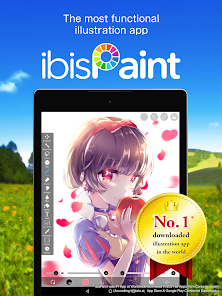
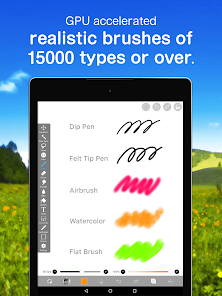
ibis Paint X is a popular and versatile drawing app downloaded more than 460 million times in total as a series, which provides over 47000 brushes, over 27000 materials, over 2100 fonts, 84 filters, 46 screentones, 27 blending modes, recording drawing processes, stroke stabilization feature, various ruler features such as radial line rulers or symmetry rulers, clipping mask features, Vector tool, Animation feature, and AI Disturbance Packed with professional features.
Many tuto...
ibis Paint X is a popular and versatile drawing app downloaded more than 460 million times in total as a series, which provides over 47000 brushes, over 27000 materials, over 2100 fonts, 84 filters, 46 screentones, 27 blending modes, recording drawing processes, stroke stabilization feature, various ruler features such as radial line rulers or symmetry rulers, clipping mask features, Vector tool, Animation feature, and AI Disturbance Packed with professional features.
Download ibis Paint X
Get the official app from the trusted app stores. You will be redirected to the download page.
Official Links
When you purchase through links on our site, we may earn an affiliate commission. Learn more
Ratings breakdown
2,860,000 reviewsDeveloper contact
Name
株式会社アイビス
Address
1-5-1, HATCHOBORI ORIX YAESU DORI BLDG. 2F. CHUO-KU, 東京都 104-0032 Japan
Website
https://ibispaint.com/Phone
+81 52-587-5072
Support
mob-paint-support@ibis.ne.jp
Privacy
View policyFrequently Asked Questions
Is ibis Paint X free to use? high
Yes, ibis Paint X is free to download and use. The free version includes most features but displays advertisements. You can purchase a 'Remove Ads Add-on' to disable ads, or subscribe to Prime Membership for additional premium features.
Source: app_metadata, app_description
Does ibis Paint X have a search bar to find my drawings? low
Based on current user feedback, there is no built-in search bar for your personal gallery. Users have expressed a desire for this feature to help find specific drawings among many canvases. The app does support folders for organization.
Source: user_reviews
Can I draw on ibis Paint X without an internet connection? high
Yes, according to user feedback, the app functions offline for drawing. The app description also emphasizes its features, and a reviewer noted that 'you don't need Internet at all!' to use the core drawing tools.
Source: user_reviews, app_description
Does ibis Paint X have tools for animation? high
Yes, the app description explicitly mentions an 'Animation feature' among its professional features. This is a core part of the app's toolset, not a separate purchase.
Source: app_description
How to Use
ibis Paint X is a feature-rich drawing app that provides professional-grade tools for creating digital art and animations on your mobile device. (app_description)
Getting Started
Source: app_description_and_user_feedback_noted
- Download ibis Paint X from the Google Play Store and open the app.
- Start a new canvas: tap the '+' icon or 'New Canvas' button. You can choose from preset proportions or set custom dimensions.
- Explore the brush library: tap the brush icon to browse over 47,000 brushes. The default selection is free to use.
- Start drawing: use your finger or a compatible stylus. The app includes stroke stabilization for smoother lines.
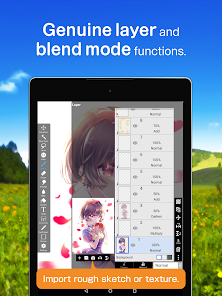
- Familiarize yourself with the layer system: you can add unlimited layers and adjust their opacity and blending modes.
- Save your work: your creations are automatically saved to the in-app gallery. You can export files as images, videos of your drawing process, or animation files.
Key Features (from app listing)
Source: app_description
- Over 47,000 customizable brushes (dip pens, pencils, airbrushes, etc.)
- Unlimited layers with opacity, alpha blending, and clipping masks
- Animation tool for creating frame-by-frame animations
- Advanced text and manga tools with vertical and horizontal writing
- Drawing process recording to share as a video
- Various rulers including radial line and symmetry rulers
- 84 filters and 46 screentones for fine-tuning artwork
This tip addresses a specific user complaint about the missing gallery search feature, which was mentioned in 1 of 5 recent_reviews as a workflow difficulty.
How this content was created
Content type: pattern_analysis_of_user_reviews_and_metadata
AI generated: Yes
- Google Play user reviews (5 per app), March 2025 - February 2026
- Google Play ratings distribution
- App Store listing metadata
- Review samples are not statistically representative of all user sentiment
- No high-engagement negative or positive reviews were available for analysis
- Claims labeled 'low confidence' are based on single-review observations only
- No real-world app testing was conducted
- Feature availability may vary by region, device, and app version
Pros & Cons
Based on analysis of Google Play user reviews
Pros
- The app is praised as a superior and feature-rich digital art tool with a long-term user base high
Theme 'superior art tool' identified in multiple recent_reviews. Review #3 calls the app 'absolutely superior' and states it 'started my love for digital art.' Review #4 calls it 'the best free digital artwork app out there.' Review #1 and #5 mention using the app for years. This is a recurring recent pattern.
Evidence (3)
“Ibis Paint compared to the other art apps is absolutely superior. The controls are easy, there are so many brushes to pick from, and you can make a drawing or animation! I have used Ibis Paint for 3-4 years and it ACTUALLY started my love for digital art. Plus, no, I haven't encountered ANY crashes”Rating: 5★ March 02, 2025 1,971 likes“this is the best free digital artwork app out there, many brushes, nice and easy to use tools, and alot more. I've been using this for 2-3 years, and whatsoever I haven't encountered anything weird or buggy.”Rating: 4★ August 26, 2025 2,398 likes“I love a lot of the recent updates but I wish they would finally add a search bar for your gallery 😭 After years of using ibispiant I have almost 1k canvases and no way of finding a specific drawing I need.”Rating: 5★ February 17, 2026 95 likes - The app is highly intuitive and easy to learn for new users high
Theme 'ease of use' found in 2 recent_reviews. Review #2 says 'It's also very intuitive and easy to learn.' Review #3 mentions 'The controls are easy.' This is a recurring recent pattern.
Evidence (2)
“Great features and brushes, almost everything can be used for free with very occasional ads, and the price for premium is reasonable. It's also very intuitive and easy to learn.”Rating: 4★ September 04, 2025 639 likes“The controls are easy, there are so many brushes to pick from, and you can make a drawing or animation!”Rating: 5★ March 02, 2025 1,971 likes
Cons
- A gallery search feature is a highly requested missing functionality low
Theme 'missing search feature' identified in 1 recent_review. Review #1 explicitly asks for a search bar for the gallery, citing difficulty finding specific drawings among many canvases. This is a single-review observation.
Evidence (1)
“I love a lot of the recent updates but I wish they would finally add a search bar for your gallery 😭 After years of using ibispiant I have almost 1k canvases and no way of finding a specific drawing I need. Sure, folders help, but when you forget which folder you put a drawing in, you spend 10 minu”Rating: 5★ February 17, 2026 95 likes - The social media feature is a minor point of dissatisfaction for some users low
Theme 'social media dissatisfaction' identified in 1 recent_review. Review #2 mentions deducting a star because of 'the social media' aspect. This is a single-review observation.
Evidence (1)
“For just the art service, I'd have to give this five stars. Great features and brushes, almost everything can be used for free with very occasional ads, and the price for premium is reasonable. It's also very intuitive and easy to learn. But I have to knock it down a star because of the social media”Rating: 4★ September 04, 2025 639 likes - Accessing additional brushes by watching ads may have become more difficult for some users low
Theme 'ad-based brush access issues' identified in 1 recent_review. Review #5 mentions they 'watch adds to get other brushes' and can no longer do so, implying a change. This is a single-review observation.
Evidence (1)
“As someone who has drawn on ibis paint X for years, (both tablet and phone with finger) it's overall a pretty good app... however for me who watches adds to get other brushes I can no lon”Rating: 4★ August 09, 2025 461 likes
Recent Reviews
Kaye
5★I love a lot of the recent updates but I wish they would finally add a search bar for your gallery 😭 After years of using ibispiant I have almost 1k canvases and no way of finding a specific drawing I need. Sure, folders help, but when you forget which folder you put a drawing in, you spend 10 minutes digging through each one to find it. I just think that after a over a decade since its launch they would've added a search bar by now.
Loki Of Asgard
4★For just the art service, I'd have to give this five stars. Great features and brushes, almost everything can be used for free with very occasional ads, and the price for premium is reasonable. It's also very intuitive and easy to learn. But I have to knock it down a star because of the social media. It's rarely updated, has very little moderation, and is not appropriate for anyone below 13 and even then I'd recommend parental guidance. But if you just wanna draw, I highly recommend this app.
Emma Pitell
5★Ibis Paint compared to the other art apps is absolutely superior. The controls are easy, there are so many brushes to pick from, and you can make a drawing or animation! I have used Ibis Paint for 3-4 years and it ACTUALLY started my love for digital art. Plus, no, I haven't encountered ANY crashes or bugs! All my art projects went smoothly and turned out great. Thank you for the wonderful experience. Have a good day!
Gaia Darkmoon (Cynane)
4★this is the best free digital artwork app out there, many brushes, nice and easy to use tools, and alot more. I've been using this for 2-3 years, and whatsoever I haven't encountered anything weird or buggy. however, I would suggest a feature where you can add custom canvas proportions as templates, where you can make custom ones and save them to use later. however still a good app though, great and well built!
Gabriela Vanna
4★As someone who has drawn on ibis paint X for years, (both tablet and phone with finger) it's overall a pretty good app where you don't need Internet at all! it's amazing how it's free to use and not too hard to figure out how to work; however for me who watches adds to get other brushes I can no longer do that. The text saying; "Get add free add removal!!" Like no, I'm ok with having adds, but I can't use those brushes anymore. Is it a bug? If not, ibis paint please fix this.