By AppHub Editorial Team · Updated August 3, 2026

Local Weather Alerts - Widget


Overview
Weather
Vitality App Studios
Free
Nov 11, 2020
1.7.2
6.0
$2.99 - $4.99 per item
No
Dec 5, 2025
Features
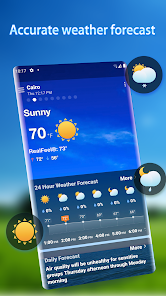
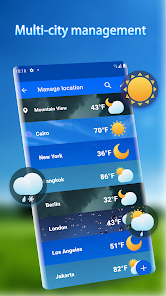
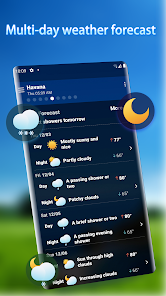
All weather information is gathered on one page for easy viewing. View and manage weather information of multiple cities at the same time. You can predict the weather in the next few hours and days. Weather warning information to help you plan ahead.
【Product Features】
Real-time weather data: Provide weather forecast information for 24 hours and 25 days. Air quality information: Monitor air quality in real time and care for your health. Alert notification: Provide weather notifi...
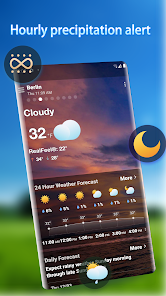
All weather information is gathered on one page for easy viewing. View and manage weather information of multiple cities at the same time. You can predict the weather in the next few hours and days. Weather warning information to help you plan ahead.【Product Features】 Real-time weather data: Provide weather forecast information for 24 hours and 25 days. Air quality information: Monitor air quality in real time and care for your health. Alert notification: Provide weather notifications for rain, snow, lightning, haze, storms, etc. Desktop Weather Widget: Multiple desktop widgets are available, and you can choose a style you like. Accurate forecast of rain and snow up to the hour: Get accurate weather temperature changes to hours in advance to plan ahead for your appearance. Global weather queries for any latitude and longitude: Supports weather queries for any latitude and longitude in the world. Multi-day weather forecast: Multi-day weather trend forecast, forecast the rain early to make plans. Radar map: Clear radar map of precipitation trends, providing accurate weather forecast trends to protect your travel. Various weather backgrounds: Beautiful weather realistic background, according to different weather information cut map is not the same weather background picture. A list of city management: View weather information for multiple cities at the same time, add or remove the city weather you want. Contact us and feedbackEmail: vitalityappstudios@gmail. com
Download Local Weather Alerts - Widget
Get the official app from the trusted app stores. You will be redirected to the download page.
When you purchase through links on our site, we may earn an affiliate commission. Learn more
Ratings breakdown
334,000 reviewsDeveloper contact
Name
董乐
Address
小店镇 董家董庄村216号 莒县, 日照市, 山东省 China 276515
Support
vitalityappstudios@gmail.com
Privacy
View policyFrequently Asked Questions
Is 'Local Weather Alerts - Widget' free, or does it have ads and in-app purchases? high
The app itself is free to download, with in-app purchases ranging from $2.99 to $4.99 per item, such as removing ads. However, multiple recent user reviews report that the app contains intrusive ads, including full-screen pop-ups, and one user who paid to remove ads still encountered them.
Source: app_metadata, user_reviews
Does this app have accurate weather forecasts? medium
User reviews are mixed on this point. Two recent 5-star reviews praise the app's accuracy, saying the temperature matches their own thermometers and forecasts are true to other apps. However, other recent reviews are dominated by complaints about ads, not accuracy.
Source: user_reviews
How do I remove ads in this app? medium
The app description does not provide specific steps, but in-app purchases are available ($2.99 - $4.99 per item), which include an ad-free option. Be aware that one recent user review (with 583 likes) claims that after paying $5, an ad appeared again.
Source: app_metadata, user_reviews
What kinds of weather information does this app provide? high
According to its description, the app provides real-time weather data (24 hours/25 days), hour-by-hour forecasts, air quality monitoring, severe weather alerts (rain, snow, lightning, storms), a precipitation radar map, and multi-city support. It also offers multiple desktop widgets.
Source: app_metadata
How to Use
Local Weather Alerts - Widget centralizes real-time weather forecasts, alerts, and radar maps for one or multiple cities on a single, easy-to-navigate page. (app_description)
Getting Started
Source: app_description_and_user_feedback_noted
- Download and install the app from Google Play.
- Grant the app necessary permissions for location services (if prompted) to automatically detect your city's weather.
- Upon opening, you will see a main screen with your current weather data and a 24-hour/25-day forecast bar.
- Tap the '+' icon or city list to add more cities for which you want weather information.
- Customize your experience by selecting from multiple desktop widget styles. Add the widget to your home screen via your device's widget menu.
- Note from user feedback: Some recent users report intrusive full-screen ads. Be aware of the in-app purchase option to remove them.
Key Features (from app listing)
Source: app_description
- Real-time weather & 24-hour/25-day forecast data.
- Air quality (AQI) monitoring for health.
- Severe weather alert notifications (rain, snow, lightning, haze, storms).
- Hour-by-hour rain/snow prediction.
- Interactive radar map for precipitation trends.
- Global weather queries for any latitude/longitude.
- Multiple desktop weather widget styles.
- Multi-city management list.
This tip is derived directly from the specific, repeated ad-related complaint pattern found in recent_reviews #2, #4, and #5, which describe ad loading times and a paid removal issue.
How this content was created
Content type: pattern_analysis_of_user_reviews_and_metadata
AI generated: Yes
- Google Play user reviews (5 per app), From December 22, 2025 to March 24, 2026
- Google Play ratings distribution
- App Store listing metadata
- Review samples are not statistically representative of all user sentiment.
- The absence of high-engagement negative, positive, and mixed review buckets significantly limits the ability to understand broader user consensus.
- Claims are based on only 5 recent reviews.
- One single, high-likes complaint about paid ad removal heavily influences the 'cons' findings.
- No real-world app testing was conducted.
- Feature availability may vary by region, device, and app version.
Pros & Cons
Based on analysis of Google Play user reviews
Pros
- Accurate temperature readings that match local thermometers, crucial for specific needs like feeding hummingbirds.
Theme 'Accuracy' identified in recent_review #1 and #3
- Easy-to-use interface with all weather info accessible without navigating multiple pages.
Theme 'Usability' identified in recent_review #1 and #3
- Does not share data with third parties, appealing to privacy-conscious users.
Theme 'Privacy' identified in recent_review #1
Cons
- Aggressive and intrusive ads that appear frequently, including after paying to remove them.
Theme 'Intrusive ads' identified in recent_review #2, #4, and #5
- Ads block app functionality, making it difficult to access weather data quickly.
Theme 'Ads blocking usage' identified in recent_review #2, #4, and #5
- Paid ad removal feature does not work as promised, leading to user frustration.
Theme 'Broken paid feature' identified in recent_review #2
Recent Reviews
Martha Larson
5★I love this app! It doesn't share data with 3rd parties. The app is very easy to use and has beautiful graphics. You can save multiple cities. The forecasts are pretty accurate and the current temperature corresponds to our thermometers, which is very important since I feed hundreds of hummingbirds year round and temperature and conditions dictates their feeding needs and whether I need to prepare for freezing weather.
Cynthia
3★Update: August 2023: paid $5 to remove ads, got an ad within 2 minutes. Not cool. Explain. I'm not paying for any more upgrades. Previous review: I Iove the detail on this app! So much better than others I've used. No ads yet but I'd pay for ad-free due to the quality. UPDATE 12/22/25: ad has been popping up every day for the past week, maybe longer. STOP.
lester smith
5★Easy to read and understand and have all the temperatures and what's going on in the following day & week. And so far, it's true to what was posted on the weather app, you don't have to flip a lot of pages To get to what you're looking for.. To get me going when turning on phone everything is right at your at your finger tips , don't have to go far Like most apps want you to do weather and more. I give it.👍🏾👍🏾👍🏾up !
Tristan Brown
1★Used to be a great app. Now they have ads that pop up every time the app opens. It takes 5-10 seconds for the ad to load, and then you have to hit a tiny little "continue to app" button, and then it takes another 5-10 seconds for the actual app to load. For just a quick check of the temperature or rain chances, this isn't worth it anymore. I'm switching to a different weather app.
Michael Yount
2★it will work right about half the time. the rest of the time it has an add that covers the whole screen. You can't even get the back button, etc. when you finally do, it might let you move forward or it might do the same thing again. i went back to the weather channel free app. It has ads but they don't completely block your progress and it's far more accurate.