By AppHub Editorial Team · Updated August 3, 2026

Kaiser Permanente




Overview
Health & Fitness
Kaiser Permanente
Free
Jan 23, 2012
7.8.0
9
No
May 7, 2026
Features
Whether you're at home or on the go, the Kaiser Permanente app gives you a simple, secure way to manage your health — all in one place.
Live in Washington (outside of Vancouver/Longview)? Download the Kaiser Permanente Washington app instead.
With the Kaiser Permanente app, you can easily:
Whether you're at home or on the go, the Kaiser Permanente app gives you a simple, secure way to manage your health — all in one place. Live in Washington (outside of Vancouver/Longview)? Download the Kaiser Permanente Washington app instead. With the Kaiser Permanente app, you can easily:
Download Kaiser Permanente
Get the official app from the trusted app stores. You will be redirected to the download page.
When you purchase through links on our site, we may earn an affiliate commission. Learn more
Ratings breakdown
153,000 reviewsDeveloper contact
Name
Kaiser Foundation Health Plan, Inc.
Address
1 Kaiser Plz Oakland, CA 94612 United States
Website
http://kp.org/thrivePhone
+1 510-740-8114
Support
kpmobile@kp.org
Privacy
View policyFrequently Asked Questions
Is the Kaiser Permanente app free to download and use? high
Yes, the app is free to download. There are no in-app purchases listed. However, you need a kp.org account and be a Kaiser Permanente member to use its features.
Source: app_metadata
Does the Kaiser Permanente app have problems with recent updates? medium
Based on recent user reviews (2022-2025), multiple reviewers report frequent glitches and bugs after app updates. Specific issues include the app becoming faulty after updates, slowdowns, and technical difficulties accessing features like prescription refills. However, the app has a 4.7 overall rating from 153,000 reviews, so these may not represent the majority experience.
Source: user_reviews, ratings_data
Can I manage prescriptions and pharmacy with the Kaiser Permanente app? medium
The app description says you can fill or refill most prescriptions, check prescription status, and see a list of medications. However, recent reviews report issues with the pharmacy feature, including inability to change from shipping to pickup, location search not working, and technical difficulties when ordering refills.
Source: app_metadata, user_reviews
Can I take screenshots in the Kaiser Permanente app? low
According to one user review, screenshots are blocked within the app, though they are possible when logging in via the web. This may be an intentional security/privacy feature, but it is a reported limitation.
Source: user_reviews
Is the Kaiser Permanente app available in all states? high
The app is for most Kaiser Permanente members. However, the description specifically notes that members in Washington state (outside of Vancouver/Longview) should download the separate 'Kaiser Permanente Washington' app instead. Check your region's availability.
Source: app_metadata
How to Use
The Kaiser Permanente app provides a secure way for members to manage health care including emailing doctors, scheduling appointments, managing prescriptions, viewing medical history, and finding facilities. (app_description)
Getting Started
Source: app_description_and_user_feedback_noted
- Download the app from Google Play.
- If you have a kp.org account, sign in with your existing credentials.
- If you don't have an account, you can create one directly within the app.
- After login, you can access features like scheduling appointments, messaging your doctor, and viewing medical records.
- Note: some users report that the app works best for routine tasks; for complex issues or screenshots, the web version may be more reliable.
Key Features (from app listing)
Source: app_description
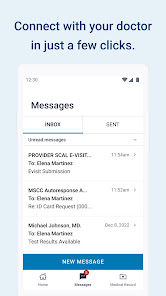
- Email your doctor’s office or Member Services with nonurgent questions
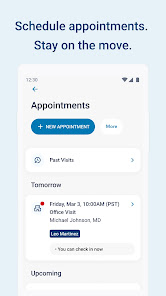
- Schedule, view, and cancel routine appointments and see past visit information
- Fill or refill prescriptions, check order status, and view medication list
- View medical history including allergies, immunizations, conditions, and lab results
- Browse doctor profiles and choose a primary care provider
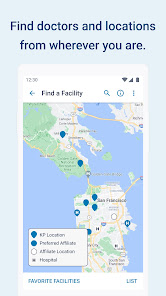
- Find nearby facilities and pharmacies
- Access digital membership card for check-in and prescription pickup
- Get personalized health reminders and information
Derived from user reports in recent_reviews: reviewer 1 mentions the ability to take screenshots on the web version but not in the app, and reviewer 4 describes the same technical difficulties on both platforms. Multiple reviewers suggest the web experience is more reliable for certain tasks.
How this content was created
Content type: pattern_analysis_of_user_reviews_and_metadata
AI generated: Yes
- Google Play user reviews (5 reviews per app), September 01, 2022 to January 29, 2025
- Google Play ratings distribution
- App Store listing metadata
- Review samples are not statistically representative of all user sentiment
- Only 5 recent reviews were available; no positive or mixed reviews were sampled
- Claims labeled 'low confidence' are based on single-review observations only
- No real-world app testing was conducted
- Feature availability may vary by region, device, and app version
- The cumulative rating of 4.7 from 153k reviews is not reflected in the small recent sample
- The absence of high-engagement buckets limits the ability to cross-validate themes
Pros & Cons
Based on analysis of Google Play user reviews
Pros
- Whether you're at home or on the go, the Kaiser Permanente app gives you a simple, secure way to manage your health — all in one place. Live in Washington (outside of Vancouver/Longview)? Download the Kaiser Permanente Washington app instead. With the Kaiser Permanente app, you can easily: medium
Extracted from app description
- Email your doctor’s office or Member Services with nonurgent questions medium
Extracted from app description
- Schedule, view, and cancel routine appointments and see information about past visits medium
Extracted from app description
- Fill or refill most prescriptions, check the status of a prescription order, and see a list of all your medications medium
Extracted from app description
- View your medical history, including allergies and immunizations, ongoing health conditions, and most lab test results medium
Extracted from app description
Cons
- Some users report issues: "Might as well just login on the web. I like the set up, it is easier than logging in online. But the app is constantly faulty. You can't take screensh" low
Identified from 3 low-rated user review(s)
Evidence (3)
“Might as well just login on the web. I like the set up, it is easier than logging in online. But the app is constantly faulty. You can't take screenshots in the app but you can when logged in online. ”Rating: 2★ September 01, 2022 75 likes“Completely useless. For the longest time it wouldn't show any appointments at all at any location, and it had the wrong primary doctor at the wrong location. I told them on the phone every time I call”Rating: 1★ December 26, 2023 28 likes“This app, and the website, on Android, have always been painfully disorganized, deathly slow. Now after spending 3 weeks trying to get one of them to work without "we are experiencing technical diffic”Rating: 1★ November 08, 2024 110 likes
Recent Reviews
Jenifer Wilson
2★Might as well just login on the web. I like the set up, it is easier than logging in online. But the app is constantly faulty. You can't take screenshots in the app but you can when logged in online. Then whenever there is an update there is always an issue. With the recent last two updates I can't even get in on the app, automatically kicks me out. Fed up.
Stephanie Renner
3★This app sucks when it comes to the pharmacy. It will not allow me to change from shipping to pick up. Constantly searches and never let's you enter a zip code. Doesn't pull up any locations. I uninstalled and reinstalled, same issue. Please fix this! Now I have to go there and wait for them to fill 3 scrips, instead of ordering ahead to pick up. Thus spreading grems longer. Yikes!
hipu
1★Completely useless. For the longest time it wouldn't show any appointments at all at any location, and it had the wrong primary doctor at the wrong location. I told them on the phone every time I called, and they finally fixed that. Now I can't pay bills in the app. I put in my card number and hit next, it says "you're almost done" and grays out the whole page, but doesn't give me anything to accept, approve, add more info, whatever. It just sits indefinitely at a grayed out page.
Jonathan S
1★This app, and the website, on Android, have always been painfully disorganized, deathly slow. Now after spending 3 weeks trying to get one of them to work without "we are experiencing technical difficulties" to order a prescription refill I'm now almost out of, I have to enter my credit card, and the box for "year" just shows "year"! No way to input a date. And lower down on the page, there's a disclaimer or something that stops in mid-sentence! Do Better. You are HEALTH CARE. Act like it!
Anthony Nonya
1★Worst app ever. Writing a message is difficult because it doesn't function like any other text box on the internet, the keyboard blocks the send button, it doesn't automatically capitalize the start of a sentence for f sake. You'll see you have two messages, but it doesn't show where. Can't screen shot, which would be really helpful. Can't check in for appointments, that has to be be done in a web browser. Payments are a PIA. There's nothing positive I can say about the way the app functions.