By AppHub Editorial Team · Updated August 5, 2026
VLC for Android




Overview
Video Players & Editors
Videolabs
Free
Feb 4, 2015
No
Feb 25, 2026
Features
VLC media player is a free and open source cross-platform multimedia player that plays most multimedia files as well as discs, devices, and network streaming protocols.
This is the port of VLC media player to the Android™ platform. VLC for Android can play any video and audio files, as well as network streams, network shares and drives, and DVD ISOs, like the desktop version of VLC.
VLC for Android is a full audio player, with a complete database, an equalizer and filters, playing all weird au...
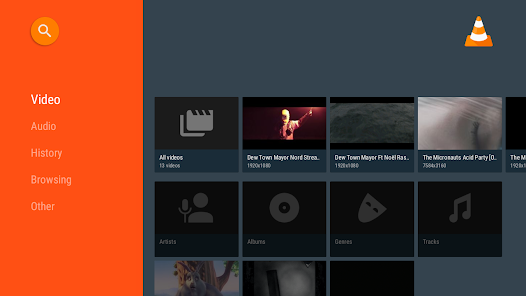
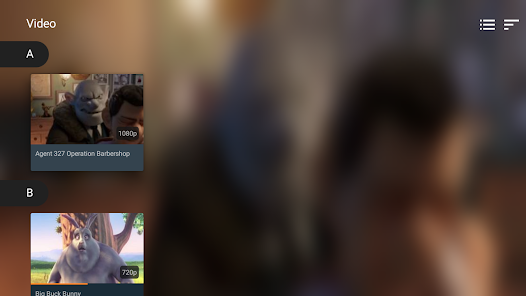
VLC media player is a free and open source cross-platform multimedia player that plays most multimedia files as well as discs, devices, and network streaming protocols. This is the port of VLC media player to the Android™ platform. VLC for Android can play any video and audio files, as well as network streams, network shares and drives, and DVD ISOs, like the desktop version of VLC. VLC for Android is a full audio player, with a complete database, an equalizer and filters, playing all weird audio formats. VLC is intended for everyone, is totally free, has no ads, no in-app-purchases, no spying and is developed by passionate volunteers. All the source code is available for free. Features––––––––VLC for Android™ plays most local video and audio files, as well as network streams (including adaptive streaming), DVD ISOs, like the desktop version of VLC. It also support disk shares. All formats are supported, including MKV, MP4, AVI, MOV, Ogg, FLAC, TS, M2TS, Wv and AAC. All codecs are included with no separate downloads. It supports subtitles, Teletext and Closed Captions. VLC for Android has a media library for audio and video files, and allows to browse folders directly. VLC has support for multi-track audio and subtitles. It supports auto-rotation, aspect-ratio adjustments and gestures to control volume, brightness and seeking. It also includes a widget for audio control, supports audio headsets control, cover art and a complete audio media library. Permissions––––––––––––VLC for Android needs access to those categories:
Download VLC for Android
Get the official app from the trusted app stores. You will be redirected to the download page.
When you purchase through links on our site, we may earn an affiliate commission. Learn more
Ratings breakdown
1,980,000 reviewsDeveloper contact
Name
VIDEOLABS
Address
9 RUE DES COLONNES 75002 PARIS France
Website
http://www.videolan.orgPhone
+33 7 49 82 24 46
Support
android-support@videolan.org
Privacy
View policyFrequently Asked Questions
Is VLC for Android free? high
Yes, VLC for Android is completely free. The app description explicitly states it has 'no ads, no in-app-purchases.' User reviews confirm it is free and ad-free.
Source: app_metadata, user_reviews
Does VLC for Android play all video formats? high
The app description says it supports all formats including MKV, MP4, AVI, MOV, Ogg, FLAC, and AAC, with all codecs included. User reviews frequently use it as a general media player for local files.
Source: app_metadata
Why does VLC keep reopening a video after I disconnect Bluetooth? low
One reviewer reports that VLC can incessantly reopen and play the same file every time a Bluetooth device connects or disconnects. This is a reported issue but appears in only one review from February 2026, and may not affect all users.
Source: user_reviews
Can I sort files by date in VLC for Android? low
In the browse section, files can only be sorted by name. To sort by date, you need to use the dedicated video or audio sections in the app. This is noted in a recent review with high engagement.
Source: user_reviews
Is VLC's shuffle algorithm random? low
One reviewer reports that the randomizer seems to play the same 20 songs repeatedly, especially if you start from track one, even with a large library. This suggests the shuffle may not be truly random, but this feedback comes from only one reviewer (with 2219 likes).
Source: user_reviews
How to Use
VLC for Android is a free, open-source media player that plays nearly all video and audio formats, streams, and network files without ads, and includes a media library organizer. (app_description_and_user_feedback)
Getting Started
Source: app_description_and_user_feedback_noted
- Download VLC for Android from Google Play. It's free and contains no ads.
- Open the app. It will automatically scan your device's storage for all audio and video files.
- Choose 'Audio' or 'Video' from the bottom tabs to browse your library organized by album, artist, or date.
- Alternatively, use the 'Browse' tab to navigate your device's folders directly. Note: in Browse, files are sorted by name only.
- Tap any file to start playback. Use gestures on the screen: swipe up/down on the left side for brightness, right side for volume, and swipe left/right to seek.
Key Features (from app listing)
Source: app_description
- Plays all major formats: MKV, MP4, AVI, MOV, Ogg, FLAC, TS, M2TS, Wv, AAC, and more, with all codecs included.
- Supports network streams (including adaptive streaming), DVD ISOs, and disk shares.
- Includes a media library for audio and video with organization by artist, album, year, and album art.
- Offers an equalizer, filters, and full playback controls including auto-rotation, aspect ratio adjustment, and subtitle/audio track selection.
This tip responds to the shuffle issue reported in recent review #5, suggesting a workaround based on the reviewer's observation that the problem is more pronounced 'especially if I start from track one.'
How this content was created
Content type: pattern_analysis_of_user_reviews_and_metadata
AI generated: Yes
- Google Play user reviews (5 reviews (smaller than the preferred 12-20) per app), May 18, 2024 to February 17, 2026
- Google Play ratings distribution
- App Store listing metadata
- Review samples are not statistically representative of all user sentiment.
- Only 5 recent reviews were provided; no high-engagement or mixed bucket data.
- Claims labeled 'low confidence' are based on single-review observations only.
- No real-world app testing was conducted.
- Feature availability may vary by region, device, and app version.
Pros & Cons
Based on analysis of Google Play user reviews
Pros
- VLC for Android is praised for its free, ad-free, and comprehensive local media playback. high
Theme 'free and ad-free local player' identified in recent reviews #2 and #4. Both praise the app for being free, ad-free, and great for playing local files.
Evidence (2)
“The best media player for any local tracks you have stored. I don't stream much music and most of what I listen to are files I have locally, and this is the perfect, ad-free app for it, both mobile and desktop.”Rating: 5★ February 17, 2026 15 likes“The only music player on my phone. It does a great job of organizing music by artist, album, year, whatever I want, and uses the album art, which not only is esthetically pleasing, but helpful in organizing and finding what you're looking for.”Rating: 5★ May 18, 2024 3,127 likes - The app has a great media library and organization for music, including album art and sorting by various criteria. low
Theme 'media library and organization' identified in recent review #4. Review #4 explicitly praises organization by artist, album, year, and album art.
Evidence (1)
“The only music player on my phone. It does a great job of organizing music by artist, album, year, whatever I want, and uses the album art, which not only is esthetically pleasing, but helpful in organizing and finding what you're looking for.”Rating: 5★ May 18, 2024 3,127 likes
Cons
- The app has a frustrating auto-replay issue where it repeatedly opens and plays the same file after Bluetooth connections or disconnections. low
Theme 'auto-replay on Bluetooth events' identified in recent review #1. The reviewer describes the app incessantly reopening and playing the same file every time a Bluetooth device connects or disconnects.
Evidence (1)
“Once you play a file with it once, it will incessantly reopen and starr playing the same file over and over every time is connects (or disconnects) from a bluetooth device. what's worse is, unless you have the player open and on top”Rating: 2★ February 10, 2026 12 likes - The file browse section lacks sorting options, requiring users to use the audio/video sections to sort by date. low
Theme 'lack of sorting in browse section' identified in recent review #3. The reviewer notes that in the browse section, files can only be sorted by name, not by date, which is available in dedicated audio/video sections.
Evidence (1)
“If I access files from the browse section, I can't order anything other than by name. To order by date, I would need to go to the video or audio sections.”Rating: 4★ June 04, 2024 2,167 likes - The randomizer/shuffle feature tends to repeat the same songs rather than playing a truly random selection across a large library. low
Theme 'poor shuffle algorithm' identified in recent review #5. The reviewer has over 700 songs and reports the randomizer plays the same 20 songs repeatedly, especially when starting from track one.
Evidence (1)
“please adjust your randomizer. I have over 700 songs on my device, and your randomizer seems to play the same 20 songs every single time I use it, no matter how short a time I use it, especially if I start from track one.”Rating: 5★ August 21, 2024 2,219 likes - Network media access can be slow or randomly fail. low
Theme 'network access issues' identified in recent review #3. The reviewer mentions that network media access can be slow or randomly stop working.
Evidence (1)
“Network media access has been nice, but sometimes performance is slow or it rando”Rating: 4★ June 04, 2024 2,167 likes
Recent Reviews
Chuck Liquor
2★I love the PC version of VLC, but the app is practically unuseable. Once you play a file with it once, it will incessantly reopen and starr playing the same file over and over every time is connects (or disconnects) from a bluetooth device. what's worse is, unless you have the player open and on top of other applications on your screen, it crashes and stops playing, so you end up in this loop where your device will connect or disconnect from bluetooth and start playing, and then crash.
Peter Young
5★The best media player for any local tracks you have stored. I don't stream much music and most of what I listen to are files I have locally, and this is the perfect, ad-free app for it, both mobile and desktop. Two criticisms: once, and only once, it lost track of a lot of my files and I had to remake a lot of playlists. I've used the app for years and it only happened once. It would be nice to have a crossfade option, seems like a pretty obvious thing to implement
Darin Woods
4★I like VLC on my PC, but the mobile experience could be better. If I access files from the browse section, I can't order anything other than by name. To order by date, I would need to go to the video or audio sections. Network media access has been nice, but sometimes performance is slow or it randomly disconnects. I think the biggest issue I have is casting MOV files. Unless I re-save them on my phone, they always play upside down. They play in the correct orientation in the app.
Christopher Galletta Stevens (ChrusherComix)
5★The only music player on my phone. It does a great job of organizing music by artist, album, year, whatever I want, and uses the album art, which not only is esthetically pleasing, but helpful in organizing and finding what you're looking for. Also works for video, which particularly on my laptop computer is far and away my favorite as well. My go-to on both mobile and PC.
Disciple
5★I've been using your app for years, and I have only one complaint: please adjust your randomizer. I have over 700 songs on my device, and your randomizer seems to play the same 20 songs every single time I use it, no matter how short a time I use it, especially if I start from track one. Weirdly, it gravitates to the same songs even if I don't start at one. With 700+ tracks, I don't get why it does this, the odds are too high for them to play so often.