By AppHub Editorial Team · Updated August 3, 2026

AI Video Editor: ShotCut AI



Overview
Video Players & Editors
Shotcut Video Workshop
Free
Apr 28, 2021
3.2.1
8.0
$0.99 - $119.99 per item
No
Feb 28, 2026
Features
ShotCut
★ AI Video Editor Tool
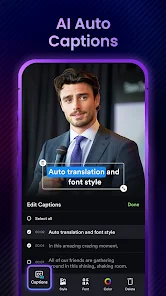
Free trial for transcribing your videos to text is now live! Experience our latest ai technology, smarter sentence segmentation, precise word segmentations, and full support across all major languages!
Post your videos to shotcut and e...
ShotCut
Download AI Video Editor: ShotCut AI
Get the official app from the trusted app stores. You will be redirected to the download page.
Official Links
When you purchase through links on our site, we may earn an affiliate commission. Learn more
Ratings breakdown
374,000 reviewsDeveloper contact
Name
ATLASV GLOBAL PTE. LTD.
Address
160 Robinson Road #19-04 SBF Center Singapore 068914
Website
https://shotcut.appPhone
+65 8881 6197
Support
support-shotcut-android@shotcut.app
Privacy
View policyFrequently Asked Questions
Is ShotCut AI Video Editor free to use? high
Yes, ShotCut is free to download and use for basic video editing features like cutting, merging, cropping, and adding music. However, advanced features, particularly AI tools like AI video creation, require additional purchases. The app offers in-app purchases ranging from $0.99 to $119.99 per item, and user reviews indicate that even the lifetime plan may require extra credit purchases for AI video creation.
Source: app_metadata, user_reviews
Can ShotCut edit long videos like movies or vlogs? low
Based on user reviews, ShotCut may struggle with longer videos. One reviewer with 3623 likes reported that the app 'cannot cope with videos that are more than 3 minutes long' and crashes when trying to edit 8-minute clips. This suggests the app may not be ideal for lengthy projects, though this feedback comes from a single review and should be considered with caution.
Source: user_reviews
Does ShotCut have AI features like auto-captions and music? high
Yes, the app description lists several AI features including AI Captions for automatic transcription, AI Automusic that generates background music matching your video style, and AI Text Generation for creating titles, hashtags, and descriptions. A free trial for AI Captions is available, but user reviews suggest AI video creation requires additional credit purchases beyond any subscription or lifetime plan.
Source: app_metadata
Does ShotCut have a watermark on exported videos? high
The app description explicitly states it includes a 'Video eraser' feature and allows export 'without watermark.' Some versions refer to it as a 'video editor no watermark' tool, suggesting watermark-free export is available, likely as part of the paid version or through specific editing tools.
Source: app_metadata
How to Use
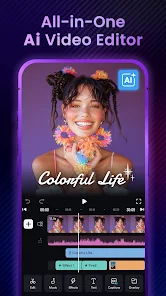
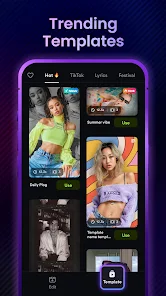
ShotCut AI is a mobile video editing app that combines basic editing tools with AI-powered features like auto-captions, auto-music, and text generation to help users create content for platforms like TikTok, Instagram, and YouTube. (app_description)
Getting Started
Source: app_description_and_user_feedback_noted
- Download and install the app from Google Play (requires Android 8.0 or higher).
- Grant necessary permissions for storage and media access when prompted.
- Import your video clips from your device gallery. Be aware that some users report videos may not appear in sequential order, so check the order before starting your edit.
- Begin with basic editing tools like cut, trim, merge, or crop to prepare your footage.
- For longer videos, users caution that the app may experience stability issues with clips exceeding 3 minutes, so consider splitting longer content into segments.
- Explore AI features through the free trial for auto-captions, auto-music, and text generation, noting that AI video creation may require additional credit purchases.
Key Features (from app listing)
Source: app_description
- AI Captions: Automatic transcription with support for multiple languages, smarter sentence segmentation, and precise word segmentation.
- AI Automusic: Auto-generates background music matching your video's style.
- AI Text Generation: Creates titles, hashtags, and descriptions optimized for specific platforms.
- Basic Editing: Video reverser, cropper, cutter/splitter, merger, converter, and watermark eraser.
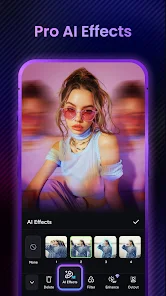
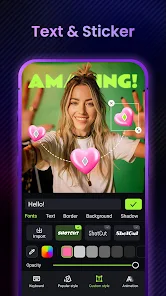
- Pro Editing: Add music/voiceover, slow motion, blur/mosaic, PIP (Picture in Picture), video effects & filters, stabilizer, green screen editor, and background remover.
- Specialized Tools: Stop motion animation, speed editor, and slideshow/collage maker.
This tip directly addresses a verified user complaint from Review #1 (December 03, 2025) in recent_reviews, who said 'I just paid for the lifetime plan and was surprised that you need to pay an additional fee for creating AI videos.'
How this content was created
Content type: pattern_analysis_of_user_reviews_and_metadata
AI generated: Yes
- Google Play user reviews (5 reviews (smaller than preferred 12-20 range) per app), May 18, 2023 to December 03, 2025
- Google Play ratings distribution
- App Store listing metadata
- Review sample is very small (5 reviews) and not statistically representative of all user sentiment
- No high-engagement negative, positive, or mixed review buckets were available for triangulation
- Claims labeled 'low confidence' are based on single-review observations and should not be generalized
- No real-world app testing was conducted
- Feature availability may vary by region, device, and app version
- The ratings distribution was not available to validate whether the app's 4.3 overall rating accurately reflects the themes found in recent reviews
Pros & Cons
Based on analysis of Google Play user reviews
Pros
- App is easy to navigate and user-friendly for both beginners and advanced users.
Theme 'Easy to navigate and user-friendly' identified in recent_review #2 and #4
Evidence (2)
“ShotCut is easy to navigate.”Rating: 4★ May 18, 2023 177 likes“the video editing portion of this app for trimming videos is the best out of all the apps that I have used”Rating: 3★ December 03, 2025 94 likes - App offers a free version with useful features, and a paid version with additional benefits.
Theme 'Free and paid versions' identified in recent_review #4
Evidence (1)
“I like both the free and paid version.”Rating: 4★ May 18, 2023 177 likes - App has a good overlay feature and allows customization with personal images.
Theme 'Good overlay feature' identified in recent_review #4
Evidence (1)
“The overlay feature is my favorite”Rating: 4★ May 18, 2023 177 likes
Cons
- App crashes frequently when editing videos longer than 3 minutes, making it unreliable.
Theme 'Crashes with long videos' identified in recent_review #5
Evidence (1)
“This app can not cope with videos that are more than 3 minutes long. App keeps crashing as I try to edit 8-minute videos.”Rating: 1★ January 30, 2025 3,623 likes - AI video creation features require additional credit purchases, even with a lifetime plan.
Theme 'Additional cost for AI features' identified in recent_review #1
Evidence (1)
“I just paid for the lifetime plan and was surprised that you need to pay an additional fee for creating AI videos.”Rating: 3★ December 03, 2025 94 likes - App lacks a zoom feature for precise editing on specific areas of a clip.
Theme 'Lack of zoom feature' identified in recent_review #2
Evidence (1)
“there is no way to zoom in, in certain areas of a clip like the desktop shotcut can do.”Rating: 4★ September 10, 2023 284 likes
Recent Reviews
Paul Ng
3★I just paid for the lifetime plan and was surprised that you need to pay an additional fee for creating AI videos. You can't create a single video on the app. You have to keep buying credits to create Videos. Other apps allow you to create some on credits that gets renewed monthly, but not this one. On the other hand, the video editing portion of this app for trimming videos is the best out of all the apps that I have used, and I have used many of them. It just works and is easy to use.
Motor7710
4★Definitely the best video app for Androids. Just 2 things that kind of annoyed me. When you want to start editing, the videos are not in sequential order. Very frustrating when trying to figure out what's what. The other thing is there is no way to zoom in, in certain areas of a clip like the desktop shotcut can do. That's why I gave it 4 stars instead of five. But like I said best app out there.
Grumpy Grandpa
5★Finally an app that does what it says, and doesn't make you hunt for buried features, or other adds to supplement the ones I already have. Had. They're no longer needed. Thanks for a great app! My only criticism is the annual subscription. I can buy a competent editor for pc for $50, and keep it forever. I prefer to just buy my software. I don't always like the next version. For example, I still use Photoshop CS2. Lol
Sherri White
4★ShotCut is easy to navigate. I like both the free and paid version. I haven't had any problems with an of the features on my TCL XE 5 G tmobile phone. I think it's user-friendly for beginners and advanced users. The overlay feature is my favorite, but I would suggest adding more to it: Clouds, weather, landscapes, vehicles, nature elements, and animals. But everything else is fine. And don't forget the more backgrounds. You can actually make those with your own pictures, patterns and drawings.
Andrea Lou Lou
1★This app can not cope with videos that are more than 3 minutes long. App keeps crashing as I try to edit 8-minute videos. I thought it was good on the first day of my free trial, but I will definitely be cancelling before the trial is over. It's caused me a headache today. A simple edit and cut took over an hour when it took me 5 minutes on a social media app editor. You need to fix this. It's good for joining videos, if they aren't very long or you have hours to waste whilst it freezes.