By App Discoverer Editorial Team · Updated October 1, 2026
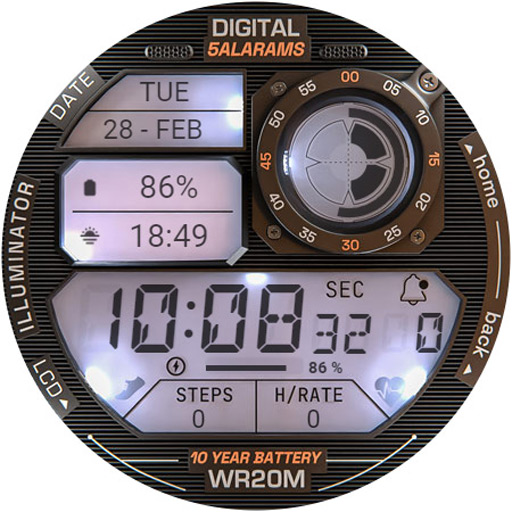
ILLUMINATOR Digital Watch face
Overview
Personalization
WatchBase
Free
false
No
Features
Very realistic and easy to read retro-like style digital watch face for Wear OS with 3 custom complications and beautiful night modes and animations.
NOTE: Please read the How to section and Installation section !!!
ⓘ Features:
ⓘ How to:
Very realistic and easy to read retro-like style digital watch face for Wear OS with 3 custom complications and beautiful night modes and animations.
NOTE: Please read the How to section and Installation section !!!
ⓘ Features:
ⓘ How to:
Want another SUPER REALISTIC watch faces? Here you go: Luna Benedicta: https://play. google. com/store/apps/details? id=wb. luna. benedicta WatchBase. Illuminator: https://play. google. com/store/apps/details? id=wb. illuminator. hybrid
ⓘ Heart rate info
In order for the HR to work, you must first allow health sensors.
When you apply the watch face if you see "-" or "E" heart rate was not measured,
just tap on it to measure it.
ⓘ Installation
How to install: https://watchbase. store/static/ai/ After installation: https://watchbase. store/static/ai/ai. html
If you have any issues installing the watch face, please note that we have no control over the installation process or any other Google Play / Watch processes. The most common issue that people face is after they buy the watch face and install it, they can't see/find it.
In order to apply the watch face after you install it, touch and hold on the main screen (your current watch face) the swipe left to look for it. If you can't see it, tap on the " + " sign at the end (add a watch face) and find our watch face there.
We use a companion app for the phone to make the installation process easier. If you buy our watch face, tap on the install button (on the phone app) you must check your watch.. a screen will appear with the watch face.. tap install again and wait for the installation to finish. If you already bought the watch face and it still asks you to buy it again on the watch, don't worry you will not be charged twice. This is a common synchronization issue, just wait a little or try to restart your watch.
Another solution for installing the watch face is to try to install it from a browser, logged with your account (google play account that you use on the watch).
JOIN WatchBase.
Facebook page: https://www. facebook. com/WatchBase
Facebook group (General watch faces group): https://www. facebook. com/groups/1170256566402887/
Instagram: https://www. instagram. com/watch. base/
YouTube: https://www. youtube. com/@WATCHBASE/videos
Google Play page: https://play. google. com/store/apps/developer? id=WatchBase
SUBSCRIBE to our YouTube channel: https://www. youtube. com/c/WATCHBASE? sub_confirmation=1 https://www. youtube. com/c/WATCHBASE
Download ILLUMINATOR Digital Watch face
Get the official app from the trusted app stores. You will be redirected to the download page.
When you purchase through links on our site, we may earn an affiliate commission. Learn more
Frequently Asked Questions
Is ILLUMINATOR Digital Watch face free to download? high
Yes. The app metadata lists ILLUMINATOR Digital Watch face as free, with in-app purchases listed as false.
Source: app_metadata
How to Use
Very realistic and easy to read retro-like style digital watch face for Wear OS with 3 custom complications and beautiful night modes and animations. (app_description)
Getting Started
Source: app_description_and_user_feedback_noted
- Install ILLUMINATOR Digital Watch face from the appropriate app store.
- Open the app and start with the free experience.
- Review the main features described in the app listing.
- Adjust app settings based on your preferences.
Key Features (from app listing)
Source: app_description
- NOTE: Please read the How to section and Installation section !!!
- - Realistic design.
- - 3 MFD (custom complications).
- - Auto 12h/24h mode.
- - Battery indicator.
- - Notifications count.