By App Discoverer Editorial Team · Updated October 1, 2026

Move to iOS

Overview
Tools
Apple
Free
Sep 16, 2015
4.0.3
6.0
No
May 19, 2025
Features
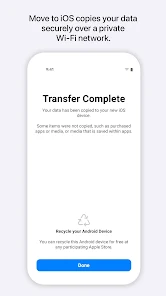
Everything about iOS is designed to be easy. That includes switching to it. With just a few steps, you can migrate your content automatically and securely from your Android device with the Move to iOS app. No need to save your stuff elsewhere before switching from Android. The Move to iOS app securely transfers all kinds of content data for you:
Apps Calendars Call logs Contacts Camera photos and videos Mail accounts Message history Voice memos WhatsApp content
Make sure to keep your devices n...
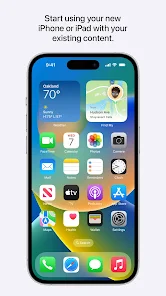
Everything about iOS is designed to be easy. That includes switching to it. With just a few steps, you can migrate your content automatically and securely from your Android device with the Move to iOS app. No need to save your stuff elsewhere before switching from Android. The Move to iOS app securely transfers all kinds of content data for you: AppsCalendarsCall logsContactsCamera photos and videosMail accountsMessage historyVoice memosWhatsApp contentMake sure to keep your devices nearby and connected to power until the transfer is complete. When you choose to migrate your data, your new iPhone or iPad will create a private Wi-Fi network and find your nearby Android device running Move to iOS. After you enter a security code, it will begin transferring your content and put it in the right places. Just like that. Once your content has been transferred, you’re ready to get going. That’s it — you can start using your new iPhone or iPad and experiencing its endless possibilities. Enjoy. Required App PermissionLocation: To establish a Wi-Fi connection between the Android device and the iPhone or iPad, which is needed to migrate the data. Optional App Permission
Download Move to iOS
Get the official app from the trusted app stores. You will be redirected to the download page.
When you purchase through links on our site, we may earn an affiliate commission. Learn more
Ratings breakdown
218,000 reviewsDeveloper contact
Name
Apple Inc.
Address
1 Apple Park Way Cupertino, CA 95014-0642 United States
Website
http://www.apple.comPhone
+1 800-275-2273
Support
support@apple.com
Privacy
View policyFrequently Asked Questions
Does the Move to iOS app actually work for transferring data? high
Based on recent user reviews, many users report that the app frequently fails to complete transfers, gets stuck indefinitely (often at '1 minute remaining'), and may fail to transfer a significant portion of data, such as 60% of photos or 30% of contacts. The app has an overall rating of 3.7 stars on Google Play, but recent feedback is overwhelmingly negative.
Source: user_reviews, ratings_data
What data can Move to iOS transfer? medium
According to the app description, Move to iOS can transfer apps, calendars, call logs, contacts, camera photos and videos, mail accounts, message history, voice memos, and WhatsApp content. However, user reviews frequently report that the transfer of photos and contacts is incomplete or fails entirely.
Source: app_metadata, user_reviews
Is the Move to iOS app free? high
Yes, the app is free to download and use. It contains no in-app purchases and no ads.
Source: app_metadata
Does the app require special permissions? high
Yes. Location permission is required to establish a Wi-Fi connection between devices. Optional permissions include SMS, Photos/Videos, Notifications, Contacts, Music/Audio, Phone, Calendar, and Call Logs—these are only needed for transferring the corresponding data types. The app can be used without granting optional permissions, but some features will be unavailable.
Source: app_metadata
How to Use
Move to iOS is an app from Apple that helps users transfer data from an Android device to a new iPhone or iPad automatically and securely. (app_description)
Getting Started
Source: app_description_and_user_feedback_noted
- Step 1: Make sure both your Android device and your new iPhone/iPad are nearby, plugged into power, and connected to Wi-Fi (though the app creates its own private Wi-Fi network).
- Step 2: On your new iPhone/iPad, look for the 'Move to iOS' screen during setup and follow the on-screen instructions.
- Step 3: On your Android device, download and open the Move to iOS app, then tap 'Continue'. Grant the required Location permission when prompted.
- Step 4: A security code will appear on your iPhone/iPad. Enter this code on your Android device to establish a secure connection.
- Step 5: Select the content you want to transfer (e.g., contacts, photos, messages, WhatsApp data) and tap 'Next'. Keep both devices near each other until the transfer completes.
- Step 6: Note: If the transfer gets stuck (e.g., '1 minute remaining' for hours), many users recommend restarting both devices and trying again, or using alternative manual transfer methods for critical data.
Key Features (from app listing)
Source: app_description
- Securely transfers contacts, message history, photos, videos, and mail accounts.
- Transfers calendar events, call logs, voice memos, and WhatsApp content.
- Automatically migrates free apps (paid apps are disabled).
- Creates a private, encrypted Wi-Fi network to ensure data security during transfer.
This tip is responsive to verified user complaints from recent_reviews (Review #2 and Review #3) about failed or incomplete transfers of photos and documents.
How this content was created
Content type: pattern_analysis_of_user_reviews_and_metadata
AI generated: Yes
- Google Play user reviews (5 reviews (only recent_reviews bucket was available) per app), March 20, 2022 to November 05, 2025
- Google Play ratings distribution
- App Store listing metadata
- Review samples are not statistically representative of all user sentiment
- High-engagement negative reviews can overrepresent complaints
- Claims labeled 'low confidence' are based on single-review observations only
- No real-world app testing was conducted
- Feature availability may vary by region, device, and app version
Pros & Cons
Based on analysis of Google Play user reviews
Pros
- The app is designed to transfer content from Android to iOS automatically and securely.
Theme 'Transfer functionality' identified in app description and recent_review #1, #2, #3
Evidence (2)
“The Move to iOS app securely transfers all kinds of content data for you: AppsCalendarsCall logsContactsCamera photos and videosMail accountsMessage historyVoice memosWhatsApp content”Rating: 5★ N/A“Data data transfer from my Samsung Galaxy failed on the first two attempts. On the third attempt the transfer ran to completion”Rating: 2★ November 05, 2025 89 likes - The app creates a private Wi-Fi network for secure data migration between devices.
Theme 'Private Wi-Fi network' identified in app description
Evidence (1)
“your new iPhone or iPad will create a private Wi-Fi network and find your nearby Android device running Move to iOS”Rating: 5★ N/A - The app can transfer WhatsApp content from Android to iOS.
Theme 'WhatsApp content transfer' identified in app description
Evidence (1)
“The Move to iOS app securely transfers all kinds of content data for you: ... WhatsApp content”Rating: 5★ N/A
Cons
- The app frequently fails to complete data transfers, often getting stuck or timing out.
Theme 'Transfer failures' identified in recent_review #1, #2, #5
Evidence (3)
“At this point it's pretty well noted that the app basically doesn't work.”Rating: 1★ March 30, 2022 785 likes“I have never been able to transfer simple things like photos or important Documents.”Rating: 1★ March 20, 2022 225 likes“It gets hung up at "1 minute remaining". I even let it sit like that overnight for about 7 hours and still nothing.”Rating: 1★ April 14, 2022 406 likes - The app transfers incomplete data, such as missing photos, contacts, and messages.
Theme 'Incomplete data transfer' identified in recent_review #3
Evidence (1)
“the app failed to transfer about 60% of my photos, about 30% of my contacts, most of my app data ... and all of my messages.”Rating: 2★ November 05, 2025 89 likes - The app forces an all-or-nothing transfer strategy with no option to transfer data in smaller batches.
Theme 'All-or-nothing transfer' identified in recent_review #1
Evidence (1)
“At the moment it forces an all or nothing strategy, which pretty clearly explains its current rating.”Rating: 1★ March 30, 2022 785 likes
Recent Reviews
Garrett Stephens
1★At this point it's pretty well noted that the app basically doesn't work. What the creaters could probably easily do is allow transfer of small amounts of data at a time, so when it inevitably fails, you can pick back up where you left off--whether it be transferring photos, contacts, etc. At the moment it forces an all or nothing strategy, which pretty clearly explains its current rating. Very sad that there aren't better options.
cynthia muaka
1★I am tech support and help clients move to IOS. And let me tell you I have tried using app over 1000+. I have never been able to transfer simple things like photos or important Documents. First of all the estimation are always wrong. The app say 15 minutes until completed . But after an hour. You get an error and have to start all over... waste of time. And it leaves the clients unsatisfied of move to IOS. Especially after such a hype to get an IOS device.
Casey Ruel
2★Very frustrating experience. Data data transfer from my Samsung Galaxy failed on the first two attempts. On the third attempt the transfer ran to completion, but the app failed to transfer about 60% of my photos, about 30% of my contacts, most of my app data (understandable, different OS), and all of my messages. Ended up having to use Google applications to transfer and salvage what I could.
Steven Mobbs
1★What an awful, awful app. As much as Apple may hate Android, you would think they might put a modicum of effort into an app that is meant to switch people to their own platform. And yet, here we are. Seriously, this must've been made by the bottom of the barrel of their software team. There was no thought (limited thought at the most) put into the data transfer process. Why in the hell can data only be transferred over Wi-Fi? Was the reasoning supposed to be security? Because nothing is more secure than a direct cable connection, and it also happens to be faster. Perhaps their thought was that a user might accidentally yank out the cable in the middle of the transfer and have to start the process over again - which might be fine IF their Wi-Fi transferring worked. As you might be able to tell from the plethora of other reviews, it almost never works. When you do manage to connect, the estimated time is absurdly long, and often drops connection or runs into an error during the middle of the transfer. It's awful, and I hate that this is the only free way to transfer text messages from an Android phone. But seriously, it's 2022. Almost every Android phone from the past 5 years has been using USB-C, and the cable you get in the box for new iPhones is USB-C to Lightning. You'd think that a data transfer using the cable included in the box (that conveniently has both connections most people would need) would be a no-brainer. But I guess it's a tiny-amount-of-brainer, because the no-brains who design and update this app still manage to miss the mark. Hope they fix the Wi-Fi issues and add a cable transfer method, because this is an awful way to introduce people to the iPhone ecosystem, and I imagine it'll drive away many people who can't figure out alternate ways to transfer data.
Rourke Buechel
1★Horrible, I can't get it to work. I've tried restarting both phones, turning on wifi only and turning everything else off including mobile data and Bluetooth and other background apps. It gets hung up at "1 minute remaining". I even let it sit like that overnight for about 7 hours and still nothing. This is why I was afraid to switch to apple and I'm tempted to take the phone back at this point.