By App Discoverer Editorial Team · Updated October 1, 2026

Bose









Overview
Music & Audio
Bose Corporation
Free
Sep 19, 2018
No
Jan 15, 2026
Features
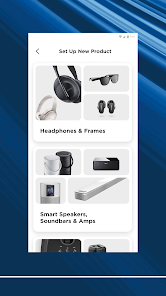
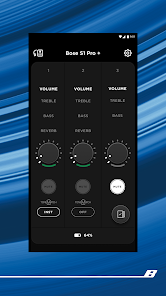
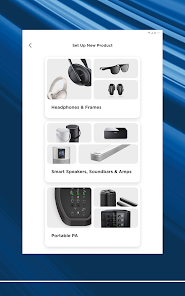
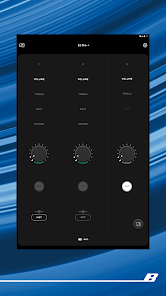
The Bose app lets you easily control all your Bose products in one place. Bose app (formerly Bose Music app) compatible speakers, soundbars, amplifiers, headphones, earbuds, OpenAudio products, and portable PA systems are designed to work together seamlessly to enhance your listening experience.
GET THE MOST OUT OF YOUR HEADPHONES AND EARBUDS
Personalize your environment with controllable noise cancellation on our QuietComfort products. With Modes on QuietComfort products, you decide how much ...
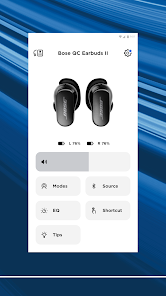
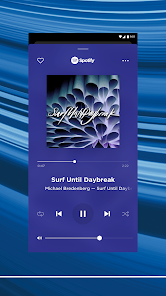
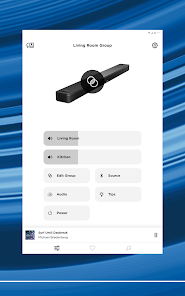
The Bose app lets you easily control all your Bose products in one place. Bose app (formerly Bose Music app) compatible speakers, soundbars, amplifiers, headphones, earbuds, OpenAudio products, and portable PA systems are designed to work together seamlessly to enhance your listening experience. GET THE MOST OUT OF YOUR HEADPHONES AND EARBUDSPersonalize your environment with controllable noise cancellation on our QuietComfort products. With Modes on QuietComfort products, you decide how much of the world to let in. Choose Quiet Mode for full noise cancelling, or Aware Mode to hear your surroundings and your music at the same time. Select products offer Aware Mode with ActiveSense technology, which brings the sounds around you down to a more comfortable level. The result is hearing everything you need to, but at a much more pleasant and balanced volume. All the QuietComfort and OpenAudio features, like Immersive Audio from the Ultra line, are made readily available for you. Fully customize your experience by balancing the EQ settings, picking your on-product shortcuts, and more all within the app. EASY SETUP AND TOTAL CONTROL Easily set up your products and get right to listening. Play the same content throughout your home or listen to different content in different areas—it’s up to you. The Bose app lets you control all your Bose products from any room. ONE-TOUCH ACCESS One touch and your home is filled with the music you love most. The Bose app makes it easy to set your favorite playlists or stations as presets. Then you can access them effortlessly on your app, the buttons on your speaker, or soundbar remote. SPEED TO MUSICIt’s faster than ever to browse and play the music you love from Spotify®, Pandora®, Amazon Music, SiriusXM, iHeartRadio™, TuneIn and more, all within the Bose app. All your favorite music in one place. ActiveSense, Bose, the B logo, and QuietComfort are trademarks of Bose Corporation. Spotify is a registered trademark of Spotify AB. TuneIn is a registered trademark of TuneIn, Inc. Google is a trademark of Google LLC. Amazon, Amazon Music, Alexa and all related logos are trademarks of Amazon, Inc. or its affiliates. Wi-Fi® is a registered trademark of Wi-Fi Alliance®. Pandora, the Pandora logo and the Pandora trade dress are trademarks or registered trademarks of Pandora Media, Inc. used with permission. iHeartRadio is a registered trademark of iHeartMedia, Inc. SiriusXM and all related marks and logos are trademarks of Sirius XM Radio Inc. and its subsidiaries. All rights reserved. Privacy Policyhttps://worldwide. bose. com/privacypolicyCalifornia Privacy Notice of Collectionhttps://www. bose. com/californiaprivacynoticeofcollection
Download Bose
Get the official app from the trusted app stores. You will be redirected to the download page.
Official Links
When you purchase through links on our site, we may earn an affiliate commission. Learn more
Ratings breakdown
171,000 reviewsDeveloper contact
Name
Bose Corporation
Address
100 The Mountain Rd Framingham, MA 01701 United States
Website
http://www.bose.comPhone
+1 508-981-4140
Support
BoseAppSupport@Bose.com
Privacy
View policyFrequently Asked Questions
Does the Bose app require an internet connection to work? medium
Yes, based on recent user reports, the Bose app may not function properly without an internet connection. One reviewer explicitly notes the app cannot see devices or adjust settings offline. Another user reports failing to connect unless the phone is in range of a network.
Source: user_reviews
Is the Bose app free to download? high
Yes, the Bose app is free to download on Google Play.
Source: app_metadata
Why won't my Bose app connect to my headphones? high
Recent user reviews indicate persistent connection failures. Users report the app not detecting their devices, random disconnections, and requiring full resets of the earbud case and Bluetooth setup to reconnect.
Source: user_reviews
What devices are compatible with the Bose app? high
The app supports a wide range of Bose products including speakers, soundbars, amplifiers, headphones, earbuds, OpenAudio products, and portable PA systems.
Source: app_metadata
How to Use
The Bose app is designed to centrally control compatible Bose audio products, enabling setup, personalization of sound, and access to music streaming services. (app_description)
Getting Started
Source: app_description_and_user_feedback_noted
- Download and open the Bose app on your Android device.
- Power on your compatible Bose product (e.g., headphones, speaker).
- Follow the in-app prompts to pair your device via Bluetooth.
- Once connected, use the app to set up presets, adjust EQ settings, or manage noise cancellation features.
Key Features (from app listing)
Source: app_description
- Control and manage multiple Bose products from a single app.
- Personalize sound with adjustable EQ settings and noise cancellation modes.
- Set one-touch presets for your favorite playlists, stations, or streaming services.
- Supports Spotify, Pandora, Amazon Music, SiriusXM, iHeartRadio, TuneIn, and more.
Derived from a verified user complaint in Review #1 about connection issues and the specific fix they mentioned (deleting from phone memory and factory resetting the case).
How this content was created
Content type: pattern_analysis_of_user_reviews_and_metadata
AI generated: Yes
- Google Play user reviews (12-20 preferred; may be smaller if source data is limited per app), October 30, 2024 to February 24, 2026
- Google Play ratings distribution
- App Store listing metadata
- Review samples are not statistically representative of all user sentiment
- High-engagement negative reviews can overrepresent complaints
- Claims labeled 'low confidence' are based on single-review observations only
- No real-world app testing was conducted
- Feature availability may vary by region, device, and app version
- Only 5 recent reviews were available for analysis; other sampling buckets (liked negative, liked positive, mixed) were missing, limiting the representativeness of the sample.
Pros & Cons
Based on analysis of Google Play user reviews
Pros
- Useful for accessing and adjusting settings for Bose headphones and earbuds.
Theme 'Settings control' identified in recent_review #2 and #3
Evidence (2)
“the app is very useful and can access many settings easily”Rating: 2★ July 14, 2025 182 likes“App is missing alot of features most modern apps have for its audience.”Rating: 3★ February 24, 2026 13 likes - Allows customization of EQ settings and on-product shortcuts.
Theme 'Customization options' identified in recent_review #2
Evidence (1)
“Fully customize your experience by balancing the EQ settings, picking your on-product shortcuts, and more all within the app.”Rating: 3★ February 24, 2026 13 likes - Provides easy setup for Bose products and multi-room control.
Theme 'Easy setup' identified in recent_review #3
Evidence (1)
“Easily set up your products and get right to listening.”Rating: 2★ July 14, 2025 182 likes
Cons
- Frequent random disconnections requiring full reset of earbuds and Bluetooth setup.
Theme 'Random disconnections' identified in recent_review #1 and #5
Evidence (2)
“They randomly disconnect, requiring deletion from phone memory and full reset of earbud case and Bluetooth setup.”Rating: 1★ December 14, 2025 273 likes“it says my device isn't connected when I have them on, it announced the sync to my pixel just fine in my ear, but alas the app doesn't register that I even have a product.”Rating: 1★ February 26, 2025 229 likes - App requires internet connection to function, even for basic device settings.
Theme 'Requires internet' identified in recent_review #3
Evidence (1)
“when not connected to the Internet it can't see your devices, adjust settings or even really use anything on the app.”Rating: 2★ July 14, 2025 182 likes - No dark mode, and the app runs in the background unnecessarily, raising privacy concerns.
Theme 'No dark mode and background activity' identified in recent_review #2 and #4
Evidence (2)
“The whole app is a flashbang. No dark mode”Rating: 3★ February 24, 2026 13 likes“the app keeps starting in the bg saying "keeping everything in sync" when I'm not using anything for audio. Seems like Spyware to me”Rating: 1★ October 30, 2024 101 likes
Recent Reviews
Deadeyez 013
1★They randomly disconnect, requiring deletion from phone memory and full reset of earbud case and Bluetooth setup. This can happen as infrequently as every few month, to less than a week. The "remember my settings" option for sound mode literally has never worked, ever. It says it's in the correct mode, but it's not. It does however work if you manually cycle through the modes every time you put them in your ear. I am using the Quiet Comfort II hardware. App works best when force-quit and reboot.
Dr. Red
3★App is missing alot of features most modern apps have for its audience. I have experimented with lots of brands, but Bose is one of the audio companies whose software lacks in alot. Majority of time, my Bose app wont even connect to my audio devices, locking me out of basically the whole earbud/headphone. Modes are auto selecting. Audio will auto pause when audio device is being undetected in use, and you can't turn this option off. Another weird thing. The whole app is a flashbang. No dark mode
Paul West
2★the app is very useful and can access many settings easily, when connected to the Internet. which makes little sense as many of the devices are used for travel including flying on a plane. when not connected to the Internet it can't see your devices, adjust settings or even really use anything on the app. If they add offline capability and access to device user manuals offline I'll upgrade to 5 stars. Until then, it really isn't all that useful.
Jacob Carton
1★New headphones are nice, but there's no way to turn off sound cancelation voiceover. Would be a nice feature since I can tell what mode it's in without. More annoying is that the app keeps starting in the bg saying "keeping everything in sync" when I'm not using anything for audio. Seems like Spyware to me, apps should stay off unless prompted to be otherwise. This is why it's a 1 star.
Allison Riis
1★Honestly, I'm disappointed. I have a Google Pixel, and I'm aware that most things are geared towards iPhone but what the hell? It's just an app to connect my headphones and it barely functions?? I can't even use it, it says my device isn't connected when I have them on, it announced the sync to my pixel just fine in my ear, but alas the app doesn't register that I even have a product. So basically the app is trash, lucky the product doesn't completely suck.