By AppHub Editorial Team · Updated August 5, 2026

Da Fit
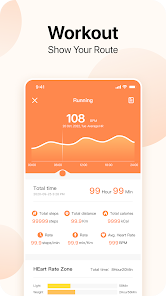
Overview
Sports
MO YOUNG LTD
Free
Dec 14, 2017
V2.9.8-149-gbdcaba5120
5.0
No
Feb 4, 2026
Features
Description
Description
Download Da Fit
Get the official app from the trusted app stores. You will be redirected to the download page.
When you purchase through links on our site, we may earn an affiliate commission. Learn more
Ratings breakdown
375,000 reviewsDeveloper contact
Name
孟帅
Address
宝华路288号 壹方商业中心二期5座A单元1705房 宝安区, 深圳市, 广东省 China 518000
Website
https://www.moyoung.comSupport
play-store@moyoung.com
Privacy
View policyFrequently Asked Questions
Does Da Fit work without a subscription? high
Yes, Da Fit is completely free to download and use. The app has no subscription fees, though recent user reviews indicate that intrusive ads have been added, with some users reporting multiple full-screen ads appearing on app launch.
Source: app_metadata, user_reviews
What health metrics can Da Fit track? high
According to the app description, Da Fit tracks sleep quality and provides health data insights with easy-to-view trends. User reviews specifically mention step counting and blood pressure monitoring, though one review rates both as very inaccurate.
Source: app_metadata, user_reviews
Does Da Fit sync contacts and messages from my phone? medium
Multiple user reviews report that contact syncing does not work properly, and text messages do not sync to show message content — only a notification that a message has arrived. This appears to be a persistent issue across multiple app versions.
Source: user_reviews
Can I use Da Fit with any smartwatch or fitness band? medium
The app description indicates it is designed to work with 'Da Fit Band' devices. The app requires Android 5.0 or higher and does not list compatibility with other brand wearables. A review mentions setting custom photos on the watch face, supporting branded device use.
Source: app_metadata, user_reviews
How to Use
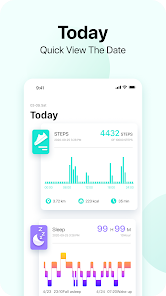
Da Fit is a companion app for a smart fitness band that helps users set health goals, track sleep quality, view health trends, and receive call and notification alerts via vibration. (app_description)
Getting Started
Source: app_description_and_user_feedback_noted
- Download Da Fit from Google Play and install on your Android device (requires Android 5.0 or higher).
- Pair your Da Fit Band with the app via Bluetooth — ensure Bluetooth stays enabled in your phone settings to maintain the connection.
- Set up your personal health data and goals using the app's tracking features.
- Configure your band settings, including alarm, call notifications, and health tracking preferences.
- Note: If you encounter persistent Bluetooth disconnection as reported in some reviews, try re-pairing the device or checking for app updates.
Key Features (from app listing)
Source: app_description
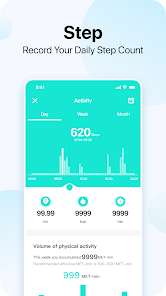
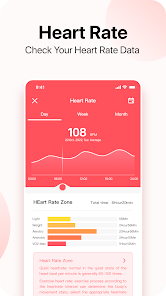
- Track health data day and night, including step count and blood pressure (as used per user reports)
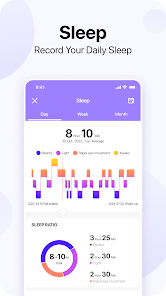
- Monitor and track sleep quality with automatic sleep tracking
- Gentle vibrating alarm to wake up feeling rested
- View personal health data trends with easy-to-read insights
- Set the band to vibrate for incoming calls on your phone
Based on review #2 (3-star, Jan 2026) which specifically notes that enabling 'other' app notifications causes alerts from all apps, and the user wished for more customizable notification control.
How this content was created
Content type: pattern_analysis_of_user_reviews_and_metadata
AI generated: Yes
- Google Play user reviews (12-20 preferred; may be smaller if source data is limited per app), March 29, 2024 to February 05, 2026
- Google Play ratings distribution
- App Store listing metadata
- Review samples are not statistically representative of all user sentiment
- Only 5 recent reviews were available — a much smaller sample than the preferred 12-20
- No high-engagement praise or complaint data was available to contextualize sentiment
- Claims labeled 'low confidence' are based on single-review observations only
- Claims labeled 'medium confidence' are based on 2 agreeing reviews within the same bucket
- No real-world app testing was conducted
- Feature availability may vary by region, device, and app version
Pros & Cons
Based on analysis of Google Play user reviews
Pros
- The app is considered simple and easy to use by some users (recent pattern) low
Theme 'simplicity/ease of use' identified in 1 recent_review #5 (3-star). The reviewer explicitly states 'the app is fine. it's simple and easy to use' before listing complaints.
Evidence (1)
“Overall the app is fine. it's simple and easy to use. I like being able to put my own pics on the watch face.”Rating: 3★ March 29, 2024 241 likes - Custom watch face feature is appreciated (recent pattern) low
Theme 'custom watch faces' identified in 1 recent_review #5 (3-star). The reviewer states 'I like being able to put my own pics on the watch face' as a positive.
Evidence (1)
“I like being able to put my own pics on the watch face.”Rating: 3★ March 29, 2024 241 likes
Cons
- Intrusive ads are a recent and growing problem (recent pattern) medium
Theme 'overwhelming/interruptive ads' identified in 2 recent reviews. recent_review #1 (Feb 2026) describes '3-5 ads taking over the ENTIRE screen' blocking app access. recent_review #3 (Nov 2025) notes 'starting to see ads after a year 1/2'. Both independently report ad volume as a major complaint.
Evidence (2)
“The ads are overwhelming. As SOON as you open the app you'll have up to 3-5 ads taking over the ENTIRE screen. Completely blocking access to the app until you watch the ads.”Rating: 1★ February 05, 2026 46 likes“Im starting to see ads after a year 1/2.. Deletion is coming soon.”Rating: 1★ November 26, 2025 323 likes - Step counting and blood pressure tracking are inaccurate (recent pattern) low
Theme 'inaccurate health tracking' identified in 1 recent_review #3 (1-star). The reviewer explicitly states 'The step meter SUCKS!! The blood pressure meter SUCKS!!' using emphatic language. No other reviewers corroborate this specific issue.
Evidence (1)
“The step meter SUCKS!! The blood pressure meter SUCKS!!”Rating: 1★ November 26, 2025 323 likes - Bluetooth connection is unreliable, leading to constant disconnection (recent pattern) medium
Theme 'Bluetooth connection issues' identified in 2 recent reviews. recent_review #3 (1-star) reports 'Doesn't stay connected'. recent_review #4 (1-star) reports 'Bluetooth connection doesn't stay connected'. Both independent descriptions of the same problem.
Evidence (2)
“Doesn't stay connected”Rating: 1★ November 26, 2025 323 likes“Bluetooth connection doesn't stay connected.”Rating: 1★ September 07, 2025 359 likes - Contact syncing is broken (recent pattern) medium
Theme 'contact sync failure' identified in 2 recent reviews. recent_review #4 (1-star) states 'The contacts do not sync' and 'Messages do not sync'. recent_review #5 (3-star) states 'I cannot get the contacts to work right. It brings up random and old ones'. Both report contacts not syncing correctly.
Evidence (2)
“The contacts do not sync. Messages do not sync.”Rating: 1★ September 07, 2025 359 likes“I cannot get the contacts to work right. I've tried everything. It brings up random and old ones that I cant sync to the watch anyways”Rating: 3★ March 29, 2024 241 likes - Notification support is limited and unreliable (recent pattern) medium
Theme 'notification limitations' identified in 2 recent reviews. recent_review #2 (3-star) notes inability to selectively enable notifications for specific apps (Signal) and lack of ringtone. recent_review #4 (1-star) states 'Message notifications work, but the messages do not show up' — meaning only a notification alert is sent without message content. Both describe different aspects of notification failure.
Evidence (2)
“It doesn't push notifications from Signal app unless you enable other, and then it pushes notifications from ALL other apps. It also doesn't have a ring tone for notifications and the vibration setting (even on strong) is weak”Rating: 3★ January 21, 2026 35 likes“Message notifications work, but the messages do not show up. It's only a message to tell you there is a message on your phone.”Rating: 1★ September 07, 2025 359 likes
Recent Reviews
Logan
1★I've had this app for a couple of years and loved it until recently. The ads are overwhelming. As SOON as you open the app you'll have up to 3-5 ads taking over the ENTIRE screen. Completely blocking access to the app until you watch the ads. I'm fine with ads at the top, off to the side or whatever. People need to make money how they can get it, but this is WAY too much and way to frequent!
Travis “Taz” Tanzey
3★Decent, but I wish it would allow for more customizable notifications. It doesn't push notifications from Signal app unless you enable other, and then it pushes notifications from ALL other apps. It also doesn't have a ring tone for notifications and the vibration setting (even on strong) is weak, but the ringer for the phone is loud and doesn't have a volume setting. The watch I'm using is an SW-7 and I haven't had it long. maybe I missed something in the set-up, but overall its OK at best.
Correy D. Tubbs
1★Im starting to see ads after a year 1/2.. Deletion is coming soon. The step meter SUCKS!! The blood pressure meter SUCKS!! Doesn't stay connected, Weather goes back to Celsius. Oh, why have an alarm, but no chime for notifications? While doing heavy or active work the vibration goes unnoticed. That's if it stays connected. Love the durability. The wristband is really good. They music player is good as well. For the price, I guess it's okay.
Bryan Shapiro
1★The contacts do not sync. Messages do not sync. Bluetooth connection doesn't stay connected. Message notifications work, but the messages do not show up. It's only a message to tell you there is a message on your phone. Thanks, that's as useful as screens on a submarine window. I get constant push messages from the app. Da Fit apparently thinks people want to know their step count every 10 minutes on their phone. You can't turn the notifications off unless you turn off all notifications. P.O.S.
N D
3★Overall the app is fine. it's simple and easy to use. I like being able to put my own pics on the watch face. The 2 main problems for me tho are: I cannot get the contacts to work right. I've tried everything. It brings up random and old ones that I cant sync to the watch anyways, but, if a contact from my phone calls me, their name shows on the watch. 🤷♀️. The blood pressure is WAY off, like 20+ too high top number, and almost always around the same numbers everytime.