By App Discoverer Editorial Team · Updated October 1, 2026

FitCloudPro

Overview
Health & Fitness
topstep
Free
Jan 23, 2019
2.6.0
5.0
No
Jan 20, 2026
Features
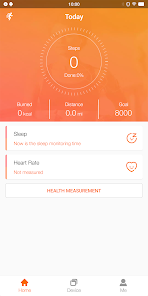
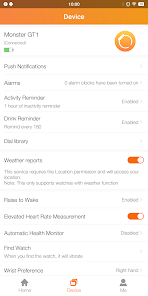
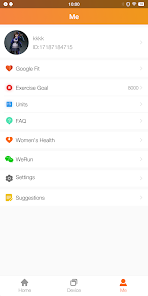
FitCloudPro helps you connect your smartwatch with your mobile phone, it manages your smartwatch while giving you more control over its functions.
FitCloudPro supports the following Kumi smartwatch:
KUMI GT6 Pro
KUMI GW16T Pro
KUMI KU3 Max
KUMI KU3 Meta
Such as steps, calories, sleep, heart rate, blood oxygen, etc.
Support calls, SMS, Facebook, Twitter and other reminders, as well as hang up the bracelet, quickly reply to text mes...
FitCloudPro helps you connect your smartwatch with your mobile phone, it manages your smartwatch while giving you more control over its functions. FitCloudPro supports the following Kumi smartwatch: KUMI GT6 ProKUMI GW16T ProKUMI KU3 MaxKUMI KU3 Meta
Download FitCloudPro
Get the official app from the trusted app stores. You will be redirected to the download page.
When you purchase through links on our site, we may earn an affiliate commission. Learn more
Ratings breakdown
77,400 reviewsDeveloper contact
Name
黄欣
Address
China
Website
http://www.hetangsmart.comSupport
rd@hetangsmart.com
Privacy
View policyFrequently Asked Questions
Is FitCloudPro free to download? high
Yes. The app metadata lists FitCloudPro as free.
Source: app_metadata
What do sampled users complain about in FitCloudPro? medium
FitCloudPro has sampled reports of connection, sync, backup, or device pairing problems. 2 sampled reviews or 1 sampling buckets support this theme.
Source: user_reviews
What do sampled users like about FitCloudPro? low
FitCloudPro is praised by sampled reviewers for features, customization, or flexibility. Only 1 sampled review supports this theme, so confidence is low.
Source: user_reviews
How to Use
FitCloudPro helps you connect your smartwatch with your mobile phone, it manages your smartwatch while giving you more control over its functions.FitCloudPro supports the following (app_description)
Getting Started
Source: app_description_and_user_feedback_noted
- Install FitCloudPro from the appropriate app store.
- Open the app and start with the free experience.
- Review the main features described in the app listing.
- Check settings or support resources if you run into sampled issue patterns such as fitcloudpro has sampled reports of connection, sync, backup, or device pairing problems.
Key Features (from app listing)
Source: app_description
- Monitor and record your health dataSuch as steps, calories, sleep, heart rate, blood oxygen, etc.
- Various dialsDifferent watch faces can be selected to match your style and mood
- Not for medical purposes, only for general fitness/health purposes
- Health & Fitness app experience
- Free download
- From topstep
Theme 'features, customization, or flexibility' identified in recent_reviews #1. Review #1 praises features, customization, or flexibility.
How this content was created
Content type: pattern_analysis_of_user_reviews_and_metadata
AI generated: Yes
- Google Play user reviews (12-20 preferred; may be smaller if source data is limited per app), November 25, 2025 to April 03, 2026
- Google Play ratings distribution
- App Store listing metadata
- Review samples are not statistically representative of all user sentiment
- High-engagement negative reviews can overrepresent complaints
- Claims labeled 'low confidence' are based on single-review observations only
- No real-world app testing was conducted
- Feature availability may vary by region, device, and app version
Pros & Cons
Based on analysis of Google Play user reviews
Pros
- Offers a wide variety of customizable watch faces to suit different styles.
Theme 'Customizable watch faces' identified in recent_review #1 and #2
Evidence (2)
“It has a lot of different displays to customize your watch face to.”Rating: 3★ April 03, 2026 3 likes“very limited dials/faces for weather, at most in some of them say the temp, but it should have more options for those who like to keep an eye on the weather constantly”Rating: 3★ April 09, 2026 - Tracking accuracy for steps and other metrics is generally good.
Theme 'Good tracking accuracy' identified in recent_review #1
Evidence (1)
“Tracking seems to be pretty accurate, but not 100%.”Rating: 3★ April 03, 2026 3 likes - Works reliably with older Kumi watch models like the HT17.
Theme 'Works with older models' identified in recent_review #5
Evidence (1)
“App is accurate with 1 of my older watches, HT17.”Rating: 3★ November 25, 2025 73 likes
Cons
- Sleep tracking is inaccurate and cannot be adjusted for actual sleep times.
Theme 'Inaccurate sleep tracking' identified in recent_review #1 and #5
Evidence (2)
“My biggest complaint is the sleep tracking feature. It is factory set to start registering your sleep at 4 minutes after midnight and not the actual time you go to sleep. I can't find a way to change this either.”Rating: 3★ April 03, 2026 3 likes“However sleep data doesnt get transferred to Google Fit via Health Connect for some reason.”Rating: 3★ November 25, 2025 73 likes - App drains phone battery significantly due to constant Bluetooth connection attempts.
Theme 'Battery drain' identified in recent_review #4
Evidence (1)
“Like the watch, but the app keeps draining my phone's battery. I can't find a way to only connect via bloetooth on request.”Rating: 3★ February 23, 2026 12 likes - Connection issues cause the app to stop working with the watch after initial setup.
Theme 'Connection problems' identified in recent_review #3
Evidence (1)
“worked and connected to my phone just fine and then stopped connecting. tried everything it says to do...turn off, turn back on, restart device, etc.”Rating: 1★ April 06, 2026 9 likes
Recent Reviews
Mary Wigerman
3★I like the fitness watch. It has a lot of different displays to customize your watch face to. Tracking seems to be pretty accurate, but not 100%. My biggest complaint is the sleep tracking feature. It is factory set to start registering your sleep at 4 minutes after midnight and not the actual time you go to sleep. I can't find a way to change this either. The time you awake at night doesn't accurately measure either.
Luingiorno Jasanpahaf
3★very limited dials/faces for weather, at most in some of them say the temp, but it should have more options for those who like to keep an eye on the weather constantly (drone operators, hikers, airports,etc). To include options for weather forecast, temp, and wind speed & direction. Other smartwatches have them, so it is possible.
Elsie LaForge
1★worked and connected to my phone just fine and then stopped connecting. tried everything it says to do...turn off, turn back on, restart device, etc. I'm really thinking of just dumping the whole watch and actually investing in something that really works. update 4/2026 the app is still not cooperating with my phone. And it's a brand new phone. Nope, app and watch just are not up to par with technology. Very Disappointed. Do not recommend.
Nancy Eddy
3★Like the watch, but the app keeps draining my phone's battery. I can't find a way to only connect via bloetooth on request. It requires me to stay connected unless I turn on the battery saver on the watch, and then it keeps trying to reconnect to the watch, even if I've closed the app. The watch battery doesn't seem to be lasting as long as the documentation says it should, either.
Paul Hewitt
3★App is accurate with 1 of my older watches, HT17. However sleep data doesnt get transferred to Google Fit via Health Connect for some reason.Developers need to look into it. With my other watch, HT30, the app is a mess.BP inaccuracies, and back to front, if you put in your own data from a blood pressure monitor in settings, the readings from the watch go haywire, over 250. Recording in miles on watch is wrong, km is correct and sleep data not transferred to Fit either. Needs some work!