By AppHub Editorial Team · Updated August 3, 2026

VN - AI Video Editor
Overview
Video Players & Editors
Ubiquiti Labs, LLC
Free
May 4, 2018
2.11.0
7.0
$0.99 - $69.99 per item
No
Feb 27, 2026
Features
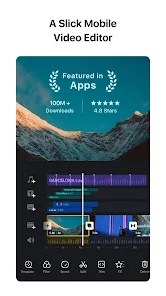
VN is an easy-to-use and free video editing app with no watermark. The intuitive interface makes video editing simple, with no prior knowledge needed. It offers all the features required to create professional and high-quality videos, satisfying both the needs of professional and amateur video editors.
Intuitive Multi-Track Video Editor
VN is an easy-to-use and free video editing app with no watermark. The intuitive interface makes video editing simple, with no prior knowledge needed. It offers all the features required to create professional and high-quality videos, satisfying both the needs of professional and amateur video editors. Intuitive Multi-Track Video Editor
Download VN - AI Video Editor
Get the official app from the trusted app stores. You will be redirected to the download page.
When you purchase through links on our site, we may earn an affiliate commission. Learn more
Ratings breakdown
5,110,000 reviewsDeveloper contact
Name
Ubiquiti Labs, LLC
Address
685 3rd Ave Fl 27 New York, NY 10017 United States
Website
https://www.vlognow.me/Phone
+1 646-780-7958
Support
vn.support@ui.com
Privacy
View policyFrequently Asked Questions
Is VN - AI Video Editor free to download? high
Yes. The app metadata lists VN - AI Video Editor as free, with in-app purchases $0.99 - $69.99 per item
Source: app_metadata
What do sampled users complain about in VN - AI Video Editor? low
VN - AI Video Editor has sampled reports of bugs, crashes, freezing, or performance problems affecting usability. Only 1 sampled review supports this theme, so confidence is low. For example, one reviewer says: "t I'd saved didn't work, when I went back to play, I got an error that the origina"
Source: user_reviews
What do sampled users like about VN - AI Video Editor? low
VN - AI Video Editor is praised by sampled reviewers for good value, free features, or affordability. Only 1 sampled review supports this theme, so confidence is low.
Source: user_reviews
Is VN - AI Video Editor worth downloading in 2026? medium
Based on 5 sampled reviews spanning July 13, 2025 to September 04, 2024, VN - AI Video Editor has a 4.7/5 overall rating from 5.1M total reviews. Sampled reviews show 1 praised themes and 1 complaint themes. As with any app, experiences vary by device and use case.
Source: user_reviews, app_metadata, ratings_data
How to Use
VN is an easy-to-use and free video editing app with no watermark. (app_description)
Getting Started
Source: app_description_and_user_feedback_noted
- Install VN - AI Video Editor from the Google Play Store or Apple App Store.
- Open the app and begin with the free experience to explore its core functionality.
- Review the main features described in the app listing to understand what this app offers.
- Be aware of sampled user-reported issues: the app has sampled reports of bugs, crashes, freezing, or performance problems affecting usability..
Key Features (from app listing)
Source: app_description
- Delete & Reorder Easily: Swipe up or down to delete selected video clips. Easily reorder materials by drag-and-drop.
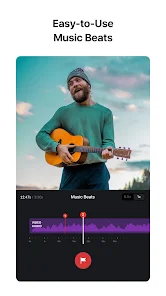
- Music Beats: Add markers to edit video clips to the beat of the music and take your videos to the next level.
- Creative Templates: Create music and video templates and share them with your friends and family.
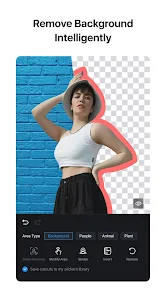
- Intelligent Cutout: Remove the background precisely to make the character stand out and radiate vitality.
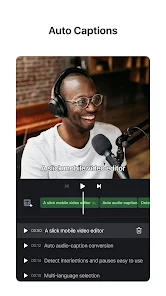
- Auto Text-Caption Conversion: Swiftly convert your audio into subtitles with just one click.
- Text-to-Speech: Generate voice-overs from text using AI voices with multiple voice options.Flexible Use of Materials
Theme 'good value, free features, or affordability' identified in recent_reviews #3. Review #3 (recent_reviews, 5★) mentions good value, free features, or affordability.
How this content was created
Content type: pattern_analysis_of_user_reviews_and_metadata
AI generated: Yes
- Google Play user reviews (12-20 preferred; may be smaller if source data is limited per app), July 13, 2025 to September 04, 2024
- Google Play ratings distribution
- App Store listing metadata
- Review samples are not statistically representative of all user sentiment
- High-engagement negative reviews can overrepresent complaints
- Claims labeled 'low confidence' are based on single-review observations only
- No real-world app testing was conducted
- Feature availability may vary by region, device, and app version
Pros & Cons
Based on analysis of Google Play user reviews
Pros
- App is free to use with no watermark, a major advantage over competitors.
Theme 'Free and no watermark' identified in recent_review #1 and #3
Evidence (2)
“It has no watermarks even on the free version.”Rating: 5★ January 23, 2026 1,736 likes“So many were unavailable on mobile or had a watermark or like 'only 2 drafts for free'.”Rating: 5★ September 04, 2024 29,439 likes - App is intuitive and easy to use, suitable for beginners and professionals.
Theme 'Intuitive and easy to use' identified in recent_review #1 and #3
Evidence (2)
“VN is intuitively easy to use.”Rating: 5★ January 23, 2026 1,736 likes“This is actually the best editor I have found”Rating: 5★ September 04, 2024 29,439 likes - App offers a wide range of effects, transitions, and fonts for creative editing.
Theme 'Wide range of effects' identified in recent_review #3 and #5
Evidence (2)
“Tons of effects to choose from.”Rating: 5★ January 23, 2026 1,736 likes“Beautiful transitions, numerous fonts to choose from, nice sound catalogue.”Rating: 4★ July 13, 2025 25,051 likes
Cons
- App can be laggy and slow, especially with multiple overlays or complex projects.
Theme 'Lag and performance issues' identified in recent_review #1 and #2
Evidence (2)
“I will say that the app is laggy”Rating: 5★ September 04, 2024 29,439 likes“the video feed/timeline at the bottom doesn't actually show the same frames as what is currently playing.”Rating: 2★ February 08, 2026 34 likes - App has issues with saving projects and exporting, leading to lost work.
Theme 'Saving and export issues' identified in recent_review #4
Evidence (1)
“the ones I thought I'd saved didn't work, when I went back to play, I got an error that the originals had disappeared.”Rating: 2★ October 01, 2024 2,240 likes - App has confusing folder organization and lacks clear instructions for saving projects.
Theme 'Confusing organization and instructions' identified in recent_review #4
Evidence (1)
“The folders organization is confusing to say the least”Rating: 2★ October 01, 2024 2,240 likes
Recent Reviews
Rox Nichols
5★This is actually the best editor I have found, and thank god for that. So many were unavailable on mobile or had a watermark or like 'only 2 drafts for free'. I don't think I'll even need 100 drafts, lol. Now, I will say that the app is laggy, and I don't mean it in the way of, 'It will crash on me 30+ times for a 2 and 40 second video' I mean it as if you are using a lot of overlays it might take a moment to actually move to where you need it to, but that's the only thing. Love this so much! ♡
Micah Flack
2★Editing photos is easy enough, but my god is it impossible to sync overlays with a video. You'll play it and everything appears to look good. But the replay will always show clips loading a half second too soon or late. Not to mention that the video feed/timeline at the bottom doesn't actually show the same frames as what is currently playing. Junk editor.
Elijah Lové
5★If I was browsing for a video editor for Android right now this is the app I'd be looking for. VN is intuitively easy to use. It has no watermarks even on the free version. Tons of effects to choose from. I'm using it for my YouTube channel. It has everything I need right out of the box. In a couple months I'll likely pay for premium — it's that good.
Raymond Dunne
2★The function of the editor itself seems to work very well, that's the only reason for a second star. The folders organization is confusing to say the least, saving projects seems to be fairly easy but the ones I thought I'd saved didn't work, when I went back to play, I got an error that the originals had disappeared. There are no clear inductions on how to save them permanently and export doesn't work nor any instructions on that either. Waste of time from my experience, too complicated.
Ayorinde Olamidipupo
4★It's a new experience for me while using phone video editors. No add, that's game. Beautiful transitions, numerous fonts to choose from, nice sound catalogue. And most especially FREE, that's mind bugging. However, there is room for improvement.