By AppHub Editorial Team · Updated August 3, 2026

Screen Recorder - AZ Recorder


Overview
Video Players & Editors
AZ Screen Recorder
Free
Nov 11, 2014
6.7.9
6.0
$2.49 - $17.99 per item
No
In-App Purchases
Feb 11, 2026
Features
🥇 Featured on Google Play Home Page, BusinessInsider, CNET, HuffPost, Yahoo News, and more.
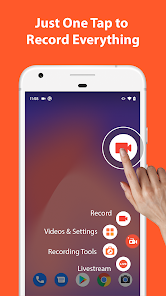
AZ Screen Recorder is a reliable and high-quality screen recorder with audio. With many features including screen record, screen capture, video editor and live streaming, this screen recording app lets you create and share gameplay videos, save video calls or record videos that cannot be downloaded.
ADVANTAGES ★ Easy to use. ★ High-quality videos. ★ NO watermark. ★ NO time limit.
KEY FEATURES ★ Screen ...
🥇 Featured on Google Play Home Page, BusinessInsider, CNET, HuffPost, Yahoo News, and more. AZ Screen Recorder is a reliable and high-quality screen recorder with audio. With many features including screen record, screen capture, video editor and live streaming, this screen recording app lets you create and share gameplay videos, save video calls or record videos that cannot be downloaded. ADVANTAGES★ Easy to use.★ High-quality videos.★ NO watermark.★ NO time limit. KEY FEATURES★ Screen recording: this function lets you create beautiful screen record videos.
Download Screen Recorder - AZ Recorder
Get the official app from the trusted app stores. You will be redirected to the download page.
When you purchase through links on our site, we may earn an affiliate commission. Learn more
Ratings breakdown
1,960,000 reviewsData Safety
- This app may share these data types with third parties Location, App activity and 2 others
- This app may collect these data types Location, App activity and 2 others
- Data is encrypted in transit
- You can request that data be deleted
Permissions
- read the contents of your USB storage
- modify or delete the contents of your USB storage
- read the contents of your USB storage
- modify or delete the contents of your USB storage
- take pictures and videos
- record audio
- view Wi-Fi connections
- view network connections
- full network access
- draw over other apps
- control vibration
Developer contact
Name
Mai Huy Mão
Address
9, ngõ 61, Nguyễn Đức Cảnh, Tương Mai, Hoàng Mai Hà Nội 100000 Vietnam
Website
https://hecorat.netSupport
az.screen.recorder@gmail.com
Privacy
View policyFrequently Asked Questions
Is AZ Screen Recorder free? high
Yes, the app is free to download. It offers in-app purchases ranging from $2.49 to $17.99 per item for an ad-free experience and additional features.
Source: app_metadata
Does AZ Screen Recorder have a watermark or time limit? high
No, according to the app description, the free version has no watermark and no time limit on recordings.
Source: app_metadata
Can I record internal audio with AZ Screen Recorder? high
Yes, the app supports internal audio recording on Android 10 and above, allowing you to record the original sound from games and apps.
Source: app_metadata
Does AZ Screen Recorder have a video editor? high
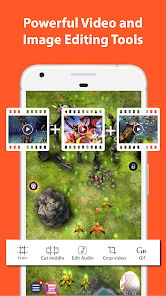
Yes, the app includes a built-in video editor with features to trim, merge, crop, rotate, compress videos, add background music and subtitles, and extract frames.
Source: app_metadata
Can I livestream my screen using AZ Screen Recorder? high
Yes, the app can be used as a livestreaming app for YouTube or Facebook, with features including facecam, external audio, and various video resolutions.
Source: app_metadata
What Android version do I need for AZ Screen Recorder? high
AZ Screen Recorder requires Android 6.0 (Marshmallow) and up.
Source: app_metadata
Does AZ Screen Recorder have a facecam feature? high
Yes, the app supports a floating facecam window that shows your face while recording the screen.
Source: app_metadata
How to Use
AZ Screen Recorder is a screen recording app for Android that lets users capture video, take screenshots, edit recordings, and livestream to platforms like YouTube and Facebook. (app_description)
Getting Started
Source: app_description_and_user_feedback_noted
- Download and install AZ Screen Recorder from the Google Play Store.
- Open the app and grant the necessary permissions (record screen, audio, overlay).
- Tap the floating record button or use the widget to start recording your screen.
- Use the control buttons to pause or stop the recording as needed.
- Access your recordings in the app's gallery to trim, edit, or share them.
Key Features (from app listing)
Source: app_description
- Screen recording with audio from microphone or internal audio (Android 10+).
- Built-in video editor: trim, merge, crop, rotate, compress, add subtitles and music.
- Live streaming to YouTube and Facebook with facecam support.
- Screenshot capture with image editing tools: stitch, crop, blur, add text/emoji.
- No watermark or time limit on recordings.
- Draw on screen while recording, shake to stop recording.
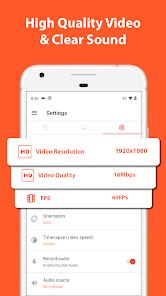
- Record in multiple resolutions up to 4K (device-dependent) and frame rates up to 60fps.
- WiFi transfer of recordings to computer.
This tip is responsive to a verified user complaint from review #4 (recent_reviews) about frame skipping on a 1.2 GHz Quad-Core device. The app description states it supports multiple resolutions, allowing users to adjust settings for their device's capability.
How this content was created
Content type: pattern_analysis_of_user_reviews_and_metadata
AI generated: Yes
- Google Play user reviews (5 (limited to recent reviews only) per app), October 18, 2024 to February 08, 2026
- Google Play ratings distribution
- App Store listing metadata
- Review samples are not statistically representative of all user sentiment.
- Only recent reviews were available; high-engagement negative and positive reviews were missing, limiting pattern detection.
- Claims labeled 'low confidence' are based on single-review observations only.
- No real-world app testing was conducted.
- Feature availability may vary by region, device, and app version.
Pros & Cons
Based on analysis of Google Play user reviews
Pros
- High-quality screen recording with no watermark and no time limit.
Theme 'Great recording' identified in recent_review #0, #3, and #4
Evidence (3)
“This app may be free. But it gets my blood boiling.”Rating: 3★ January 02, 2026 38 likes“Works really well. But if recording at highest resolution (1280 × 720) then I need to close other apps in the background or the video recording skips frames.”Rating: 5★ November 09, 2025 710 likes“Without a doubt, the best possible screen recorder out there! It comes equipped with a video compressor and basic editor.”Rating: 4★ October 18, 2024 28 likes - Comes with a built-in video editor and compressor for convenience.
Theme 'Built-in editor' identified in recent_review #3 and #4
Evidence (2)
“Works really well. But if recording at highest resolution (1280 × 720) then I need to close other apps in the background or the video recording skips frames.”Rating: 5★ November 09, 2025 710 likes“Without a doubt, the best possible screen recorder out there! It comes equipped with a video compressor and basic editor.”Rating: 4★ October 18, 2024 28 likes - Non-intrusive UI that hides itself during recording.
Theme 'Non-intrusive UI' identified in recent_review #4
Evidence (1)
“Also, the UI is not intrusive at all. It hides itself when being used, which is a major bonus.”Rating: 4★ October 18, 2024 28 likes
Cons
- App shows ads even when closed, disrupting other activities.
Theme 'Ads when closed' identified in recent_review #0 and #1
Evidence (2)
“Ever since I downloaded it, even when the app is closed. I STILL GET ADS ON MY PHONE.”Rating: 3★ January 02, 2026 38 likes“Hello, PRO user here. Was having an issue with app chrashes when recording and live streaming MechArena.”Rating: 4★ February 08, 2026 4 likes - No data usage limit for recordings, risking high data consumption.
Theme 'No data limit' identified in recent_review #2
Evidence (1)
“you cannot set a data usage limit for recordings instead if you're not paying or forget it's recording for some reason if you're distracted it will record nearly 4 hours and use tons of data.”Rating: 1★ January 28, 2026 11 likes - App crashes during recording or live streaming on some games.
Theme 'Crashes' identified in recent_review #1
Evidence (1)
“Was having an issue with app chrashes when recording and live streaming MechArena.”Rating: 4★ February 08, 2026 4 likes
Recent Reviews
DamonT Cave
3★This app may be free. But it gets my blood boiling. Ever since I downloaded it, even when the app is closed. I STILL GET ADS ON MY PHONE. Trying to watch a video, every minute, AD. Trying to edit a video, AD. Trying to write this review, AD. IT'S SO ANNOYING! If you were to add a donation system and no ads, I'd give it 5 stars. But it's only getting 3 only because I needed a screenrecorder because my phone didn't come with screenrecording.
Joshua Clark
4★Hello, PRO user here. Was having an issue with app chrashes when recording and live streaming MechArena. I've reached out to Plarium on their Discord as well, to see if they can support AZ Screen Recorder. Or if they would contact you so your app can run along side the game smoothly. The crashes are so severe that VFixer can't recover the videos either, so it's very unfortunate; especially when you could have gotten a good clip or were trying to host a show.
Don Morgan
1★I cannot recommend this app for one feature in particular you cannot set a data usage limit for recordings instead if you're not paying or forget it's recording for some reason if you're distracted it will record nearly 4 hours and use tons of data. Thus, if you're on limited data it could wipe out all your data and you will incur $$$. I almost feel this is intentional to force you to upgrade. I am uninstalling.
Daniel Smith
5★Works really well. But if recording at highest resolution (1280 × 720) then I need to close other apps in the background or the video recording skips frames. Its my phone's fault since this requires a lot of computing power (I have 1.2 GHz Quad-Core). Even so this only affects the video while recording the audio perfectly. Lowering the res. a bit also solves the problem. So all this means -one great little app, 5 1/2 stars! EDIT 11/8/25: Now it does work with Pixel 10 Pro - seems good to go 👍
Thomas Barager
4★Without a doubt, the best possible screen recorder out there! It comes equipped with a video compressor and basic editor. Which is extremely useful. Also, the UI is not intrusive at all. It hides itself when being used, which is a major bonus. Not to mention, the devs give a fair amount of free space to hold all your videos. Sadly, the moment you start using their music, they slap a watermark on your video. 7/10 app I highly recommend.