By App Discoverer Editorial Team · Updated October 1, 2026

State Farm®


Overview
Finance
State Farm Insurance
Free
Apr 29, 2010
10.159.1
10
No
Apr 1, 2026
Features
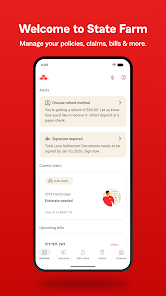
With the award-winning State Farm® app, you can manage your insurance and other products, request roadside assistance, file and track claims, and much more.
Drive Safe & Save® is on the move!
With the award-winning State Farm® app, you can manage your insurance and other products, request roadside assistance, file and track claims, and much more. Drive Safe & Save® is on the move!
Download State Farm®
Get the official app from the trusted app stores. You will be redirected to the download page.
When you purchase through links on our site, we may earn an affiliate commission. Learn more
Ratings breakdown
447,000 reviewsDeveloper contact
Name
State Farm Mutual Automobile Insurance Company
Address
1 State Farm Plz Bloomington, IL 61710-0001 United States
Phone
+1 800-782-8332
Support
sf-android-apps@statefarm.com
Privacy
View policyFrequently Asked Questions
Is the State Farm app free to download? high
Yes, the State Farm app is free to download. There are no in-app purchases listed.
Source: app_metadata
Does the State Farm app require location permissions? high
Yes, the app requests location permissions, and multiple recent user reviews report that the Drive Safe & Save feature requires 'always-on' location access. One reviewer (March 2026) says they set it to 'while using the app', but the default prompt suggests 'always on' is needed. This has been a common point of frustration in recent feedback.
Source: user_reviews, app_metadata
Can I turn off notifications from the State Farm app? medium
According to user reviews, turning off notifications for the Drive Safe & Save feature may affect your discount. One highly-liked review (December 2024) states that you cannot shut off notifications without losing the discount. The app itself does not advertise a way to disable them in the description.
Source: user_reviews
Does the State Farm app work with Google Pay? high
Yes, according to the app description, you can pay your insurance bill using Google Pay.
Source: app_metadata
How to Use
The State Farm app allows you to manage your insurance policies, pay bills, file and track claims, access digital insurance cards, and use the Drive Safe & Save safe driving discount program. (app_description)
Getting Started
Source: app_description_and_user_feedback_noted
- Step 1: Download the free State Farm app from Google Play.
- Step 2: Log in using your existing State Farm online account credentials, or create a new account.
- Step 3: To view and manage your policies, navigate to the policy section after logging in.
- Step 4: To use Drive Safe & Save, opt in and grant the required permissions (note: recent user feedback indicates that 'always on' location permission may be required).
Key Features (from app listing)
Source: app_description
- Pay your insurance bill quickly, including via Google Pay.
- View your digital insurance card and add it to Google Pay.
- File a vehicle, property, or vehicle glass claim.
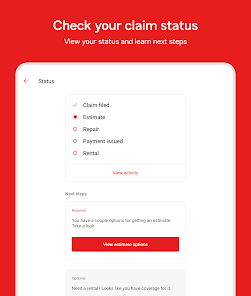
- Track the status of your claim and get claim status notifications.
- Request roadside assistance for tire changes, dead batteries, stuck vehicles, and more.
- Search for nearby repair facilities.
- Log in using biometrics or a PIN.
- View details about your financial products.
- Use the messaging feature for technical assistance.
- Access the Drive Safe & Save safe driving discount program.
Derived from a user review in recent_reviews (Review #5, 4-star, March 2026) that stated they use 'while using the app' for location permission.
How this content was created
Content type: pattern_analysis_of_user_reviews_and_metadata
AI generated: Yes
- Google Play user reviews (5 per app), December 19, 2024 - April 09, 2026
- Google Play ratings distribution
- App Store listing metadata
- Review samples are not statistically representative of all user sentiment.
- Only 5 recent reviews were available; no stratified sample was possible.
- High-engagement complaints (e.g., 3222 likes) can overrepresent negative experiences.
- Claims labeled 'low confidence' are based on single-review observations only.
- No real-world app testing was conducted.
- Feature availability may vary by region, device, and app version.
- Ratings distribution data was not provided.
Pros & Cons
Based on analysis of Google Play user reviews
Pros
- Convenient for filing claims and requesting roadside assistance.
Theme 'Claims and roadside assistance' identified in app description.
Evidence (1)
“File a vehicle, property or vehicle glass claim. Track the status of your claim... Get roadside assistance with tire changes, dead batteries...”Rating: 5★ N/A - Allows easy viewing of insurance cards and adding to Google Pay.
Theme 'Insurance card in Google Pay' identified in app description.
Evidence (1)
“View your insurance card and add it to G-Pay.”Rating: 5★ N/A - Personalized reminders and notifications upon login.
Theme 'Personalized reminders' identified in app description.
Evidence (1)
“Get personalized reminders and notifications when you log in.”Rating: 5★ N/A
Cons
- Drive Safe & Save app is intrusive with constant notifications and battery drain.
Theme 'Intrusive notifications' identified in recent_review #1.
Evidence (1)
“In order to have the drive safe and save, the app becomes far too intrusive. I don't need a notification every single time I'm in a vehicle... this app does nothing but notify me every hour and drain my battery.”Rating: 1★ December 19, 2024 3,222 likes - Forces acceptance of data collection terms without clear opt-out upfront.
Theme 'Forced permissions' identified in recent_review #3.
Evidence (2)
“Why do I have to initially grant State Farm permission to access, record and redistribute my devices information, sensors data, location and status...”Rating: 3★ March 19, 2026 4 likes“It's simple to use, but it requires certain permissions that just are not necessary. Having location set as 'always on' is not necessary.”Rating: 4★ March 10, 2026 7 likes - Premium increases unexpectedly due to missed odometer update in merged app.
Theme 'Premium increase from missed odometer update' identified in recent_review #4.
Evidence (1)
“I somehow did not get notified to update my odometer... My premium went up by 30% with no explanation why right before the bill was due!”Rating: 1★ February 10, 2026 75 likes
Recent Reviews
HSpezy
1★In order to have the drive safe and save, the app becomes far too intrusive. I don't need a notification every single time I'm in a vehicle. Yet, you can't shut notifications off, or they won't allow the discounts. I understand precise location permissions, maybe even the physical activity, but this app does nothing but notify me every hour and drain my battery. Figure out a better system.
Stacy Wood
1★Just cannot understand how my monthly payment fluctuates. Two months ago the payment was $374 and this month it's $416. I have 3 vehicles on the policy along with renters. 6 months prior, I had a forth vehicle and paying well over $500 a month. Since I complained to my agent, and adding the driving trackers on all 4 vehicles, rates went down so it was better. Sold one vehicle and went to 3. Now the premiums are creeping up again. Well I'm looking for a new company. Any suggestions, I'm looking.
Alexis Edwards
3★While I appreciate the efforts to offer accident detection and assistance, it would be nice to be able to access my account information through the app without being forced to accept terms that I haven't had time to fully read and, therefore, don't agree to. Why do I have to initially grant State Farm permission to access, record and redistribute my devices information, sensors data, location and status, to then have to dig through settings to "turn off" a feature I never wanted turned on?
Jace Thomas
1★I've been using the Drive Safe and save app for 10 years now with no issue. Now that the apps merged I somehow did not get notified to update my odometer (I believe it's usually every 6 months) My premium went up by 30% with no explanation why right before the bill was due! I went in to talk to an agent but it wasn't their fault as they had records of sending me an email. Years of being a customer and building a discount gone because I didn't realize it was time to update my odometer.
Stephen McMullin
4★It's simple to use, but it requires certain permissions that just are not necessary. Having location set as 'always on' is not necessary. I have it set for 'while using the app'. Also, another permission that I don't like is, it is set to go inactive if not used. That won't happen as long as I am covered by your insurance. remove that on all together. It's really not your business.