By App Discoverer Editorial Team · Updated October 1, 2026

AI Video Editor - VivaCut


Overview
Video Players & Editors
VivaCut professional video editor
Free
Jun 27, 2019
4.4.6
7.0
$0.99 - $79.99 per item
No
Jan 28, 2026
Features
VivaCut is an amazing video editor & video maker. Whether you want to make a great movie or just want to share memories and fun moments with your friends, VivaCut is a perfect choice for you.
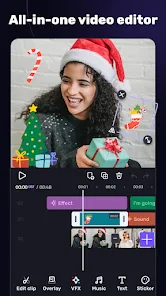
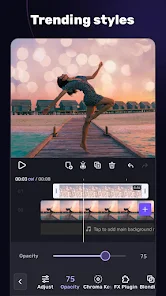
Create short videos with one click using cool effect and transition templates! VivaCut is also a professional video editing app with all the editing features. Multi-layer timeline, chroma key and green screen features help you create cinematic videos with music for YouTube, Instagram and TikTok. Want to ge...
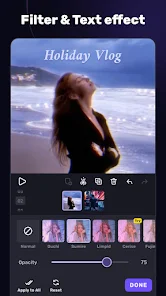
VivaCut is an amazing video editor & video maker. Whether you want to make a great movie or just want to share memories and fun moments with your friends, VivaCut is a perfect choice for you. Create short videos with one click using cool effect and transition templates! VivaCut is also a professional video editing app with all the editing features. Multi-layer timeline, chroma key and green screen features help you create cinematic videos with music for YouTube, Instagram and TikTok. Want to get more likes on your social media? Download this video editor & video maker now! Basic Video Editing[Multi-layer timeline] An intuitive and sleek editing interface with zoom for frame-by-frame precision with overlay video editor app. [Text] Edit, duplicate, and modify styles (variety of fonts & emoji, color, opacity, shadow, stroke). [Trim videos] Professional tools developed for precise Video Editing App. [Split videos] Split videos and optimize them for sharing. [Combine video clips] Merge clips into a stunning video with transitions effects; combine video clips into one video. [Speed Control] Fast & slow motion video like a pro, only with VivaCut Video
Download AI Video Editor - VivaCut
Get the official app from the trusted app stores. You will be redirected to the download page.
When you purchase through links on our site, we may earn an affiliate commission. Learn more
Ratings breakdown
1,440,000 reviewsDeveloper contact
Name
Vivalive (Hong Kong) Limited
Address
Rm A1 11/F SUCCESS COML BLDG 245-251 HENNESSY RD 灣仔 Hong Kong
Website
http://www.vivacut.comPhone
+86 191 0650 0403
Support
vivacutofficial@gmail.com
Privacy
View policyFrequently Asked Questions
Is VivaCut free to use? high
VivaCut is a free app to download with in-app purchases ranging from $0.99 to $79.99 per item. The app description mentions a subscription model that auto-renews. User reviews indicate the free version is significantly limited with access to only 4 basic transitions and a small music library.
Source: app_metadata, user_reviews
Does VivaCut have a free trial for the premium version? medium
According to app descriptions and user reviews, VivaCut offers a free trial. However, a 2020 user review reports being charged for the premium pass before the trial period ended, calling it a 'FRAUD.' Another recent review describes paying for the premium pass but having it fail to activate at times.
Source: user_reviews, app_metadata
What video editing features does VivaCut offer? high
Based on the app description, VivaCut includes multi-layer timeline editing, green screen/chroma key, keyframe animation, various masks, picture-in-picture, collage, video transitions, filters, glitch effects, music markers, audio extraction, and export up to 4k resolution.
Source: app_metadata
Can I use VivaCut on a PC? high
A user from 2025 states, 'there is no pc version'. The app is designed for Android devices (requires Android 7.0+). There is no mention of a PC version in the app description.
Source: user_reviews, app_metadata
How to Use
VivaCut is a video editing and making app for Android with multi-layer timeline, green screen, and effects to create videos for platforms like YouTube, Instagram, and TikTok. (app_description)
Getting Started
Source: app_description_and_user_feedback_noted
- Install VivaCut from the Google Play Store.
- Open the app and use the 'New Project' button to start editing.
- Import video clips and images from your device's gallery.
- Use the multi-layer timeline to trim, split, and arrange clips.
- Apply transitions and effects by tapping the respective icons in the editor.
- Preview your project frequently to catch mistakes, as automatic saving may not be reliable.
- Export your final video in your desired resolution (up to 4k).
- Share directly to social media platforms like YouTube, Instagram, or TikTok.
Key Features (from app listing)
Source: app_description
- Multi-layer timeline for precise editing
- Green screen / Chroma key functionality
- Keyframe animation for masks, text, and stickers
- Various masks (Linear, Mirror, Radial, Rectangle, Oval)
- Picture-in-Picture and collage capabilities
- Professional transitions, filters, and glitch effects
- Music markers and audio extraction tools
- Export options up to 4k resolution
This tip is derived from verified user complaints in 2 of 5 recent reviews about premium activation failures and unexpected billing after a free trial.
How this content was created
Content type: pattern_analysis_of_user_reviews_and_metadata
AI generated: Yes
- Google Play user reviews (12-20 preferred; may be smaller if source data is limited per app), Date range of available reviews: February 2020 to April 2025
- Google Play ratings distribution
- App Store listing metadata
- Only recent_reviews bucket was available (5 reviews). This is a small sample.
- The absence of high-engagement negative/positive and mixed review buckets means the findings are derived from a narrow slice of user feedback.
- Claims labeled 'low confidence' are based on single-review observations only.
- User reviews are subjective and may not reflect all user experiences.
- No real-world app testing was conducted.
- Feature availability may vary by region, device, and app version.
Pros & Cons
Based on analysis of Google Play user reviews
Pros
- Simple to use and great for beginners making quick edits.
Theme 'Easy to use' identified in recent_review #0, #1, and #2
Evidence (3)
“This app is amazing! I only rate it a 4 star because I have a few problems.”Rating: 4★ September 25, 2020 846 likes“So I do fan edits so this was a really great app. At first.”Rating: 1★ June 19, 2020 619 likes“Simple to use! Made my first video soon after installing and upgraded immediately!”Rating: 3★ April 03, 2025 115 likes - Good transitions and smooth performance for basic editing tasks.
Theme 'Good transitions' identified in recent_review #0 and #4
Evidence (2)
“This app is amazing! I only rate it a 4 star because I have a few problems.”Rating: 4★ September 25, 2020 846 likes“Dont get me wrong, cool app, it has good transitions and its pretty smooth”Rating: 2★ February 15, 2020 599 likes - Offers a free trial for premium features before purchase.
Theme 'Free trial' identified in recent_review #3
Evidence (1)
“I downloaded it due to the "10 day FREE TRIAL" they were offering, on April 6th or 7th I believe.”Rating: 1★ April 10, 2020 140 likes
Cons
- Most transitions and effects are locked behind a paywall.
Theme 'Paywalled features' identified in recent_review #0 and #4
Evidence (2)
“I bought the monthly premium pass but somedays when I go to make a video, it says I don't have premium.”Rating: 4★ September 25, 2020 846 likes“you have to pay for all of the transitions except for like 4 which are the two fades (black and white) and i think the slide transitions”Rating: 2★ February 15, 2020 599 likes - Projects sometimes fail to save, losing audio or clips.
Theme 'Saving issues' identified in recent_review #0 and #1
Evidence (2)
“I bought the monthly premium pass but somedays when I go to make a video, it says I don't have premium.”Rating: 4★ September 25, 2020 846 likes“When I go back to it, either the audio is gone, or some of the clips I added are gone.”Rating: 1★ June 19, 2020 619 likes - Free trial is misleading, charging users before the trial ends.
Theme 'Misleading trial' identified in recent_review #3
Evidence (1)
“I get an email notification that I was charged $35.99 for a year subscription. I was shorted 7 whole days from this trial!”Rating: 1★ April 10, 2020 140 likes
Recent Reviews
Ashlyn McRoy
4★This app is amazing! I only rate it a 4 star because I have a few problems. I bought the monthly premium pass but somedays when I go to make a video, it says I don't have premium. I click on the thing and it says "purchased" and still won't let me use any premium items until I close the app. Then when I go to add transitions, it sometimes freezes up on me. Other than that, it is phenomenal!!
Alissa Vann
1★So I do fan edits so this was a really great app. At first. There aren't really enough transitions to use, not enough effects, and I would not get the pro, just because of the price. I've been having a issue lately though. When I'm done with it I sometimes forget to save it. When I go back to it, either the audio is gone, or some of the clips I added are gone. I would not recommend, but it's simple to use, I'm going to find a different app though
Marlon Are (Marlon R)
3★Simple to use! Made my first video soon after installing and upgraded immediately! . . Update: I have been using this app for 2yrs and have made amazing videos with cool sound effects. The drawbacks...music library is small ,sound effects library is limited, there is no pc version, and you cannot set save location to SD card on Android. Other than that, I am happy with this app for on the go editing.
A Google user
1★This app is a FRAUD! I downloaded it due to the "10 day FREE TRIAL" they were offering, on April 6th or 7th I believe. I tried the app, but decided it just wasn't what I was looking for and just as I was getting ready to cancel my trial after only 3 days use, I get an email notification that I was charged $35.99 for a year subscription. I was shorted 7 whole days from this trial! WOW! If you download this app, take into consideration you should be certain you want it or cancel within 72 hours.
A Google user
2★Dont get me wrong, cool app, it has good transitions and its pretty smooth, but you have to pay for all of the transitions except for like 4 which are the two fades (black and white) and i think the slide transitions (up, down, left and right) I just dont think thats very necessary for an app that people want to use, especially since on the ads it never says almost all of the transitions are priced. Sorry.