By App Discoverer Editorial Team · Updated October 1, 2026

Yi iot
Overview
Video Players & Editors
Kami HK
Free
May 9, 2018
5.0.6_20260324
7.0
$0.49 - $479.99 per item
No
Mar 29, 2026
Features
Download Yi iot
Get the official app from the trusted app stores. You will be redirected to the download page.
When you purchase through links on our site, we may earn an affiliate commission. Learn more
Ratings breakdown
122,000 reviewsDeveloper contact
Name
ZK (HK) LIMITED
Address
Rm 1906A 19/F BANK OF AMERICA TWR 12 HARCOURT RD 中環 Hong Kong
Website
http://www.yitechnology.comPhone
+86 136 8188 2136
Support
support@yitechnology.com
Privacy
View policyFrequently Asked Questions
Does the Yi IoT app have ads? high
Yes, multiple recent reviews state that the app displays ads before you can view your camera's footage, and that this was not disclosed at the time of purchase. Some users also report aggressive subscription upsells.
Source: user_reviews
Is the Yi IoT app free to use? high
The app itself is free to download, but users report that the free experience is heavily restricted—you can only watch live video for a very short time without a subscription. The app also forces ads on non-subscribers. In-app purchases range from $0.49 to $479.99 per item.
Source: app_metadata, user_reviews
Can I cancel my Yi IoT subscription? low
Based on one recent review, the user reported being unable to cancel their subscription and said the app does not provide customer service contact information. This is a single report, so proceed with caution.
Source: user_reviews
How good is the camera picture quality? medium
Two reviewers mention that the video quality is decent or was great initially, but overall they rate the app poorly due to ads and connectivity issues. The app description lists HD resolution (1280x720) and a 111° wide-angle lens.
Source: user_reviews, app_metadata
Why does my Yi camera keep disconnecting? medium
Recent reviews indicate that the camera frequently loses connection, sometimes staying online for only a day or two at a time, and may turn off/on repeatedly. This is a commonly reported issue in the sample.
Source: user_reviews
How to Use
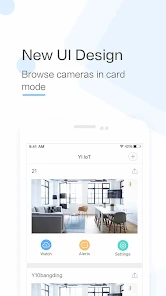
Yi IoT connects you with your family via real-time video/audio from a compatible Yi IoT camera. (app_description)
Getting Started
Source: app_description_and_user_feedback_noted
- Ensure you have an International Version Yi IoT camera (China Version YUNYI Smart Camera requires a different app from Mi Store).
- Download and install the Yi IoT app from Google Play.
- Power on your camera and follow in-app pairing instructions (typically scanning a QR code or entering Wi-Fi credentials).
- After pairing, you can view live footage, use 2-way audio, and enable motion detection alerts.
- Be aware that free use includes ads before camera view and frequent subscription prompts. Consider a subscription if you find the ads disruptive.
Key Features (from app listing)
Source: app_description
- Real-time video and audio streaming from anywhere
- 111° wide-angle lens with 4x digital zoom
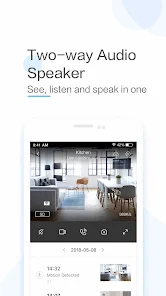
- Two-way conversation via built-in microphone and speaker
- Gyroscope support – pan your phone to see a panoramic view
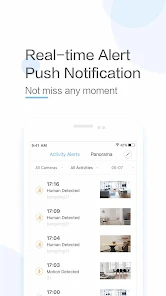
- Motion detection notifications with time/location details
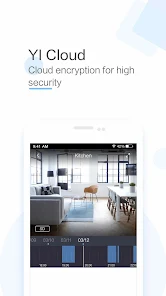
- Supports up to 32GB SD card for indexed local recording
- Adaptive streaming technology adjusts quality based on network
This tip directly responds to the verified user complaints about aggressive ads and upsells (recent reviews #2, #3, #5) and the single report of cancellation difficulty (review #4). The tip also references the app's subscription offering mentioned in metadata.
How this content was created
Content type: pattern_analysis_of_user_reviews_and_metadata
AI generated: Yes
- Google Play user reviews (5 reviews per app), September 12, 2024 – March 18, 2026
- Google Play ratings distribution
- App Store listing metadata
- Review samples are not statistically representative of all user sentiment
- Only 5 reviews were available; all were negative, which may skew the analysis
- No high-engagement positive reviews or mixed reviews were available to balance the picture
- Claims labeled 'low confidence' are based on single-review observations only
- No real-world app testing was conducted
- Feature availability may vary by region, device, and app version
Pros & Cons
Based on analysis of Google Play user reviews
Pros
- Decent video quality and ability to pan and scan in real time when the camera is connected.
Theme 'Decent video quality' identified in recent_review #3, #1
Evidence (2)
“Videos, once they come up, seem decent. Appreciate the ability to pan and scan in real time.”Rating: 1★ January 23, 2026 42 likes“Camera is the "nicest" one I have but is less reliable, lower picture quality...”Rating: 1★ September 12, 2024 912 likes - Free plan includes a few days of reviewable recordings, which is sufficient for some users.
Theme 'Free plan adequate' identified in recent_review #3
Evidence (1)
“Free plan is limited to a few days of reviewable recordings, which is fine.”Rating: 1★ January 23, 2026 42 likes - Two-way audio communication feature allows remote conversation with family.
Feature described in app description, not from reviews
Evidence (1)
“With a simple tap on your mobile phone, you can initiate a 2-way conversation with your family remotely.”Rating: 0★
Cons
- Excessive and intrusive ads that appear before viewing camera feed, even after purchasing a subscription.
Theme 'Too many ads even with subscription' identified in recent_review #2, #3, #4, #5
Evidence (3)
“consistent ads (which was not expressed at purchase) is absolutely annoying.”Rating: 1★ March 18, 2026 8 likes“Prepare to be bombarded with ads like never before.”Rating: 1★ January 23, 2026 42 likes“The final straw was having to watch ads before you can see picture from camera if you didn't subscribe. Then after about 3 minutes have to watch another ad to see more.”Rating: 1★ March 01, 2026 11 likes - Camera frequently disconnects and is unreliable, staying connected for only a few days at a time.
Theme 'Frequent disconnections' identified in recent_review #1, #2
Evidence (2)
“Camera is the "nicest" one I have but is less reliable, lower picture quality, and barely stays connected for more than a day or 2. I've had it for a couple years and it's only been connected maybe a few weeks total out of that time.”Rating: 1★ September 12, 2024 912 likes“Some times I have decent connection for months, but sometimes just consistent issues for days. I'm not sure if there's been some auto update but it has been turning off/on repeatedly the last few days.”Rating: 1★ March 18, 2026 8 likes - Subscription is difficult or impossible to cancel, with no customer service phone number and chat only offering more deals.
Theme 'Cannot cancel subscription' identified in recent_review #4, #2
Evidence (2)
“I bought the subscription... now it turns out I can't cancel it anywhere. They don't provide a customer service phone number, so I contacted them through their chat, and all they do is offer me more and more deals to extend it, but there's no way to cancel it.”Rating: 1★ March 07, 2026 10 likes“Constant requests for paid service also very annoying.”Rating: 1★ March 18, 2026 8 likes
Recent Reviews
Justin Berge
1★Absolutely unbelievably disappointing app and camera. Camera is the "nicest" one I have but is less reliable, lower picture quality, and barely stays connected for more than a day or 2. I've had it for a couple years and it's only been connected maybe a few weeks total out of that time. The app has never refreshed the camera on its own and it's always a 30min ordeal to reconnect the camera. My daughters cheap minion camera and supporting app does all these things without issue... Disappointed
Rosly Schofield
1★As others have reported, consistent ads (which was not expressed at purchase) is absolutely annoying. Some times I have decent connection for months, but sometimes just consistent issues for days. I'm not sure if there's been some auto update but it has been turning off/on repeatedly the last few days. I restarted and reconnected everything but still performing the same. No customer service except a bot. Constant requests for paid service also very annoying. I would never pay for another
Defenestratus
1★Horrible experience overall due to a cataract of ads as soon as you launch the app, plus upsells at every which turn. With some effort, you'll be able to click through the ads and review your cameras' footage. Would be great if there were just half as many ads. Videos, once they come up, seem decent. Appreciate the ability to pan and scan in real time. Free plan is limited to a few days of reviewable recordings, which is fine. But man! Prepare to be bombarded with ads like never before.
Xariz Mercado (Ivette)
1★The worst camera and subscription ever. I bought the subscription to watch without ads, since it only lets you watch live for a very short time unless you're practically forced to have the subscription. Well, I bought it, and now it turns out I can't cancel it anywhere. They don't provide a customer service phone number, so I contacted them through their chat, and all they do is offer me more and more deals to extend it, but there's no way to cancel it.
Christopher Boles
1★Was great at first but went downhill. Worked fine but nagged a little about subscription service. As time went on it became annoyingly nagging about subscription. The final straw was having to watch ads before you can see picture from camera if you didn't subscribe. Then after about 3 minutes have to watch another ad to see more. I only used this to monitor my basement when its pouring rain, so not often enough for a subscription service. Getting rid of it for something less annoying.