By AppHub Editorial Team · Updated August 5, 2026

Allstate Mobile




Overview
Finance
The Allstate Corporation
Free
Jan 12, 2013
20.9.1
10
No
Apr 2, 2026
Features
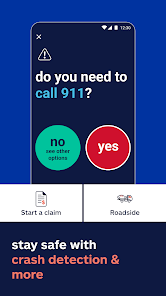
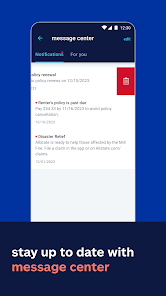
Get the Allstate app for quick access to ID cards, easy bill payments, and policy management — all in one place.
Stay covered & in control
Drive smarter & save
More ways to protect wha...
Get the Allstate app for quick access to ID cards, easy bill payments, and policy management — all in one place. Stay covered & in control
Download Allstate Mobile
Get the official app from the trusted app stores. You will be redirected to the download page.
Official Links
When you purchase through links on our site, we may earn an affiliate commission. Learn more
Ratings breakdown
124,000 reviewsDeveloper contact
Name
Allstate Insurance Company
Address
3100 Sanders Rd Northbrook, IL 60062 United States
Phone
+1 224-255-5106
Support
mobileappsupport@allstate.com
Privacy
View policyFrequently Asked Questions
Does the Allstate Mobile app have issues with battery drain? low
Yes, a recent user reported that the app drains the battery and causes the phone to overheat, even when not driving, due to constant background activity. This issue was specifically linked to the Drivewise feature.
Source: user_reviews
Is the Drivewise speed tracking accurate? low
One user reports that the app's speed limits for many roads are incorrect, causing it to incorrectly flag them as speeding. The user was concerned about how this would affect their policy. This suggests the data may not be fully reliable.
Source: user_reviews
Can I pay my bill and manage my policy in the Allstate Mobile app? medium
Yes, the app description on Google Play lists bill payment, policy viewing, and claims management as core functions. However, a recent reviewer found they could not access their account or update payment info while traveling, suggesting that access can be unreliable.
Source: app_metadata, user_reviews
Is the Allstate app free? high
Yes, the Allstate Mobile app is free to download and use. It may offer in-app purchases, but the app description and store listing indicate it is free.
Source: app_metadata
How to Use
The Allstate app provides tools for policy management, bill payment, and safe-driving tracking through the Drivewise feature. (app_description)
Getting Started
Source: app_description_and_user_feedback_noted
- 1. Download and install the Allstate Mobile app from the Google Play Store.
- 2. Log in using your Allstate policy or account credentials.
- 3. To use Drivewise, review the terms and conditions carefully, especially regarding data usage and potential rate impacts, as noted in user feedback.
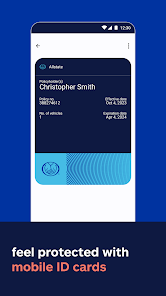
- 4. Access digital ID cards by navigating to the 'ID Cards' section in the app's menu.
- 5. Set up bill payments by going to the 'Pay Bill' section and linking your preferred payment method (e.g., bank account or credit card).
Key Features (from app listing)
Source: app_description
- Access and manage digital insurance ID cards, with option to add to Apple Wallet.
- Pay bills and view current insurance policies in one place.
- File and manage insurance claims directly from the app.
- Use Drivewise to get feedback on driving and earn potential savings.
This tip is a direct response to a verified user complaint in recent_review #1, where the user noted that the speed limit in the app was incorrect on many roads, potentially affecting their Drivewise score.
How this content was created
Content type: pattern_analysis_of_user_reviews_and_metadata
AI generated: Yes
- Google Play user reviews (12-20 preferred; may be smaller if source data is limited per app), Date range of available reviews: December 20, 2024 to March 5, 2026
- Google Play ratings distribution
- App Store listing metadata
- Review samples are not statistically representative of all user sentiment
- High-engagement negative reviews can overrepresent complaints
- Claims labeled 'low confidence' are based on single-review observations only
- No real-world app testing was conducted
- Feature availability may vary by region, device, and app version
- This analysis is based on a very small sample of 5 recent-only reviews, which may not reflect the broader user experience.
Pros & Cons
Based on analysis of Google Play user reviews
Pros
- Drivewise program offers potential savings on insurance by tracking safe driving habits.
Feature 'Drivewise' described in app description and referenced in reviews.
Evidence (2)
“Get safe-driving rewards and feedback with Drivewise®”Rating: 5★ App Description“you can save money when you make 50 trips. To me it's well worth having.”Rating: 5★ March 03, 2026 9 likes - Digital ID cards and Apple Wallet integration for easy proof of insurance access.
Feature 'Access digital ID cards and add them to Apple Wallet' described in app description.
Evidence (1)
“Access digital ID cards and add them to Apple Wallet”Rating: 5★ App Description - Comprehensive policy management and bill payment features are available in one place.
Feature 'Pay bills, view policies and manage claims' described in app description.
Evidence (1)
“Pay bills, view policies and manage claims”Rating: 5★ App Description
Cons
- Drivewise app drains battery and causes overheating by running constantly in the background.
Theme 'Drivewise battery drain and overheating' identified in recent_review #2.
Evidence (1)
“App drains my battery even when Im not driving. It causes my phone to get super hot because it's running constantly in the background.”Rating: 1★ December 20, 2024 2,153 likes - Drivewise frequently fails to log trips, making it impossible to earn the required 50 for a discount.
Theme 'Drivewise trip logging failures' identified in recent_review #2 and #4.
Evidence (2)
“It doesn't track all the trips, so it's impossible to get the required 50.”Rating: 1★ December 20, 2024 2,153 likes“I will get weeks of driving recognition and then weeks WITHOUT driving recognition, and I don't change anything.”Rating: 2★ February 23, 2026 21 likes - App has incorrect speed limit data, potentially affecting Drivewise scores unfairly.
Theme 'Incorrect speed limits in Drivewise' identified in recent_review #1.
Evidence (1)
“there are plenty of roads where the speed limit on the app is completely wrong and it says I'm speeding”Rating: 4★ February 18, 2026 65 likes
Recent Reviews
Sandman
4★the app is pretty good overall but if you have their "drive wise" policy, you will probably want to double check the speed limits they have on the app. there are plenty of roads where the speed limit on the app is completely wrong and it says I'm speeding and this makes me wonder if this will affect my rate. if it does, i just a soon dump the drive wise program. it's useless in this case. I have contacted allstate about this at the beginning of January and nothing has changed yet.
Laurel Jones
1★App drains my battery even when Im not driving. It causes my phone to get super hot because it's running constantly in the background. It doesn't track all the trips, so it's impossible to get the required 50. Tried uninstalling/reinsalling and everything recommended by tech support, but nothing helps. It's frustratingly unusable to the point that it seems like they are making it so you can't get the drivewise discount.
Pamela Daniels
5★This app is somewhat precise. I'd rather have it than not. Be careful if you have your keys not in the ignition and of course car nit running and you get a call and touch the screen it will say phone activity. However, other than that 1 glitch it's a great app to have. Plus you can save money when you make 50 trips. To me it's well worth having. I also wished that the app didn't constantly run in the background when not in use. Overall as I mentioned it's better to have than not to.
John Kilgore
2★It's great -> when it works. <- After initial setup, my app ALWAYS says Drivewise is set up and ready. But I will get weeks of driving recognition and then weeks WITHOUT driving recognition, and I don't change anything. I don't even know it's happening until I get an email saying no trips have been detected and to check Drivewise. But, guess what? The app says Drivewise is set up and ready. I change nothing and the app decides to not log safe driving for the discount.
Claudia Kachmarik
1★The app is not working. We have our payments on auto-pay and needed to change our credit card information. We were traveling in Europe and the credit card attached to our Allstate account was compromised. I could not get access to our account as the app would not open. I uninstalled the app and tried to download and install it again. Nothing worked. I finally had to make a phone call to Customer Service and provide the information over the phone. Not happy at all with the mobile app!!