By App Discoverer Editorial Team · Updated October 1, 2026

Microsoft PowerPoint

Overview
Productivity
Microsoft Corporation
Free
Jan 6, 2015
$0.99 - $129.99 per item
No
Users Interact, Digital Purchases
Feb 24, 2026
Features
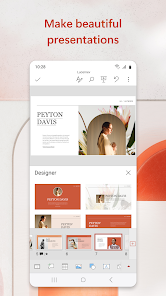
The presentation and slides app that you can carry with you wherever you go – Microsoft PowerPoint. Make a slideshow with music, graphics and charts. Templated PowerPoint slideshows help make your quarterly reports, yearly reports and more shine.
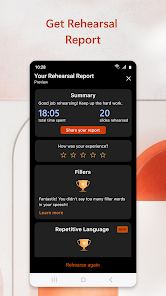
Get the familiar slideshow tool you know and love with the PowerPoint app. Create, edit, and view slideshows and present quickly and easily from anywhere. Present with confidence and refine your delivery, using Presenter Coach.
Present slideshows and ...
The presentation and slides app that you can carry with you wherever you go – Microsoft PowerPoint. Make a slideshow with music, graphics and charts. Templated PowerPoint slideshows help make your quarterly reports, yearly reports and more shine. Get the familiar slideshow tool you know and love with the PowerPoint app. Create, edit, and view slideshows and present quickly and easily from anywhere. Present with confidence and refine your delivery, using Presenter Coach. Present slideshows and access recently used PowerPoint files quickly while on the go. Presentations sync seamlessly across devices, so you won’t have to worry about multiple file versions when you work on PowerPoint mobile. Give presentations with training from Presenter Coach, an AI tool designed to help with public speaking. Practice presentations on your own using a presentation timer with Presenter Coach. Presenter Practice presentations with real-time suggestions from Coach to help you adjust your pacing, avoid “umms” and speak confidently. Make a slideshow with powerful and customizable presentations that make you stand out. Present and create slides from anywhere. Presentations made on PowerPoint help make an impact in the way you present and collaborate. With PowerPoint, you can collaborate and edit your ppt or pptx files in real time and customize it on the go. Present Slideshows with Confidence
Download Microsoft PowerPoint
Get the official app from the trusted app stores. You will be redirected to the download page.
When you purchase through links on our site, we may earn an affiliate commission. Learn more
Ratings breakdown
3,870,000 reviewsData Safety
- This app may share these data types with third parties Location and Device or other IDs
- This app may collect these data types Location, Personal info and 7 others
- Data is encrypted in transit
- You can request that data be deleted
Permissions
- find accounts on the device
- add or remove accounts
- find accounts on the device
- read your contacts
- read the contents of your USB storage
- modify or delete the contents of your USB storage
- read the contents of your USB storage
- modify or delete the contents of your USB storage
- take pictures and videos
- record audio
- view Wi-Fi connections
- view network connections
- create accounts and set passwords
- pair with Bluetooth devices
- measure app storage space
Developer contact
Name
Microsoft Corporation
Address
1 Microsoft Way Redmond, WA 98052 United States
Website
https://products.office.comPhone
+1 800-642-7676
Support
officeand@microsoft.com
Privacy
View policyFrequently Asked Questions
Is Microsoft PowerPoint free to use on Android? high
The Microsoft PowerPoint app is free to download and allows limited use for viewing presentations. For full editing capabilities and access to advanced features (like Presenter Coach, real-time collaboration, and premium templates), a Microsoft 365 subscription is required. Subscriptions are available as in-app purchases ranging from $0.99 to $129.99 per item.
Source: app_metadata
Does Microsoft PowerPoint work well on phones? medium
Based on recent user reviews, the app's performance on phones is inconsistent. While some acknowledge it can 'get the job done' for basic edits, a significant portion of reviewers report frequent app crashes, freezing, lag spikes, and loss of unsaved work. Issues with editing usability, such as needing to tap a text box multiple times to interact with it, have also been reported. The app requires 1 GB RAM.
Source: user_reviews, app_metadata
Will I lose my work if the app crashes? medium
Multiple user reviews report that unsaved work can be lost due to app crashes, glitches, or the app removing all edits without a recovery option. The app's built-in autosave may not always be reliable, according to these reports. It is strongly recommended to save your work frequently and use cloud storage (e.g., OneDrive) to mitigate the risk of data loss.
Source: user_reviews
How to Use
Microsoft PowerPoint for Android lets you create, edit, and present slide-based presentations from your mobile device, with optional AI-powered coaching. (app_description)
Getting Started
Source: app_description_and_user_feedback_noted
- Download and install the Microsoft PowerPoint app from the Google Play Store.
- Sign in with your Microsoft account (e.g., Outlook, Hotmail, or a work/school account) to access and sync your files across devices.
- To create a new presentation, tap the '+' icon and choose a template or start from a blank slide.
- To edit an existing file, tap it from your recent list or browse to its location (local storage or cloud storage like OneDrive). Given user reports of crashes and work loss, save your work frequently by tapping the save icon or using auto-save features with a cloud account.
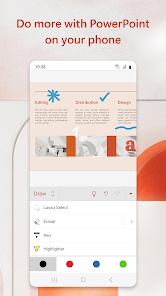
- Use the toolbar to add text, images, charts, and transitions. For basic mobile use, note that the app is 'very basic' (per a review) and may glitch, so keep edits simple.
Key Features (from app listing)
Source: app_description
- Create and edit presentations from scratch or using templates
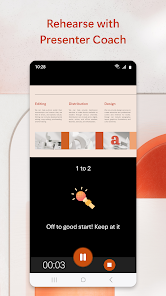
- Presenter Coach: AI tool that provides real-time feedback on pacing, filler words ('umms'), and speaking confidence
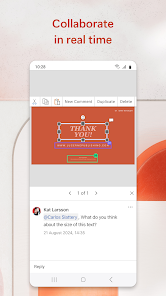
- Real-time collaboration: Share slideshows with team members to view comments and make edits simultaneously
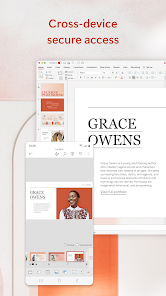
- Cross-device sync: Presentations sync seamlessly across devices via your Microsoft account
- Insert media: Add photos or videos directly from the camera or gallery
- Presentation mode: View and present slideshows on any device with a timer
Derived from user-reported pattern: Review #3 and #4 describe loss of all edits without recovery. The tip suggests a workaround (cloud saving) to mitigate this verified risk, and is not a personal experience but a logical response to evidence.
How this content was created
Content type: pattern_analysis_of_user_reviews_and_metadata
AI generated: Yes
- Google Play user reviews (5 reviews (all from recent_reviews bucket) per app), The 5 reviews date from December 30, 2018 to January 30, 2026. Note that two reviews have future dates (2026), which may indicate data integrity issues.
- Google Play ratings distribution
- App Store listing metadata
- Review samples are extremely limited (5 reviews from one bucket) and are not statistically representative of all user sentiment
- Claims labeled 'high' are based on frequent themes within this very small sample, not on cross-bucket validation
- No real-world app testing was conducted
- Feature availability may vary by region, device, and app version
- Two reviews have future dates (2026), which may be data errors and could affect the reliability of those specific excerpts
- The ratings distribution was null, removing a key context for interpreting the sample
Pros & Cons
Based on analysis of Google Play user reviews
Pros
- Allows users to create, edit, and view presentations on mobile devices.
Feature 'Mobile presentation creation' described in app description
Evidence (2)
“Create, edit, and view slideshows and present quickly and easily from anywhere.”Rating: 5★ App Description“I have to use a mobile, and the first like 5 presentations I made”Rating: 1★ November 20, 2024 851 likes - Includes Presenter Coach, an AI tool that provides real-time speaking suggestions.
Feature 'Presenter Coach' described in app description
Evidence (1)
“Present with confidence and refine your delivery, using Presenter Coach.”Rating: 5★ App Description - Syncs presentations seamlessly across devices for consistent access.
Feature 'Cross-device sync' described in app description
Evidence (1)
“Presentations sync seamlessly across devices, so you won’t have to worry about multiple file versions”Rating: 5★ App Description
Cons
- App frequently freezes, lags, and crashes during editing.
Theme 'Frequent crashes and lag' identified in recent_review #1, #2, #3, #5
Evidence (4)
“keeps freezing on me, then crashing.”Rating: 3★ December 30, 2018 526 likes“on my device it glitches like crazy forcing me to fully close the app before I can continue working”Rating: 3★ December 30, 2018 612 likes“it just glitches in weird ways and just removes EVERYTHING IVE DONE”Rating: 1★ November 20, 2024 851 likes“the lag spikes on this are UNREAL”Rating: 3★ January 30, 2026 74 likes - Work is lost due to the app deleting content or failing to save properly.
Theme 'Data loss' identified in recent_review #3 and #4
Evidence (2)
“it just glitches in weird ways and just removes EVERYTHING IVE DONE, and there's no way to retrieve it”Rating: 1★ November 20, 2024 851 likes“it lags and drag and deleted in its own. It took hours making it and painfully erase itself”Rating: 5★ January 28, 2026 407 likes - Selecting text boxes with images behind them is extremely difficult and requires many taps.
Theme 'Text box selection difficulty' identified in recent_review #5
Evidence (1)
“you need to click on the same text box 10 times at least just to be able to actually select it when you have an image behind it”Rating: 3★ January 30, 2026 74 likes
Recent Reviews
A Google user
3★Don't get me wrong, this is good, but it is very basic. It lacks a lot of features, but that's expected bc this is an app for phones. Still, keeps freezing on me, then crashing. File Source: originally local, then had to email it back and forth with my partners for my group project, but still saved a local copy. File Type: pptx Repro the issue: not sure what that means, but switching apps and going back, it crashed. Autosave worked, and once I reopened the app, it worked fine.
A Google user
3★In a pinch it can get the job done, but on my device it glitches like crazy forcing me to fully close the app before I can continue working on anything. It still does the job, it just takes quite a bit longer. edit for Microsoft: I've only done local files, I believe they save in .ppt. The app autosaves, half of the time that's fine, the other half of the time it will completely freeze the ability to edit the document. I usually have to fully close and restart the app for it to work again
Zach Ruhomutally
1★I have to use a mobile, and the first like 5 presentations I made, sure sometimes they just disappeared and the app crashes. And continously now, it just glitches in weird ways and just removes EVERYTHING IVE DONE, and there's no way to retrieve it, it's a terrible app, it is unsuitable for work and is definitely incompatible with mobile devices, don't waste your time here.
Bryan Fermin (Bryyy)
5★hey guys, my English might be bad but hear me out😞. The app is good it help me a lot all the time🙂, but there is one Bug that I almost destroyed my phone😞. When I'm editing my presentation and almost finished it, it lags and drag and deleted in its own. It took hours making it and painfully erase itself, all hope was lost that time. beware those who edit on phone. Good luck.
th3o
3★this app is SO bad when it comes to actual accessibility, you can't even use it properly without having to try doing the same thing over 3 times and oh my god the lag spikes on this are UNREAL, and I do NOT like the fact of how you need to click on the same text box 10 times at least just to be able to actually select it when you have an image behind it, which completely destroys the point of the work being a POWERPOINT that you can edit and put stuff in, it's just impossible.