By App Discoverer Editorial Team · Updated October 1, 2026

Xfinity



Overview
Productivity
Comcast
Free
Apr 18, 2017
5.73.0-3
10
No
Apr 7, 2026
Features
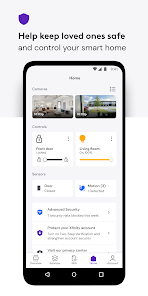
Your Xfinity experience, enhanced.
Easily manage all your services in one place with the Xfinity app. Plus discover the power of NOW.
NOW is a simple new way to get internet and mobile. It’s just what you want, and nothing you don’t. With all-in monthly pricing. Backed by Xfinity.
Xfinity customers also get:
Your Xfinity experience, enhanced. Easily manage all your services in one place with the Xfinity app. Plus discover the power of NOW. NOW is a simple new way to get internet and mobile. It’s just what you want, and nothing you don’t. With all-in monthly pricing. Backed by Xfinity. Xfinity customers also get:
Download Xfinity
Get the official app from the trusted app stores. You will be redirected to the download page.
When you purchase through links on our site, we may earn an affiliate commission. Learn more
Ratings breakdown
329,000 reviewsDeveloper contact
Name
Comcast Cable Communications Management, LLC
Address
1701 John F Kennedy Blvd Ste 300 Philadelphia, PA 19103-2854 United States
Website
https://internet.xfinity.com/Phone
+1 833-520-0216
Support
Xfinity_xFi_App@comcast.com
Privacy
View policyFrequently Asked Questions
Is the Xfinity app free to download and use? high
Yes, the app is free to download and does not contain any ads. However, to log in and use its features, you need to be an active Xfinity customer with an Xfinity ID.
Source: app_metadata
Does the Xfinity app help me troubleshoot my internet connection? medium
The app's description says it includes tools for this, but multiple recent user reviews strongly criticize the troubleshooting feature, claiming it is ineffective, especially when your home internet is down. Users report that the app either fails to connect or provides incorrect information.
Source: app_description, user_reviews
Do I have to be an Xfinity customer to use the app? high
Yes. To log in, you need an Xfinity ID and password, which requires an active Xfinity account (internet, TV, or phone). The app is designed for managing existing services.
Source: app_metadata, app_description
Can I pay my bill through the Xfinity app? high
Yes, the app's description says you can manage your account, which includes paying your bill. However, one recent user review implies that this function is one of the few that works, describing the app as unable to do anything 'but look at your amt owed and talk to a bot.'
Source: app_description, user_reviews
How to Use
The Xfinity app is a comprehensive customer portal for managing Xfinity services, including account management, WiFi control, and technical support, which requires an active Xfinity ID to log in. (app_description)
Getting Started
Source: app_description_and_user_feedback_noted
- Step 1: Download and install the free Xfinity app from the Google Play Store.
- Step 2: If you do not have an Xfinity ID, create one by visiting the Xfinity website at xfinity.com/getstarted.
- Step 3: Open the app and log in with your existing Xfinity ID and password. If you have forgotten your credentials, use the links on the login screen or visit xfinity.com/id or xfinity.com/password.
- Step 4: Once logged in, explore the main dashboard to pay your bill, view plan details, and manage your account.
Key Features (from app listing)
Source: app_description
- 24/7 real-time support through the app.
- Tools for activating new equipment and testing internet speed.
- Xfinity Rewards program for perks and experiences.
- Advanced Security features to protect devices on and off your home network (includes VPN).
- Parental controls to set browsing limits and pause WiFi on specific devices.
- Personalized WiFi performance optimization tips and tools.
This tip is derived from a specific user complaint (recent_reviews #2) which states, 'If you're connected to wi-fi when your gateway is down, the app won't connect at all. If you disconnect from wi-fi, the app runs, and tells you your internet is fine...' The workaround is inferred from the described problem.
How this content was created
Content type: pattern_analysis_of_user_reviews_and_metadata
AI generated: Yes
- Google Play user reviews (12-20 preferred; may be smaller if source data is limited per app), March 2025, September 2025, March 2026, April 2026
- Google Play ratings distribution
- App Store listing metadata
- Review samples are not statistically representative of all user sentiment.
- The sample for this analysis is very small (5 reviews) and consists entirely of recent 1-star reviews. No high-engagement or mixed reviews were available, which significantly biases the findings toward negative feedback.
- Claims labeled 'low confidence' are based on single-review observations only.
- No real-world app testing was conducted.
- Feature availability may vary by region, device, and app version.
Pros & Cons
Based on analysis of Google Play user reviews
Pros
- Allows users to view account balance and manage basic account details.
Theme 'Account management' identified in recent_review #1
Evidence (1)
“You can't use the app to do anything, but look at your amt owed and talk to a bot.”Rating: 1★ March 14, 2026 3,244 likes - No significant pros reported in recent reviews; app is heavily criticized.
Theme 'No positive features' identified in all recent_reviews
Evidence (1)
“The app is useless when there's an Internet issue.”Rating: 1★ March 19, 2025 2,499 likes
Cons
- App is useless for troubleshooting internet issues, often failing to connect or providing inaccurate information.
Theme 'Useless troubleshooting' identified in recent_review #1, #2, #4
Evidence (3)
“The app is useless when there's an Internet issue. If you're connected to wi-fi when your gateway is down, the app won't connect at all.”Rating: 1★ March 19, 2025 2,499 likes“the troubleshooting function do not work.”Rating: 1★ April 01, 2026 4 likes“still useless and constantly lies about network quality and speeds.”Rating: 1★ March 19, 2025 2,499 likes - App is slow, buggy, and frequently crashes, making it nearly unusable.
Theme 'Slow and buggy' identified in recent_review #2, #3
Evidence (2)
“The app is slow and buggy still, it's honestly atrocious that an internet company can't make a polished app.”Rating: 1★ September 10, 2025 1,643 likes“Now it just constantly crashes. They made it even more useless.”Rating: 1★ March 19, 2025 2,499 likes - Customer support is poor, with no live agents and unhelpful automated responses.
Theme 'Poor customer support' identified in recent_review #1, #5
Evidence (2)
“you can never talk to a live person when you call.”Rating: 1★ March 14, 2026 3,244 likes“The assist in this app doesn't assist with the questions you have. It forces you to pick from its list and never ends with me being able to ask or discuss my problem.”Rating: 1★ March 17, 2026 8 likes
Recent Reviews
Promise Revell
1★3/13/26 update, the app is still awful. you'd think they have it fixed by now. You can't use the app to do anything, but look at your amt owed and talk to a bot. I'm so close to canceling my entire xfinity accounts (cable, landline, internet and cell phone) because I can't get into the app & you can never talk to a live person when you call.
Jason Ingraham
1★The app is useless when there's an Internet issue. If you're connected to wi-fi when your gateway is down, the app won't connect at all. If you disconnect from wi-fi, the app runs, and tells you your internet is fine. It is absolute garbage for troubleshooting. Edit 01/09/23 Now it just constantly crashes. They made it even more useless. Edit 03/18/25 Yep, still useless and constantly lies about network quality and speeds.
Malachi Cole
1★The app is slow and buggy still, it's honestly atrocious that an internet company can't make a polished app. 3 years later: The app is a full scale advertisement for services you don't want, and never use. Enjoy paying for an unlimited plan because they don't offer less, unhappy about it because I don't really need to be paying this much for the very low amount of data I use. On the bright side they can only guarantee that the price remains locked in for 5 years. Optimum for no one... but them.
Connor Potucek
1★First, requiring an app when I already registered, ordered, and entered my bank account information in a browser is ridiculous. Second, when I downloaded and logged in to the app, it launched into my browser. Also, the troubleshooting function do not work. Also, I just updated the application, and now every time I launch it, the prompt says it needs to be updated.
Greg Hargrove
1★The assist in this app doesn't assist with the questions you have. It forces you to pick from its list and never ends with me being able to ask or discuss my problem. by far, this is the worst system I've ever dealt with. When I go to the store, they just want to sell me extras. I'd switch, but I'm sure their all like this. I hate automation.