By AppHub Editorial Team · Updated August 5, 2026

Google Home




Overview
Lifestyle
Google LLC
Free
Jul 18, 2013
$0.05 - $999.99 per item
No
Feb 25, 2026
Features
The Google Home app helps you get the most out of Gemini for Home.
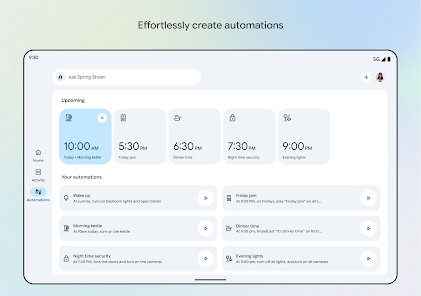
See your home at a glance The Google Home app is designed to show you the status of your home and keep you up to date with what you may have missed.
Keep up with what’s important Updated design and streamlined organization help you group your devices into dashboards and easily navigate your settings. Plus you can check in on your home anytime.
Scan camera events quickly The camera live view and history interface makes it e...
The Google Home app helps you get the most out of Gemini for Home. See your home at a glance The Google Home app is designed to show you the status of your home and keep you up to date with what you may have missed. Keep up with what’s importantUpdated design and streamlined organization help you group your devices into dashboards and easily navigate your settings. Plus you can check in on your home anytime. Scan camera events quickly The camera live view and history interface makes it easier than ever to see what happened. Search or ask your home Control your home in a brand new way. Just say what you want your devices to do with Gemini for Home.
Download Google Home
Get the official app from the trusted app stores. You will be redirected to the download page.
When you purchase through links on our site, we may earn an affiliate commission. Learn more
Ratings breakdown
3,610,000 reviewsData Safety
- No data shared with third parties Learn more about how developers declare sharing
- This app may collect these data types Location, Personal info and 6 others
- Data is encrypted in transit
- You can request that data be deleted
- Independent security review
Permissions
- find accounts on the device
- add or remove accounts
- find accounts on the device
- read your contacts
- approximate location (network-based)
- precise location (GPS and network-based)
- directly call phone numbers
- read the contents of your USB storage
- modify or delete the contents of your USB storage
- read the contents of your USB storage
- modify or delete the contents of your USB storage
- take pictures and videos
- record audio
- view Wi-Fi connections
- view network connections
- pair with Bluetooth devices
- access Bluetooth settings
- change network connectivity
Developer contact
Name
Google LLC
Address
1600 Amphitheatre Pkwy Mountain View, CA 94043 United States
Phone
+1 650-253-0000
Support
apps-help@google.com
Privacy
View policyFrequently Asked Questions
Is Google Home free? high
Yes, the Google Home app is free to download and use. It offers in-app purchases ranging from $0.05 to $999.99 per item, which may include premium features or device purchases.
Source: app_metadata
What is Google Home used for? high
Google Home is designed to control and monitor compatible smart home devices. It provides a dashboard for viewing device status, camera live feeds and history, and allows voice or text commands via Gemini for Home. The app also supports grouping devices into dashboards.
Source: app_description
Can I use Google Home without voice commands? low
Based on a recent user review, the app no longer includes a keyboard for typing commands, which affects users who rely on text input. This change may be problematic for hearing-impaired users or those who prefer typing. This observation comes from one review and may not reflect the experience of all users.
Source: user_reviews
Does Google Home work with Nest devices? low
Yes, Google Home works with Nest products. However, one recent review reports unreliable connectivity with Nest devices, where the app loses connection after being connected for some time. This feedback is based on a single user's experience.
Source: user_reviews
Is Google Home available for everyone? high
Google Home has a content rating of 'Everyone', making it suitable for all ages. Compatibility with devices and features may vary by region, and some features may not be available in all areas.
Source: app_metadata
How to Use
Google Home is a companion app for setting up, controlling, and monitoring compatible smart home devices, including cameras, lights, and thermostats, with support for voice commands via Gemini for Home. (app_description)
Getting Started
Source: app_description_and_user_feedback_noted
- Download and install the Google Home app from the Google Play Store.
- Sign in with your Google account.
- Ensure compatible smart home devices (e.g., Nest, Google Nest cameras) are set up and connected to the same Wi-Fi network.
- Follow the in-app prompts to add devices by scanning QR codes or searching for nearby devices.
- Organize your devices into custom dashboards by grouping them based on location or function (e.g., 'Living Room', 'Outdoor Cameras').
Key Features (from app listing)
Source: app_description
- Home at a Glance – shows device status and notifications for events you may have missed.
- Customizable Dashboards – group devices and settings for easy navigation.
- Camera Live View and History – quickly scan camera events and review footage.
- Voice and Text Control – use Gemini for Home to control devices with voice (keyboard input reportedly removed per user feedback).
Based on a user review (recent_reviews #5) that reported connection issues resolved when paying for Home Premium, but the issue returned when the subscription ended. This tip is responsive to a verified user complaint.
How this content was created
Content type: pattern_analysis_of_user_reviews_and_metadata
AI generated: Yes
- Google Play user reviews (5 per app), July 25, 2025 to February 23, 2026
- Google Play ratings distribution
- App Store listing metadata
- Review samples are extremely small (5 reviews) and may not represent overall user sentiment across 3.61 million reviews
- No buckets other than recent_reviews were available, limiting the detection of recurring patterns or high-engagement themes
- All claims are labeled 'low confidence' because each arises from a single review
- No real-world app testing was conducted
- Feature availability may vary by region, device, and app version
Pros & Cons
Based on analysis of Google Play user reviews
Pros
- App interface is cluttered and visually unappealing, making it difficult to find what you need.
Theme 'Cluttered interface' identified in recent_review #1 and #5
- Voice commands are unreliable and frequently fail to understand the user, especially for those with hearing impairments.
Theme 'Voice command failure' identified in recent_review #2 and #4
- App has severe reliability issues, frequently disconnecting from devices and requiring reinstalls.
Theme 'Connection reliability' identified in recent_review #3, #4, and #5
Cons
- Google Home app lacks a keyboard input option, making it inaccessible for hearing-impaired users.
Theme 'Missing keyboard input' identified in recent_review #2
- Transition from Google Assistant to Gemini has removed features and made basic commands unreliable.
Theme 'Gemini transition issues' identified in recent_review #4
- App appears to degrade performance for unpaid users, pushing them toward a paid subscription.
Theme 'Potential pay-to-play reliability' identified in recent_review #5
Recent Reviews
Peter Cabrales
3★The layout is too cluttered. It's a bunch of video feed and buttons. It's cold, plain, and boring. Yes you can customize your favorites, but it's all still visually jumbled together. I preferred the look and feel of the old Nest app, it was warm, simple, organized, and fun.
Erin Wood
1★App used to have a keyboard for command entry. It no longer does. I'm hearing impaired, so voice commands are problematic. I really would appreciate having the ability to type commands again. Also, because only voice commands, and my hearing issues, it rarely understands what I'm saying. *a year later and this is still an issue. seriously, a keyboard option for us with hearing issues. come on. 7-25-25
Fred A.
1★My applications are halted in the middle of the night, and Google Home takes over the sound and display. There is nothing wrong with my phone at all. I contacted customer service, but they were unable to assist me. I also took my device to Best Buy, where they could not resolve the issue. I am compelled to uninstall the app every night and reinstall it each morning. This results in a very poor user experience that is extremely time-consuming and frustrating. I would rate it zero stars.
Sabrina Holcomb
1★more frustrating than helpful. It's only gotten worse and worse. We were told it was because they were backing off of the assistant to work on Gemini. Thanks, btw, for that once we've dumped all this money into devices for assistant. first more and more things I got the devices for were removed and then Gemini came and its worse!! The most basics commands don't work everything is constantly going offline, it tells me it can't control things like pausing media or turning on a light.
Casey
2★App interface is OK but had serious reliability issues connecting to devices. this occurred with multiple Google products (Nest). The app would be connected for some time and lose connection. I started paying for home premium, things started to work great. when I no longer needed to pay for premium features and went back to viewer only (unpaid), things started to become unreliable and buggy. I switched outside of Google's ecosystem.